Solved Templates

Hope - translate "Read more"

Asked by caroline lemoine 4 years ago Last activity 4 years ago

Hello,
I tried to change "read more" text, but I didn't find the file which has to be changed.
I check the langage file
/language/fr-FR/com_content.ini
and changed
COM_CONTENT_READ_MORE="Lire la suite..."

But it's not usefull.

Could you help me ?
Thanks !

Accepted answer

Marked as the solution
Paul Frankowski Senior Staff

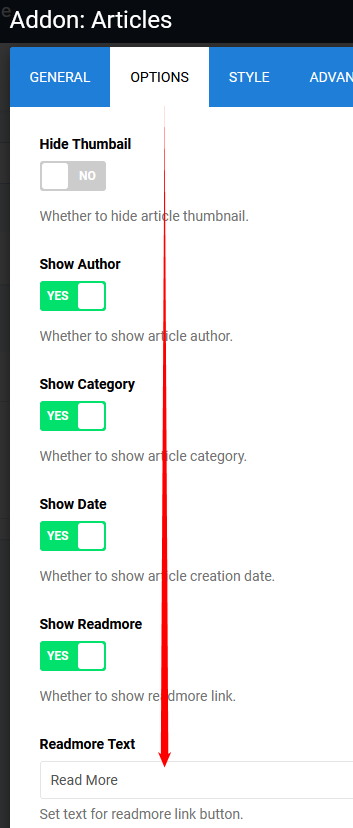
As I told you before - In Addon settings in 2nd tab "Options".

foto_8619_2022.jpg

4 more replies

Paul Frankowski Senior Staff
4 years ago · edited

Hi Caroline,

I will share with you old method that works since Joomla 1.0 (2005) - it's a free lesson!

  1. Use FTP tool or File Manager from cPanel
  2. Rename that folder "language" to "==language"
  3. Refresh your site (browser) - and instead of english phrases (like Read more) you should see BIG LETTERS
  4. If "Read more" is still in English it means that can be translated only inside Addon or module settings!
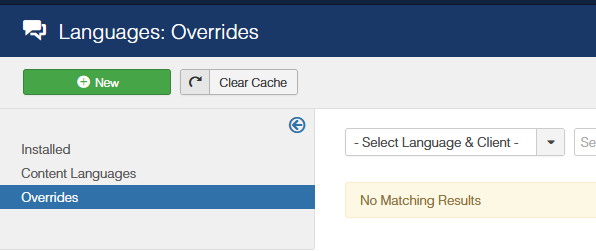
  5. Use it in Language Override (Joomla admin, screenshot below) to translate phrases (3) into French language. It's much better method than using lang .ini files.
  6. Rename folder back to "language"

That's all.

Screenshot for step 5)
foto_8605_2022.jpg

Paul Frankowski Senior Staff

Extra tips:

  1. "Read more" from "Articles" addon can be translated only inside Addon settings, not from language file!
  2. For Articles (component view) Joomla uses two phrases:
COM_CONTENT_READ_MORE="Read more: "
COM_CONTENT_READ_MORE_TITLE="Read more ..."
caroline lemoine Asked this

Thank you, my mistake was because I didn't think about the addons.
So I checked the files in /components/com_sppagebuilder/addons/articles
I found the COM_CONTENT_READ_MORE and COM_CONTENT_READ_MORE_TITLE in admin.php

but where can I define the ="lire la suite" ?

caroline lemoine Asked this

Sorry, I was lost, all is ok now.
Thanks for everything.

Log in to reply.