We have purchased a 3rd party notification bar extension so we can alert users when our organzation is closed due to weather.
What module should we choose so it shows above the menu and not over the menu?
We have purchased a 3rd party notification bar extension so we can alert users when our organzation is closed due to weather.
What module should we choose so it shows above the menu and not over the menu?
Hi Chris,
I guess we talk about Module position, not Module name. Those are two different things, like Address (1) and Full Name (2).
Try : top1 or top2 - position for that new module.
but first in Template Options check if you enabled predefined header that already have TopBar with top1 and top2 position
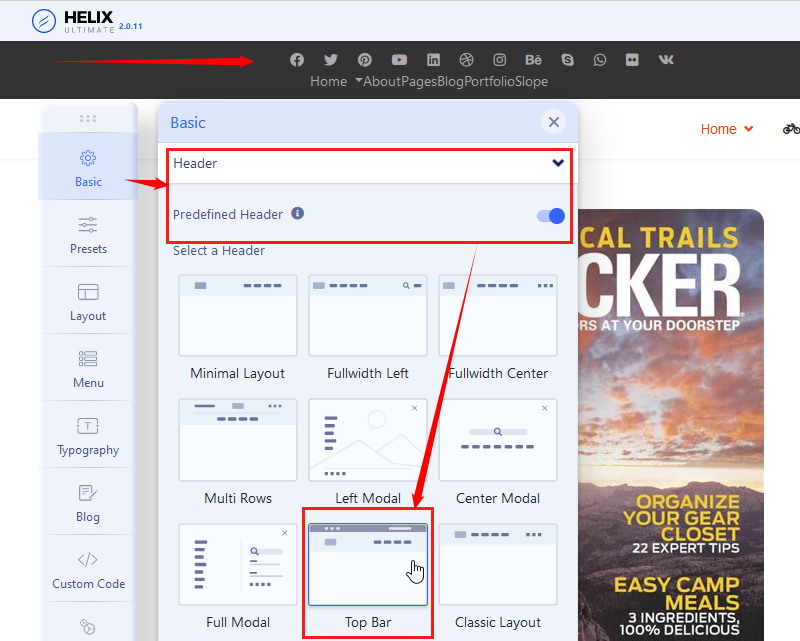
Thank you,
When I make those choices the banner shows up in different areas depending on the Module Position shown and it completely covers the menu.
Ideally, when the notificiaton bar is enabled it should position itself just above the menu, displacing the menu to just below it.
In that case you need Custom Header and extra rows above etc.
Basic tips (as always) inside Helix Documenation > https://www.joomshaper.com/documentation/helix-framework/helix-ultimate-2/custom-header
Thank you for your quick response. I was able to place it in the "Content Top" position using the Edulif template which causes the notificatoin bar to function as I want it to.
On the home page the banner is from edge to edge mimicing the width of the menu.
On other pages, the banner starts and stops with the margins of the content pages leaving white space to the left and right.
Is there a work around?
In looking closer I have the option to use code instead of module positon to make the notificaton bar appear.
Is there a file I could add this to that would make the notification bar show just above the menu?
(I tried to post the code but this site just hangs when I do.)
