
Hi
I get a 404 fail https://nordicdental.dk/images/2018/10/25/testimonial-bg.png
Map image/2018/10/25 do not excist.
Maybe anyone know how to solve this. I think it in in Heliux, but I am not sure.
Best regards
Peter
Awaiting an answer
Helix Framework
404 in Heliux
Asked by Peter Kjeldsen
4 years ago
Last activity 4 years ago
28 replies

Toufiq Senior Staff
Hi there,
Thanks for contacting us. Sorry for the inconvenience. Will you please provide me the Joomla administrator access to check the issue? I will check & get back to you soon.
-Thanks


Paul Frankowski Senior Staff
It's just a missing image, upload any using that same filename on that folder struture.
Peter Kjeldsen Asked this
Hi Paul
But do the picture need to be there?
May I deleted it because I dont need it?
Br.
Peter
Toufiq Senior Staff
If you delete the picture & if you search again on this image. I can't understand what do you want exactly. Can you explain more details? Thanks
Paul Frankowski Senior Staff
4 years ago
· edited
any image, any you want, for example upload that one

just download and create missing folder and upload there using FTP
Peter Kjeldsen Asked this
Hi Paul
Ok.
The only thing is, why do this photo have to be there?
Thank you in advance.
Br.
Peter
Paul Frankowski Senior Staff
Probably you used premade section that had bg image set. It's possible to remove it, to not keep that file.
Just search in database where "testimonial-bg.png" phrase was used, and remove filename from record.
It will be faster than checking all pages, rows etc.
Peter Kjeldsen Asked this
Hi Paul
I think Google want it to excist.
The folder and foto are not there.
In search console I have change url from https://www.nordicdental.dk to https://nordicdental.dk because they ask me to do it.
I will try to delete cache from the old url in search console.
Br.
Peter
Paul Frankowski Senior Staff
4 years ago
· edited
So if Google wants.... you have two options:
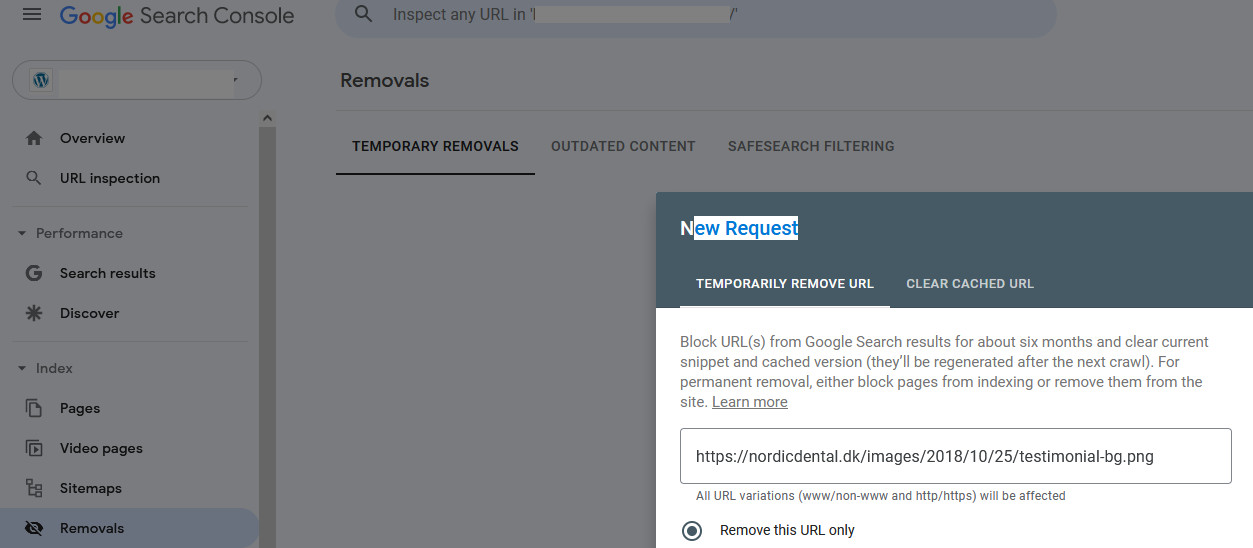
- Remove image URL from Google using Google Search Console > Removals > New Request
- or/and Upload missing image
Peter Kjeldsen Asked this
4 years ago
· edited
Hi Paul
I have tryed that.
Can you tell me why I cannot upload a photo when I want to show a photo to you?
The gray box with text. How do I move this around?
Br.
Peter
Paul Frankowski Senior Staff
Upload image /screenshot/ on your hosting and just share URL to that.
Peter Kjeldsen Asked this
Hi Paul
I really need you to check in at my page to see if all are working in pagebuilder.
I try to change text in slider to size 32 and thin.
In front end it do not change.
In chache I have this who will not remove _media_version
Also in global opening I have to lock up Tabel spqoc_sppagebuilder all the time??
I am working and working and getting no where.
Hope for your help.
Br.
Peter
Paul Frankowski Senior Staff
What SPPB version you have?
Peter Kjeldsen Asked this
4 years ago
· edited
4.04
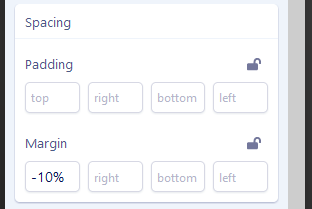
Can you please check if padding and margin are working like it should.
If I make -20 I dont see an effect?
Br.
Peter
Paul Frankowski Senior Staff
4 years ago
· edited
but have you used px or % or rem or just -20? which doesn't tell browser anything.
Only such a value works, use like in normal CSS.

Peter Kjeldsen Asked this
Hi Paul
I have tried many things. But in my browser all the correction is not showen in the front?
Even if I use % pr px.
In the front page slider I have changed Heading to 32px weight lite.
In the back end all is ok, but not in the public end.
I have cleaned cookies and cache.
https://nordicdental.dk/
Why do I need to unlock Tabel spqoc_sppagebuilder all the time?
Br.
Peter
Paul Frankowski Senior Staff
I have changed Heading to 32px weight lite.
Can you show me screenshot from your settings,
yes, upload image on your server and just share URL to that
Peter Kjeldsen Asked this
I have never tried that before, so I dont know how.
I gave you login, why dont you look?
I mean it is the text in the slider on front page.
Br. Peter
Peter Kjeldsen Asked this
Dear Paul
Did you try to login and change H2/ top text in the slider?
It change inside the SP pagebuilder backend but not in the public frontend.
I tryed another slider and it is the same.
And why do I have to unlock Tabel spqoc_sppagebuilder all the time?
I was talking to Ariba before because I could not insert slider in SPPB backend. I saw only a blank page and no slider.
Ariba gave me this code for custom codes, and after this I could insert slider again.
@media (min-width: 1921px) {
.sp-slider-outer-stage {
height: 100vh !important;
}
}
I think there maybe can be an issue somewhere, so it is very important if anyone can login and check.
Br.
Peter
Paul Frankowski Senior Staff
4 years ago
· edited
As I remember there are technical problems ... I will check what I can do.
Paul Frankowski Senior Staff
4 years ago
· edited
check what I set
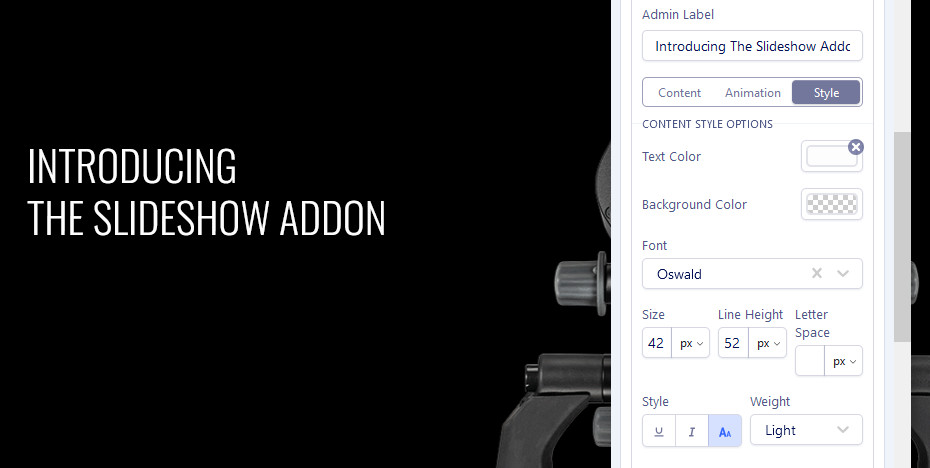
I disabled Production mode in SPPB Options and cleaned cache. Do not use Production mode if you are doing changes , you can enable it LATER after saving all changes.
Yes, on the preview mode , font changes should be visible.
Sorry for all problems, it's still fresh version.
Peter Kjeldsen Asked this
Dear Paul
I dont know if it is here or what.
The settings do not work, suddently the slider disapear etc. When I try to save, it is freezing and I have to close the browser and open again.
Can I install pagebuilder 3 again?
I will never get started like this.
I cannot use more waste time.
I am getting crazy.
Tabel spqoc_sppagebuilder is still locked.
Br.
Peter
Paul Frankowski Senior Staff
In theory yes, its possible to downgrade,
- But how many pages you already edited thru SPPB 4 ??
- Do you have website database backup before SPPB 4.0 installation ?
Peter Kjeldsen Asked this
I dont know, not many pages. A few. .
There is backup in my server 30 days behind. I dont remember when I installed sp4.
I also tried Quix, they also have problems.
I should have waited. Too much work with nothing.
But of course I did som changes I have to do over again.
Peter Kjeldsen Asked this
When I try to make custom height, no change too.
Peter Kjeldsen Asked this
Is it possible you could try to make changes in the slider too?
So we can say that you have same experience like me before doing anything.
In this slider https://www.nordicdental.dk/cj-optik-dental-mikroskoper
Peter Kjeldsen Asked this
Hi Paul
Is this your/ SP or a joomla cache folder?
_media_version
I found Quix tables in database.
They are deleted now and I think Tabel spqoc_sppagebuilder is unlocked.
I have 3 different tables names. Is that normal?
I think they should have same name?
clk3415d40c25
spqoc
ucvku_
Peter Kjeldsen Asked this
Ok, Tabel spqoc_sppagebuilder is still there.
Can you tell me if there is problems with SPPB 4 or is it only here in my page?
If the fail is with SPPB, then there is no need that I use more time at the moment.
I wasted one more day now with nothing.
Is it me, or in your page builder?
Please answer.
Br.
Peter
Log in to reply.