

Unable To Reach Options
YS
YUMA SCOTT
When a block is hidden under the header, you cannot select any options to edit. Is there a way to move the edit bar or something? https://prnt.sc/6aq15-PLtx5b
There are other "glitches/bugs" I'm running into. Is this the right place to report them?
9 Answers
Order by
Oldest

Mehtaz Afsana Borsha
Accepted AnswerHi
Thanks for contacting us. Could you please give me a screencast of your issue? And also please share your administrative information on the hidden content so that I can check.
-Regards.
YS
YUMA SCOTT
Accepted AnswerHello, Thanks for the response. I'll work on a screencast. In the meantime, please see this and the admin infor included. You can see the edit toolbar hidden behind the header: https://prnt.sc/6aq15-PLtx5b
YS
YUMA SCOTT
Accepted AnswerHello Mehtaz, Thanks for the response. I did mention it in the hidden content: Screenshot is from the About page.
Thanks!
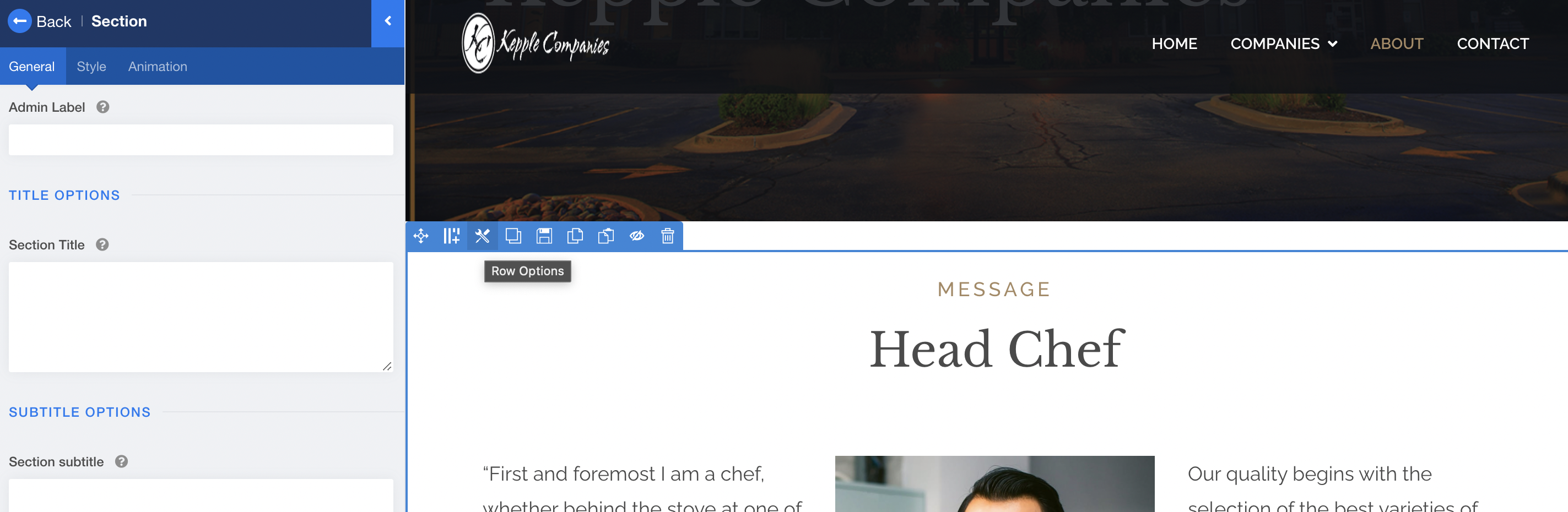
YS
YUMA SCOTT
Accepted AnswerYes, you can now because I added a header. If I go into the menu settings and remove the header, it will look like my screenshot.
Try this page instead, and you will see it: https://kepplecompanies.com/index.php/companies/medi-weightloss
Mehtaz Afsana Borsha
Accepted AnswerSorry for the inconvenience.
I have suggestions for you...
You can use the context menu to edit those addons. Context menu appears when you right-click inside of an addon, it gives you useful edit options right there.
Another suggestion is that you can create a new Row, put a divider addon there, then disable that row, and move that disabled row on top of all.
And keep it please, must be disabled, not deleted. Then you may be able to edit all rows below.
Please follow the screencast: https://imgur.com/a/y113xaM
Thanks
YS
YUMA SCOTT
Accepted AnswerThe right click options I see are as shown here: https://prnt.sc/1as3legE2enr
Is there a way to enable right-click options?
Thank you for the row option suggestion also.