

BACK TO TOP - Question | JoomShaper
Black Friday sale is live with flat 50% OFF. Sale ends soon! Grab your deal now!

BACK TO TOP

C

Charlie

Template 3 years ago

How to remove the link for " BACK TO TOP", or modify the text Template I used is Gazatte

0
5 Answers
Ofi Khan
Ofi Khan
Accepted Answer
Support Agent 3 years ago #88709

Hello Charlie

Please go to Language Overrides and create a new override. Then search for Back to Top and change the text.

https://prnt.sc/cAMS3-r7D9Dp

Best regards

0
Paul Frankowski
Paul Frankowski
Accepted Answer
Senior Staff 3 years ago #88715

If I may...

You should be able to disable from Gazatte > Template Options > Basic > Footer > Go to Top: OFF
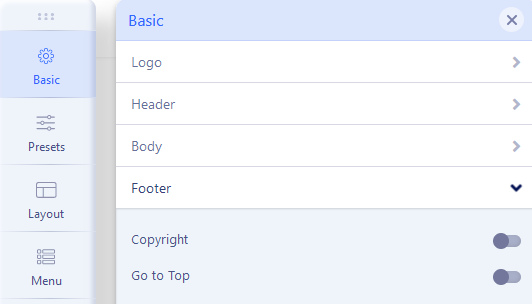
foto_8963_2022.jpg

0
C
Charlie
Accepted Answer
3 years ago #88817

I did....as you suggested, but it is still there.....

0
Paul Frankowski
Paul Frankowski
Accepted Answer
Senior Staff 3 years ago #88841

Can you share URL to website?

0
Paul Frankowski
Paul Frankowski
Accepted Answer
Senior Staff 3 years ago #88842

In case of you can always use custom CSS

.sp-scroll-up {
  display: none !important;
  visibility: hidden;
  z-index: -1;
}

Template Options > Custom Code > Custom CSS

0

