Solved Templates

Too much space between rows in mobile view

Asked by Ola 3 years ago Last activity 3 years ago

Hi!

There is a big distance between the rows in the mobile view. The padding is to wide. How can I reduce it? I have set padding of row to 0 and it works on desktop but on mobile it is still a big white space.

I use this on custom.css but has no effect.

#sp-main-body {padding: 5px 0; }
.offcanvas-menu .offcanvas-inner .sp-module ul > li ul {display: block;}

I use Helix Ultimate template.

Check (with mobile) on : https://www.coachenevents.se

Kind regards,
Ola

Accepted answer

Marked as the solution
Paul Frankowski Senior Staff
3 years ago · edited

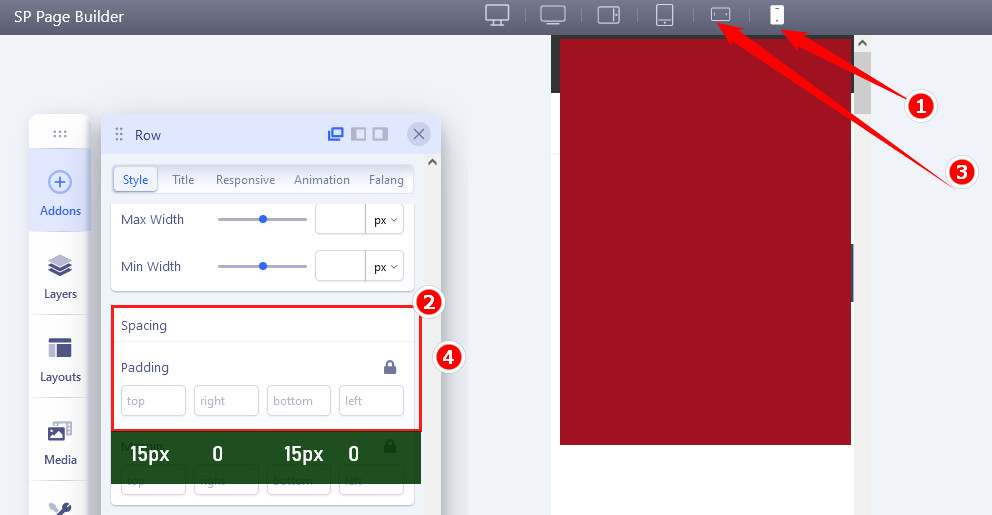
In SPPB 4.0.x it's similar but first you have to click Mobile icon at the top bar to tell SPPB that you will change for that view only.

foto_9180_2022.jpg

Even if you do not see any values, put above - then Save changes after.

Default value is 75px which is as you noticed too big.

4 more replies

Mehtaz Afsana Borsha Staff

Hi

Thanks for contacting us. Could you please give me a screenshot of your issue?

-Regards.

Paul Frankowski Senior Staff
3 years ago · edited

Hi Ola,

You do not need CSS for that.
Besides above CSS is for component area padding in general and 2nd for offcanvas menu. So this is not that direction. I wish you know that as webmaster.


Space (padding) between rows you can change inside Row Options.

If you have SPPB 3.8 > Row Options > Style > Padding > click mobile icon > add padding values, for example 15px 0 15px 0

And repeat for all Rows.

That's all.

Ola Asked this

Aha!

I could never have found out that myself. :-)

Works fine now. Thanks for as always great support Paul and Mehtaz!

Kind regards
Ola

Mehtaz Afsana Borsha Staff

Glad to know that. You are most welcome.

Log in to reply.