Hallo,
ich probiere gerade das Addon "Artikel" und habe 3 Artikel Spalten pro Zeile konfiguriert. Beim Klicken auf den Link wird der Artikel/Beitrag auf einer neuen Seite im aktuellen Fenster angezeigt. das möchte ich nicht!
Der Artikel soll in der jeweiligen Spalte angezeigt werden. Wie kann ich das konfigurieren?
Danke und Grüße
Ludwig
Awaiting an answer
SP Page Builder
Addon "Artikel"
8 replies

Paul Frankowski Senior Staff
Hi Ludwig,
I don't understand anything, this is a forum in English language only. Follow our Support Policy guidelines
Paul Frankowski Senior Staff
Articles addon - is like News module, you have to create first menu item with blog view to allows Joomla have short alias etc.
And without URL - hard to guess, what is wrong and why.
Ludwig Balla Asked this
Hello, I am currently trying the "Article" addon and have configured 3 article columns per row. When you click the link, the article/post WILL appear on a new page in the current window. I don't want that! The article should be displayed in the respective column. How can I configure this? Thank you and greetings Ludwig
Paul Frankowski Senior Staff
I will reapet myself...
without URL - hard to guess, what is wrong and why.
And ...
The article should be displayed in the respective column.
??? I don't understand, articles are displayed in component area only.
Ludwig Balla Asked this
Hey Paul, here is the link:
Paul Frankowski Senior Staff
Thanks for the link, it's from Page (SPPB)
and this is your Articles addonn - HTML code with link to article
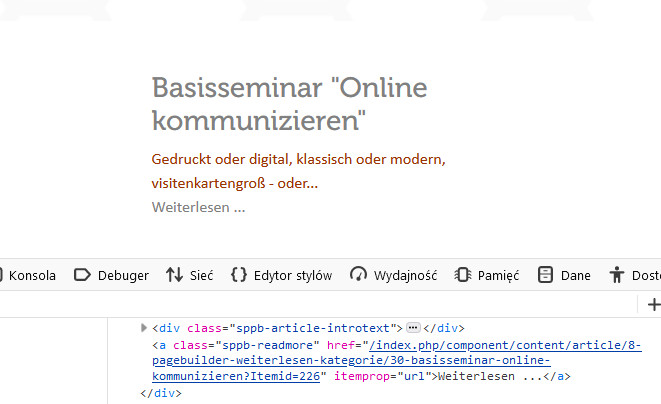
As you may see - it "calls" for Joomla Article view.
And when you click it by default it display Article view. This same as it would as News module, as I mention before.
And sorry, but I don't understand where you see a "bug/issue".
Paul Frankowski Senior Staff
3 years ago
· edited
The only technical "problem" as I see now, that you forgot to add blog view as menu item with category used for those articles. That's why you have long "ugly" link alias.
To have 3 columns displayed in Articles addon, you need at 3 articles added to that category. Otherwise addon display only one, still in 3 columns layout. It's like in car, you have sits and persons. Now I see only one article, write 2 more.
But it's your task, not mine.
Ludwig Balla Asked this
Thank you very much Paul, but my problem is still: "When I click on the link, the post is displayed on a new(!) page in the current window, I don't want that! The post should be displayed in the respective column. How can do I configure that?
Log in to reply.