Solved Templates

Width of SPPageBuilder article is different from normal article

Asked by Andrea 3 years ago Last activity 3 years ago

Accepted answer

Marked as the solution
Paul Frankowski Senior Staff
3 years ago · edited

Hi Andrea,

In general, it was planned to be like that, becuase SPPB give you more flexibility, and article displayed on full-width doesn't look good if somebody has 21" or larger screen, have you thought about that?

But in that template - we added EXTRA right column for modules. Let me check ...

5 more replies

Andrea Asked this

Hi, you're right. I'll check with other resolutions and eventually I'll hide the column via CSS.
Thanks.

Paul Frankowski Senior Staff

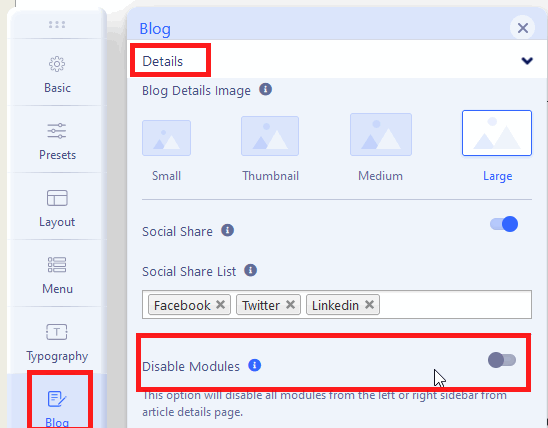
In your case in Template Options just change that setting to remove right column >>

info_901_2023.gif

Paul Frankowski Senior Staff

Use template settings, CSS is not need ;)

Andrea Asked this

"disable module" option in template>blog is already disabled (and this has no effect)...

Andrea Asked this

Hi, to disable the empty column that appear in Pagebuilder articles, can you confirm that I must use only CSS ? I have activated the "disable module" option in template>blog but nothing changes.
Thanks in advance.
Bye

Log in to reply.