
https://mega.nz/file/DzpDBI4D#HyY3yBbUZilB7iZQYSlt7Qfx3bJfIl5Vi-oJmQvUxbE
I understand that this is a third-party editor, but it interacts with an external SPPB editor. And there are no changes specifically in SPPB
https://mega.nz/file/DzpDBI4D#HyY3yBbUZilB7iZQYSlt7Qfx3bJfIl5Vi-oJmQvUxbE
I understand that this is a third-party editor, but it interacts with an external SPPB editor. And there are no changes specifically in SPPB
Hi Dimitry, I noticed issue with JCE, we will check it.
but for color changes use icons from toolbar, you don't need to switch to HTML mode.
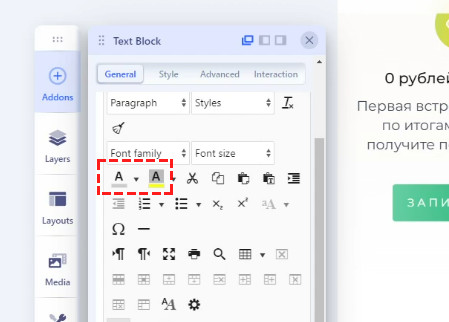
Yes. The first time it can be done through the toolbar, but in the future it is already necessary to use ready-made formatting and it is easier to copy and paste part of the code, then click on the color, fatness, margins and so on every time.
I agree, that it should work as it was in SPPB 3.x
BTW
COM_SPPAGEBUILDER_EDITOR_GOOGLE_FONT_INSTRUCTION_TITLE="To integrate Google Fonts, follow these steps"
COM_SPPAGEBUILDER_EDITOR_GOOGLE_FONT_INSTRUCTION_1="Visit"
COM_SPPAGEBUILDER_EDITOR_GOOGLE_FONT_INSTRUCTION_2="Scroll down and locate the (...)