SPPB Image Carousel links without URL set - Forum | JoomShaper
Staff replied SP Page Builder

SPPB Image Carousel links without URL set

Asked by UMIF 3 years ago Last activity 3 years ago

Hi,

I am using SPPB Pro 5.0.8. In the add-on Image Carousel all images and names are links though there is no URL set. Funnily, all default items inside when adding the Add-On are without anchors, but as soon as you click "apply" in the item settings (without making changes practically), they contain anchors suddenly. I am using Helix Ultimate template, I cannot share webpage access since it is a local webpage currently.

Any solutions?

Thanks and best regards,

Bernd

11 replies

Ofi Khan Staff

Hello Bernd Zobiak

Please share a screencast of your issue to understand it better. We will check it on our end.

Best regards

UMIF Asked this

Here you can see that Item 2 has no URL in the link. I added the image carousel and these are the default settings. The only "change" I made was opening Item 2 and click "Apply" button. Without practically modifying anything. Unofrtunately I found a lot of bugs like those in other add-ons, where e.g. certains styles are defined but not displayed in the settings dialogs...

Ofi Khan Staff

Sorry, I could not get the issue. The second item has no link added. Can you see any link in the frontend on the item? If you see, then what is the link?

UMIF Asked this

Dear Ofi Khan,

you see in the screenshot that the middle picture name is orange (indicates hyperlink, the two black left and right are no hyperlinks)). The link address is "localhost".

Ofi Khan Staff

Please update to 5.0.9 and check the issue. I have not faced this issue on my localhost.

UMIF Asked this

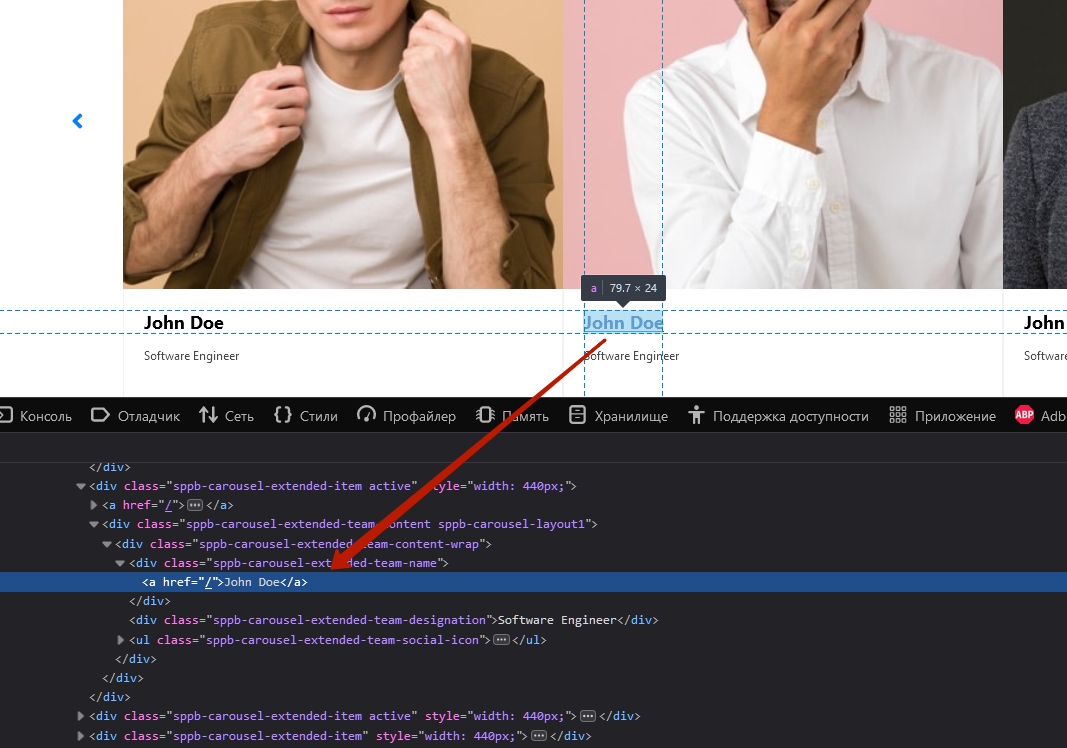
I updated to 5.0.9 and it persists. Also adding new items without URL will become names with links to "localhost". This is how the code of the page looks for the respective section:

<div class="sppb-carousel-extended-team-content sppb-carousel-layout1">
<div class="sppb-carousel-extended-team-content-wrap">
<div class="sppb-carousel-extended-team-name">
<a href="/">John Doe</a>
</div>
<div class="sppb-carousel-extended-team-designation">Software Engineer</div>
<ul class="sppb-carousel-extended-team-social-icon">…</ul>
</div>
</div>
Ofi Khan Staff

Please change your default template and check the issue. I have checked. I have the HTML structure like this

<div class="sppb-carousel-extended-team-content sppb-carousel-layout1">
    <div class="sppb-carousel-extended-team-content-wrap">
        <div class="sppb-carousel-extended-team-name">John Doe</div>
        <div class="sppb-carousel-extended-team-designation">Software Engineer</div>
        <ul class="sppb-carousel-extended-team-social-icon">…</ul>
    </div>
</div>
UMIF Asked this

I switched to cassiopeia template and it persists. The code that you showed is only visible for me for the non-linked team members in the default view of the add-on.
I am using PHP 8.2.4, could this be a reason?

Ofi Khan Staff

This should not be related to PHP version. Please share your administrator access here to check the issue. Use the Hidden Content box to share the credentials. Make sure that you have a full site backup with you before sharing.

Pavel

Hi Ofi. This is easily reproduced on any test site. You do not need a backup or access to user site. I confirm this bug.

Perhaps you did not understand, the problem can be visible in live viewing but not in the editor.

Here is from my test site (Cassiopea + SPPB 5.0.9)

Ofi Khan Staff

Hello Pavel

Which browser are you using here? I cannot reproduce it on Google Chrome, SP Page Builder Pro 5.0.9.

https://prnt.sc/Fu3MWx-qatFK

Best regards

UMIF Asked this

I can see it with Microsoft Edge and Google Chrome identically.

UMIF Asked this

Dear Ofi,

did you also really "modify" the team carousel item in the backend? Because it will be only visible then; in its original form it is without a link set. So:

  1. Edit item
  2. Click apply in the pop-up window
  3. Save page

Best
Bernd

Ofi Khan Staff

Thanks guys, for your feedbacks. I think I have found the issue. I have added a link at first. It works okay. Then I removed the link but it does not work. It keeps a link to the homepage by default. But in the settings, the link is not set. I will share the scenario with the developer team. It will be fixed in the next release.

Log in to reply.