
I migrated this site using migrateme4 and the site migrated but had the following error/notification message in the Joomla admin page. Please can you tell me how I can get rid of it/reolve it? https://prnt.sc/ijrKPbWWDpOe
www.christianretreats.live/mm4/administrator
Staff replied
SP Page Builder
Migrated from J3 to J4
Asked by Alex Walker
3 years ago
Last activity 3 years ago
39 replies

Paul Frankowski Senior Staff
3 years ago
· edited
Hi Alex,
Next time please update all components & modules BEFORE Joomla upgrade, then you will reduce many problems like current.
FIXED. I only updated SP Easy Gallery ;p
But still you have to update others installed componens, like Akeeba, JMap, OSMeta Pro, EDocman etc.
Paul Frankowski Senior Staff
3 years ago
· edited
BTW
In cPanel in PHP 8 settings area correct those values

Joomla thing, quite important.
Alex Walker Asked this
Hi Paul, I migrated all components and eventually updated sppagebuilder 5.1.1 and it now throws an error message at www.christianretreats.live/mm4
Could I have a mix-match of sppagebuilder 4 and now 5? https://prnt.sc/GwydRAXtCqVR
Paul Frankowski Senior Staff
3 years ago
· edited
Not fully, it means that not all files were updated during update or Joomla kept old version number in database.
Please in cPanel in PHP settings change value for Max upload size from 3MB to 15MB or 30MB.
Then reinstall SPPB component
Alex Walker Asked this
Paul, I made the php change and got this message when installing: https://prnt.sc/HXGy8wUb4_Ex
When clicking on pages in sppagebuilder I get this error message: https://prnt.sc/vJAKSeUeVsug
Paul Frankowski Senior Staff
Don't worry, I will update files soon
Alex Walker Asked this
Paul, YOU are a STAR and I prayed you had a solution! Thank you!!! (again).
Paul Frankowski Senior Staff
3 years ago
· edited
tomorrow I have to ask our develper, your site seems to be cursed ;p
- Today Remove or Rename .htaccess file - that you have now.
- WE NEED FTP ACCESS
Alex Walker Asked this
Paul, please see ftp details below.
Paul Frankowski Senior Staff
Alex, Oh..... I see only empty folder, no Joomla files, we both have to be tired...
Alex Walker Asked this
Paul, do I need to give you more permissions in the ftp access? The site is up and running at www.christianretreats.live It is the /mm4 you are trying to fix.
Alex Walker Asked this
Please see new ftp account below:
Paul Frankowski Senior Staff
with current FTP access, I cannot do anything useful, worthless :/
please at least remove .htaccess file (!) from folder /mm4/
Alex Walker Asked this
Paul, I have deleted the .htaccess
The solution for the 403 error message was resolved by Rochen the hosting company like this:
Thanks for the update. This issue is due to your .htaccess code in the main site's public_html/.htaccess file.
I have created a .htaccess file in your '/mm4' folder with the following two lines:
RewriteEngine Off
RewriteEngine On
This tells the web server to disregard the .htaccess directives in the main /public_html folder.
Alex Walker Asked this
I have actually renamed the .htaccess file to .htaccess_old in /mm4
Paul Frankowski Senior Staff
Do you also see that?
Paul Frankowski Senior Staff
If yes, in configuration.php file change from
public $gzip = true;
to
public $gzip = false;
Alex Walker Asked this
Paul, the site is now backup - of a fashion. Still an issue with sppagebuilder. Please can you take a look. https://christianretreats.live/mm4/
Alex Walker Asked this
Paul, I just have this message showing on the home page: Warning: Undefined property: stdClass::$content in /home/christian/public_html/mm4/administrator/components/com_sppagebuilder/editor/helpers/ApplicationHelper.php on line 89
and when I click on sppagebuilder > pages there is a 505 error message.
If this can be reolved I can then make the migrated site LIVE and leave you alone (for the time-being)!
Alex Walker Asked this
Paul, any update on this ussue please.
Alex
Alex Walker Asked this
Paul, before i start the migration all over again please can you let me know if this error can be resolved? thanks. Alex
Paul Frankowski Senior Staff
checking....
Paul Frankowski Senior Staff
Akeeba Tools from your root folder blocking all my moves... BRRRRRRRR
In general you have problem with database structure, becuase I cannot get it, please make full backup of that website using AKeeba Backup, upload somewhere and share link to it, I will fix on my server and share with you fixed database. Otherwise I cannot help.
Alex Walker Asked this
Paul, i will uninstall admintools.
Alex Walker Asked this
Paul, I have uninstalled admintools. Does that help?
Paul Frankowski Senior Staff
I only disabled that searching for source of error 500 problem.
Alex Walker Asked this
Paul, I have now made a fresh install at www.joomwalker.com
Your login details are the same for the web site.
Paul Frankowski Senior Staff
Alex, please not again, also new FTP is useless, empty folder. Please check next time BEFORE you will share, common. I prefer to get access to database than not working FTP :]
Paul Frankowski Senior Staff
And login & password to Joomla:
Username and password do not match or you do not have an account yet.
:(
Please send me what I asked before, link to website full backup file (.zip or .jpa)
Alex Walker Asked this
Paul
Links to the files: https://drive.google.com/file/d/13LLhwc6LGcUuwFuY_0A2I0JXLDtULYQV/view?usp=sharing, https://drive.google.com/file/d/1HVrCU053nO-djCnDVz5MTTD7XDpM3eCt/view?usp=sharing, https://drive.google.com/file/d/1I4AOKHOqIOE8v9leSZkYPILvHnWVkLiU/view?usp=sharing, https://drive.google.com/file/d/1gsIyixilNJ0RGorAQxhkCe_88KnGCWXP/view?usp=sharing, https://drive.google.com/file/d/1gxykthmTI6eIV4PPfyWOuvpA363RMqEI/view?usp=sharing
Alex Walker Asked this
See the details below for the backup site of christianretreats.live at www.joomwalker.com
Alex Walker Asked this
Paul, have you got all the information you need?
Alex
Alex Walker Asked this
Paul, is that a yes? Alex
Paul Frankowski Senior Staff
3 years ago
· edited
thx, now I am working on my server, I will let you know tomorrow.
Paul Frankowski Senior Staff
Our developer said:
- At first there was page builder 3
- Then user (You) installed page builder 4
- Again he downgrade 4 to 3 & installed page builder 5 over the 3.
- That's why crashed the database
So the main question is ... do you still have website, even before J3>4 migration where is still SPPB 3.8 installed. If yes, migrate directly from SPPB 3 > SPPB 5 - then should be OK.
Paul Frankowski Senior Staff
3 years ago
· edited
After all I still have a good news, we have fixed site (it took a while). Look down for details :)
Paul Frankowski Senior Staff
3 years ago
· edited
- Download full AkeebaBackup (link in Hidden Content will be for 24h)
- Unzip and Install it step by step - whatever you need.
- From orginal website please upload all folders and files from /images folder - my backup had to be small that's why I reduced that area.
- Later change Akeeba Backup settings - I used local backup storage.
Yes, SPPB is working now OK.
Alex Walker Asked this
Paul, thank you for this. i no
Alex Walker Asked this
3 years ago
· edited
Paul, sorry for the delay in getting back to you but I went away for a couple of days. I have installed the backup site you fixed at www.joomwalker.com but it tells me there are some datables tables not updated in sppagebuilder See here: https://prnt.sc/4HVGHIkJkD6r
Also, the images are not displaying on the web site and not sure why, other than I cannot see the images in the spagebuilder media manner although I can see they are in cpanel > file manager > images
Sorry, I should read what you wrote:
From orginal website please upload all folders and files from /images folder - my backup had to be small that's why I reduced that area.
Paul Frankowski Senior Staff
3 years ago
· edited
In "Maintence: Database" - you have to mark [x] next to Sp Page Builder and then click button "Update Structure" - it should correct what is missing.
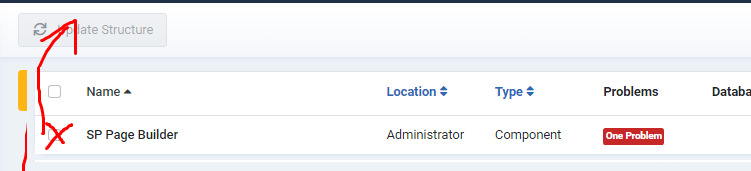
yes, in my backup there are no images files from /images/ folder - upload them from orginal website, as I said.
Alex Walker Asked this
I did the update and it still said some tables not updated: https://prnt.sc/qEAUnHltybR6
Paul Frankowski Senior Staff
Leave it for now, ifd all works ... let me life
Log in to reply.