
I want to make a button for a downloadable PDF file.
I used Media Manager to upload the file in the Attachments section and now I need to select it in the Button Addon url but there is no such option. It would be best if I was able to use similar dialog panel as when I select images but I can't find such option.
All I can do for now is to manually type the path to the file in the url field. This is very inconvenient way as it is difficult to use and mistakable. I couldn't find any other way to make it work.
It would be great if there is another tab in the url options like [ Url | Menu | Page | Attachment ]
Solved
SP Page Builder
How to link an attachment from Media Manager to a button addon?
Asked by Stan
2 years ago
Last activity 2 years ago
Accepted answer
Marked as the solution
Paul Frankowski Senior Staff
Hi Stan,
if that file was upload by SPPB media, you can use that feature to link it
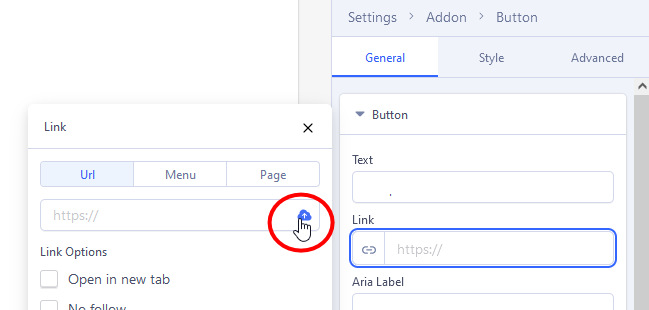
ScreenShot from SP Page Builder Pro 5.2.5
1 more reply
Stan Asked this
Hi Paul,
This is very hardly hidden but now I will use it for sure :)
The whole Settings panel in SP Page Builder Pro 5+ can be a little wider to be more user friendly. I don't know why there is so much space for the Addons pannel and so narrow space for the Settings. This is making our work much harder than with SP Page Builder Pro 3.
Nevermind. Thanks for your helpful reply :)
Log in to reply.