Hi
I use Jooomshaper 5 and Helix Ultimate 2.0.18.
Is there a way to use predefined colors (defined in custom.css-file) in Jooomshaper Pagebuilder components?
e.g. for colorize the background of a row:

Hi
I use Jooomshaper 5 and Helix Ultimate 2.0.18.
Is there a way to use predefined colors (defined in custom.css-file) in Jooomshaper Pagebuilder components?
e.g. for colorize the background of a row:
If you could record as few minutes video it will help us understand a problem better.
You can upload to YouTube/Vimeo and share link etc.
And add short info/answer what is (if is any) relation with Helix Ultimate.
Hi Robert,
I don't know what is "Jooomshaper 5" but I assume that you thought about SP Page Builder 5.x
Predefined colors you can set ONLY in SPPB and it will be used only inside SPPB component.
Read guide: https://www.joomshaper.com/documentation/sp-page-builder/color-library
But inside custom.css file you can of course set (predefine) colors used for links, headers, selected classes etc. so later you don't have to choose any color, just put content.
Hi
Sorry, yes i mean SPPB 5.x.
I know about the option to set predefined colors in SPPB. But the problem is that when using these colors in the SPPB-components, the selected color code eg. #474747 will be saved but not the reference of the choosen color. That has the effect that after using a predefined color and later change the color code from #474747 to e.g. #151515 the SPPB-components show the "old" color code #474747.
What i am looking for is a way to set "variables" as a color reference. Any idea how to do that with SPPB?
br, Robert
What i am looking for is a way to set "variables" as a color reference.
Hi. Reference not possible. You can only add variables manually, like:
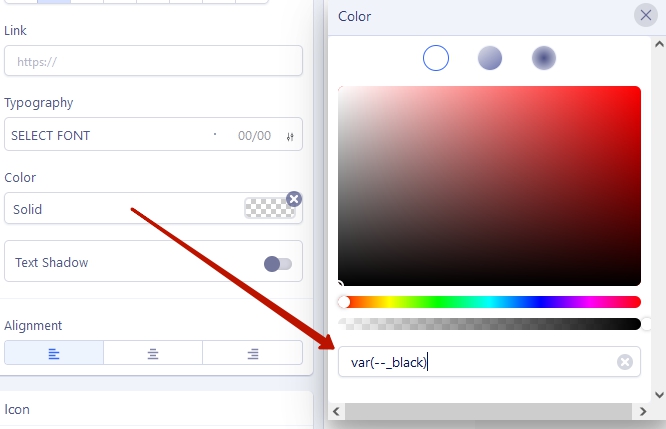
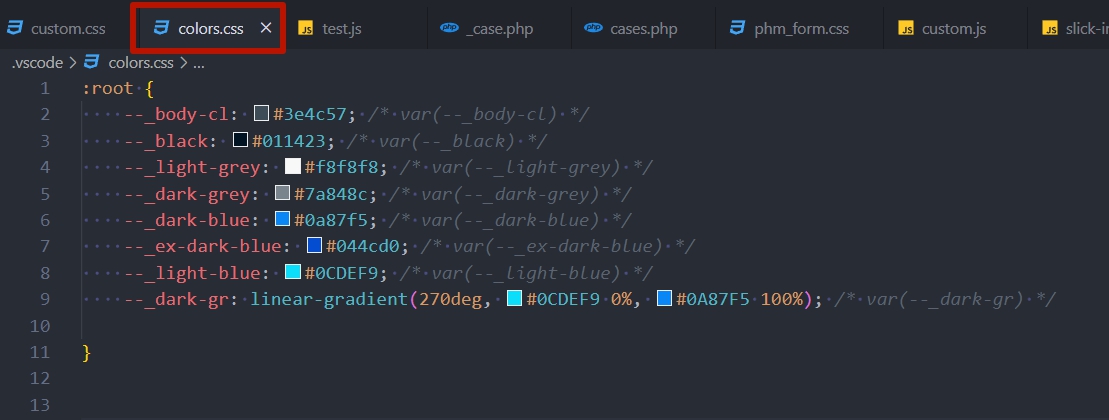
For convenience, I usually create a separate CSS file with color variables to quickly copy/paste
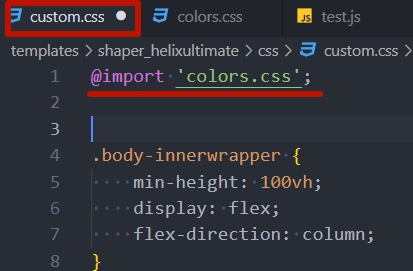
And impotr it to custom.css
Hi Pavel
YES - that was what i'm looking for. Many thanks for your help. Works perfect for me.
@Paul Frankowski: Also thank you for your post. With Pavel's answer my issue is solved.
br, Robert

