Good evening, I have created a module login and I want to edit the form, how can I do it?
Awaiting an answer
Templates
problem with login
6 replies

Asfakur Rahman Saikat Staff
Hi Gregory,
Thank you for reaching out.
You can edit the form in two ways:
- Use Custom CSS: A simpler, recommended method for styling changes. Add your styles to the custom.css file in your Helix template. https://www.joomshaper.com/documentation/helix-framework/custom-code-css-js-meta#documentation-heading-3
- Override the Login Module Layout:
This allows structural changes but requires more expertise.
If you have any further questions or concerns, please don't hesitate to let me know.
Best regards.
gregory Asked this
I can't change this form by correcting the fields with the names and introductory texts?
Asfakur Rahman Saikat Staff
Could you please clarify which specific fields, text, or styling you want to modify? If possible, could you provide a sample or example to help us understand better?

Paul Frankowski Senior Staff
2 years ago
· edited
Gregory, If I may....
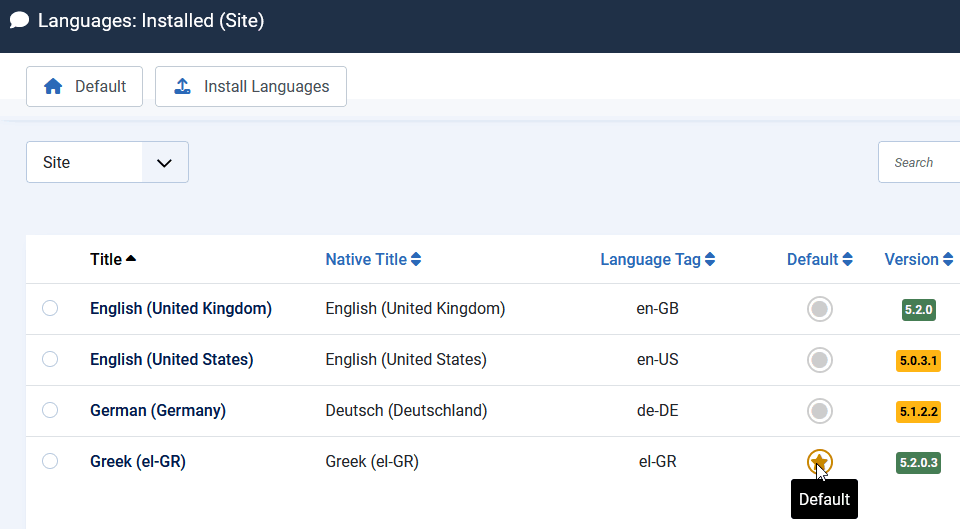
- Install Greek Joomla transation || Languages: Installed (Site) > Install > Greek
- Set Greek language as default for front-end (set yellow star)
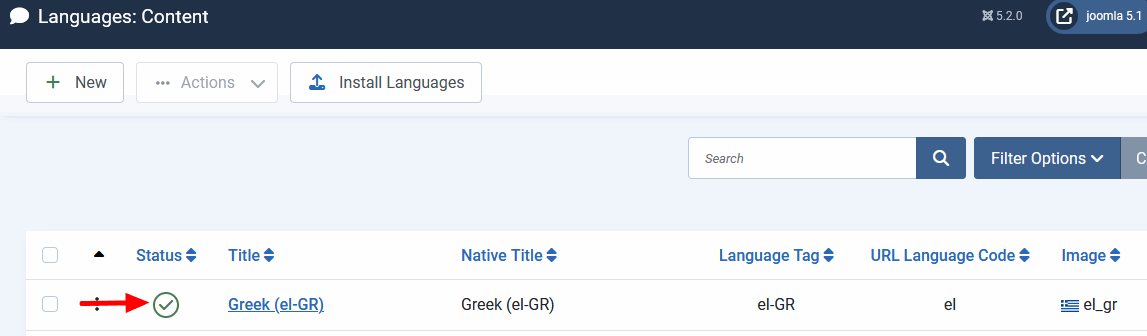
- Go to Languages: Content > [x] Greek > Publish
Then all Joomla default messages should be in Greek language, if somebody will use Greek lang browser :)
Step 1 and step 2
Step 3
Paul Frankowski Senior Staff
If you're going to use more than one language, use settings from plugin "System - Language Filter "

gregory Asked this
where can I change the texts?
Asfakur Rahman Saikat Staff
Please go to Joomla Administrator > Content Tab > Site Module and edit the 'Registration top' module in the front-end editor: https://prnt.sc/nFlB1G0-dnJo.
Let me know if you have any questions!
Log in to reply.