Hello, I am attempting to remove sign-up login link in the header of the off-canvas menu. I have already disabled the My Account site module, but it is still visible after clearing the cache. Appreciate if you could help with this. Thank you.
Solved
SP Page Builder
Joomla 6
v6.2.0
Selixo template remove sign-up login link in off-canvas menu header
Accepted answer
Marked as the solution
Paul Frankowski Senior Staff
Maybe because of Mod_Security you couldn't save the settings; it's a common reason. In most cases, you have to disable it for 7 min, make changes, save, and enable it again in the Host panel.
5 more replies

Ziaul Kabir Staff
Hello,
Thanks for reaching out to us.
Please add the following CSS to your template's Custom CSS section:
@media (max-width: 991px) {
    .d-flex.header-modules {
        display: none !important;
    }

    a.sp-sign-in {
        display: none;
    }
}
I tried to update it for you, but your server's ModSecurity blocked the save request.
If you encounter the same issue, please contact your hosting provider and ask them to temporarily disable ModSecurity or whitelist the blocked save request.
Thank you for your understanding.
Best regards,
Linda Asked this
Hello Ziaul,
I added the extra CSS with no problems and that seems to have fixed the issue. Thanks for the extra advice also, I really appreciate the support.
Regards,
Linda
Ziaul Kabir Staff
You are most welcome.
Paul Frankowski Senior Staff
BTW
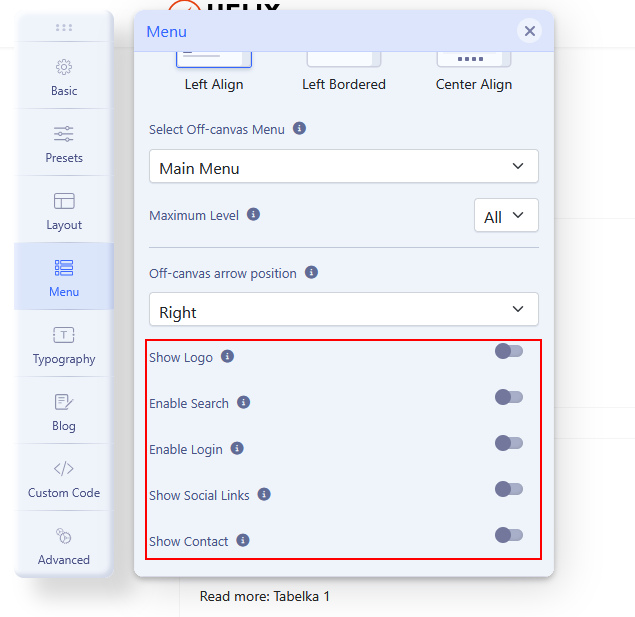
Have you also checked the Template Options > Menu > Off-canvas?
Linda Asked this
Hello Paul,
Yes, that is where I started by disabling the Login on the off-canvas menu, but when I open this, I see the Drafting... message which never stops and after I hit Save I see an Error Undefined message at the bottom of that page. When I go back into it the Enable Login is back on.
Linda Asked this
Okay, I will try that. Thank you!
Log in to reply.