Joomla\CMS\HTML\HTMLHelper JABehavior not found. - Forum | JoomShaper
Staff replied SP Page Builder

Joomla\CMS\HTML\HTMLHelper JABehavior not found.

Asked by Ramon 1 year ago Last activity 1 year ago

Good day

I have successfully created a backup on my website https://swiss-skydiving.ch/. I have imported this to a subdomain https://t2.swiss-skydiving.ch/ and it works perfectly so far. Unfortunately, I have noticed that over 90% of the pages show the same error message when the page is called up.

For example the page
https://t2.swiss-skydiving.ch/skydiving-aargau-und-umgebung

The error message appears here:
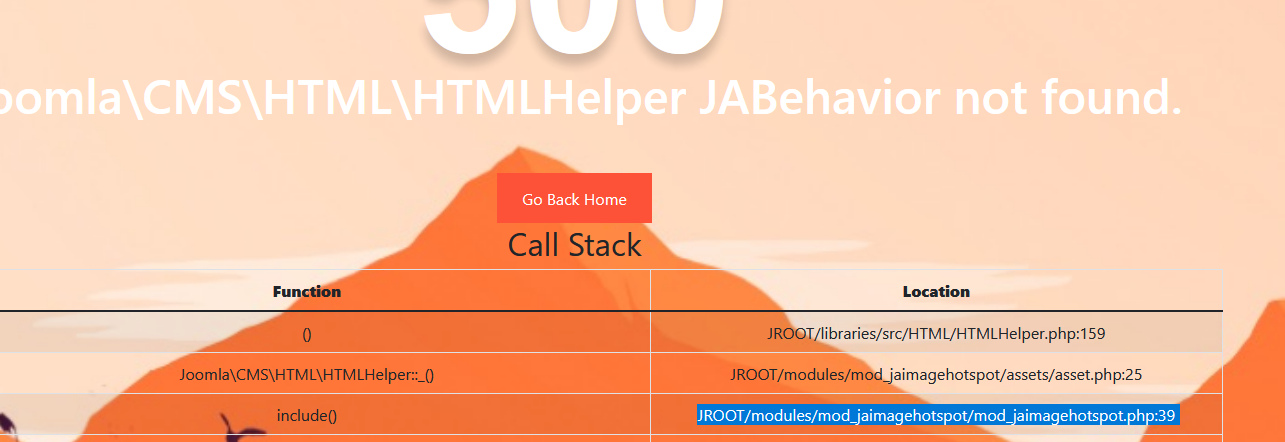
500
Joomla\CMS\HTML\HTMLHelper JABehavior not found.

However, this works on the main domain:
https://swiss-skydiving.ch/skydiving-aargau-und-umgebung

Can you maybe help me how to fix this problem?

Kind regards
Ramon

Translated with DeepL.com (free version)

8 replies

Atick Eashrak Shuvo Staff

Hi there!

Sorry for your experience.

Would you please give me your admin access to check the issue for you? Kindly, keep a full site backup before sharing the credentials.

Best Regards

Ramon Asked this

Good day

Thank you very much for your support. Please find enclosed the access data.

Many thanks and best regards
Ramon Brunner

Paul Frankowski Senior Staff
1 year ago · edited

Hi Ramon,

The main problem is from that module modules/mod_jaimagehotspot/mod_jaimagehotspot.php

Evidence screenshot ! Update that module to last version 1.3.2 or contact with JA developer.

info_2780_2024.jpg

Paul Frankowski Senior Staff
1 year ago · edited

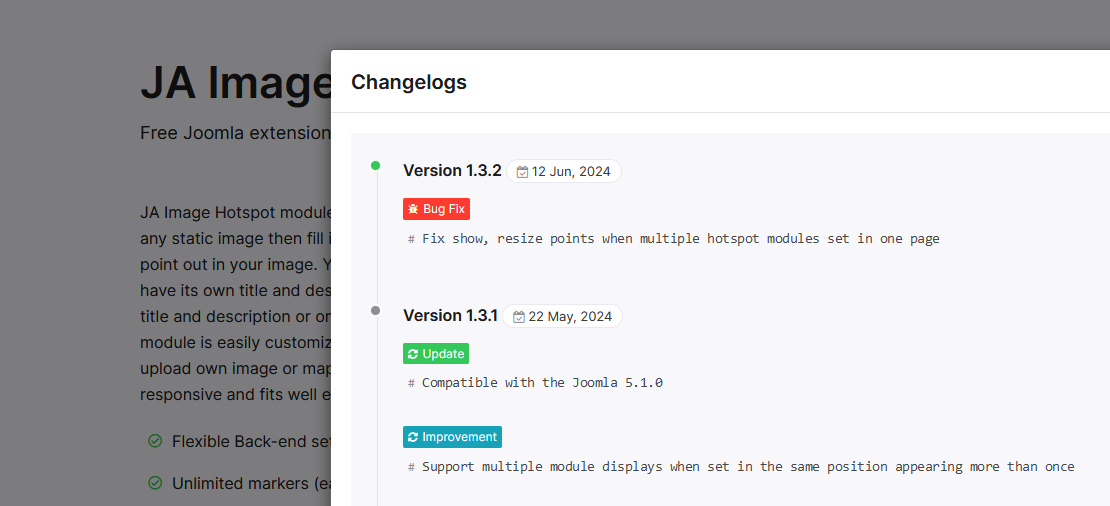
As 1st step update module used JA IH module. Here detailed info why

info_2781_2024.jpg


Current installed version (1.2.3, Dec 2022) can work only in J4x, and wasn't develop for Joomla 5.1, only new version 1.3.1+ (May 2024) can work in J5.1x. Probably that's why you have error message. With disabled module all pages works. We are not responsible for problems caused by other modules. Support Policy rule.

Paul Frankowski Senior Staff
1 year ago · edited

That Deprecated message at the bottom was before, but hidden becuase of Joomla Error Display Settings.

Now I fixed that file :)


My role ends here.

Ramon Asked this

Thank you very much Paul.

I only have one more question.
Now everything works and I had to update my template that I bought from you. Shaper_rhino

Since I updated this, the search window no longer appears. I click on the magnifying glass in the header menu and then the input window should appear. Can you perhaps help me with this problem and maybe also tell me where I can find this if I have to do something myself?
Maybe you can show me how to do this on the main domain, https://swiss-skydiving.ch/
The access data are all the same.
Thank you very much.

Best regards
Ramon

Atick Eashrak Shuvo Staff

Hello Ramon,

Thank you for bringing this to my attention, and I apologize for the inconvenience. The issue was due to the replacement of the old search module with Joomla's recommended Smart Search Module. I’ve configured it, and the search window should now work as expected on https://swiss-skydiving.ch/.

Please let me know if you need further assistance.

Best regards

Ramon Asked this

Hello Atick

Thank you very much. That looks great.
Can you perhaps tell me where I can find the module or the content for the search window? Just in case I want to customise something myself.

Thank you for the good support.

Best regards
Ramon

Atick Eashrak Shuvo Staff

Are you asking about those section https://prnt.sc/mhVKjzuuBbFU?

Log in to reply.