

License Cannot Be Entered, Page does Not Exist
TC
Tobias Creutziger
Hello, I have purchased Page Builder Pro, downloaded the package and installed it in Wordpress. SP Page Builder Pro is also displayed under Components. However, as soon as I start it I cannot enter the license key, there is no such item under Settings. Also, many options are displayed as “Pro”, but I cannot select them.
Joomla 5.3.0 - Everything up to date
4 Answers
Order by
Oldest
TC
Tobias Creutziger
Accepted AnswerHi Paul, Thanks for the answer. I was talking about Joomla, no idea why I wrote WordPress :-D

Paul Frankowski
Accepted AnswerHi Tobias,
- In WordPress you cannot install that component, it will not be possible. Only in Joomla 4 or Joomla 5.
- Please read tip 1. and follow steps >> https://www.joomshaper.com/documentation/sp-page-builder/troubleshooting
- Settings are visible, for example, in list of Pages
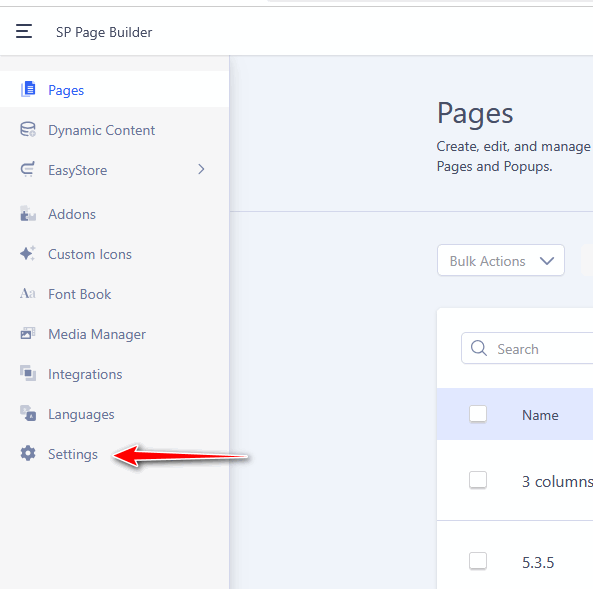
Or you can use that direct link
/administrator/index.php?option=com_sppagebuilder&view=editor&tmpl=component#/settings
of course with your domain url.