

Categories List: Error 0 Class "ApplicationHelper" Not Found
G
gemmajoom
The error appears when clicking on the menu item List of all categories in an item category tree. With the cassiopea template the problem doesn't exist.
I can't provide links to my local site.
Joomla! 5.4.1 PHP 8.3.28 Template Themis 2.0.2
11 Answers
Order by
Oldest

Paul Frankowski
Accepted AnswerI don't know to be honest. But check by disabling all addons in SPPB module, and then enable one by one, to check how it will work.
G
gemmajoom
Accepted Answerdisabling SPPB modules, I just discovered that if I open them in the backend the same error appears:
An error has occurred. 0 Failed opening required 'C:\wamp64\www\mysite/administrator/components/com_sppagebuilder/builder/classes/base.php' (include_path='.;C:\php\pear')
Paul Frankowski
Accepted AnswerHi,
but you have problem in admin area in Menu Manager? Or on front-end ?
Paul Frankowski
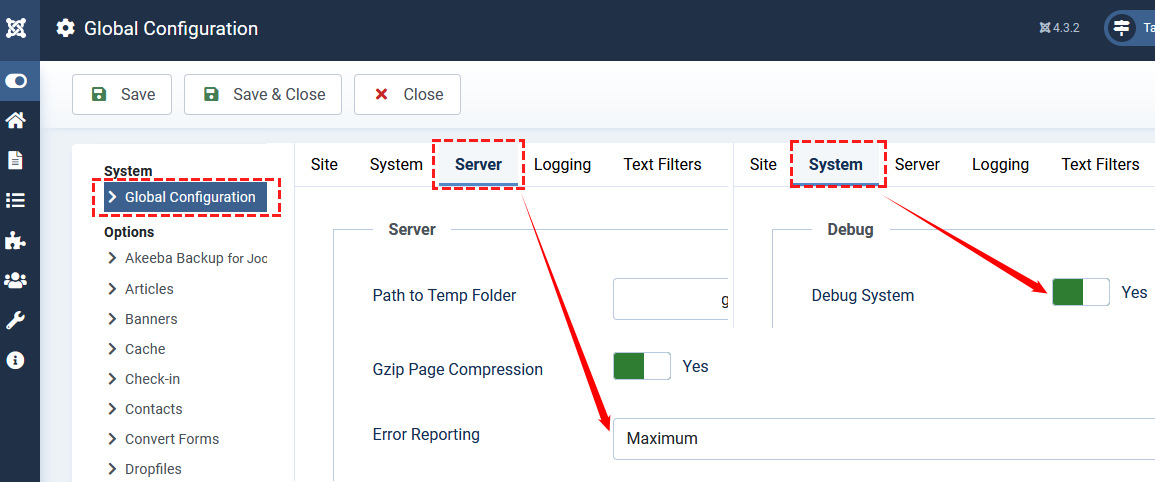
Accepted AnswerCan you on Joomla 5 enable that , and re-check view, take a screenshot with error details and share link to that image here
G
gemmajoom
Accepted Answer
G
gemmajoom
Accepted Answersame error with Shaper_helixultimate template https://files.fm/u/uaje8j7nuz
Paul Frankowski
Accepted AnswerBut error seems to be from SPPB not template itself.
- Are you using SPPB on that view? If yes, please disable SPPB Module and recheck.
- List of all categories in your example is a menu item? Example below
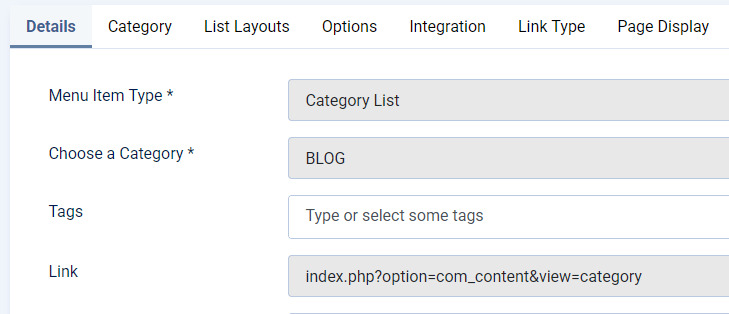
I tested the same menu item on my site and was OK.
G
gemmajoom
Accepted AnswerI thought the problem was with the template because it works fine with Cassiopeia.
Menu Item Type: Articles >> List All Categories in an Article Category Tree
Actually, disabling the SPPB modules that appear on that page makes the error disappear. Why?
G
gemmajoom
Accepted Answerdisabling SPPB modules, I just discovered that if I open them in the backend the same error appears:
An error has occurred. 0 Failed opening required 'C:\wamp64\www\mysite/administrator/components/com_sppagebuilder/builder/classes/base.php' (include_path='.;C:\php\pear')