

Power Admin Template – Share Your Feedback

Toufiq
We have recently launched the Power Admin Template for Joomla, and we would love to hear your feedback.
Here is the more details of Power Admin Template
If you encounter any issues, bugs, or unexpected behavior, feel free to report them here. Your reports help us identify problems quickly and improve the template for upcoming releases.
You can also share:
- Suggestions to improve usability or performance
- General feedback from your experience using the template
- Feature requests you would like to see in future updates
Please try to include clear details when reporting an issue, such as:
- Joomla version
- Steps to reproduce the problem
- Screenshots (if possible)
Our team will review the reports regularly and prioritize them for the next releases and improvements.
Your feedback plays an important role in making Power Admin Template better for everyone.
Best regards,
Toufiqur Rahman
Team Lead, Tech Support (JoomShaper)
Website
http://joomshaper.com
59 Answers
Order by
Oldest

Scott
Accepted AnswerIntegrate the Joomla 6 dark mode option. The power admin styling is not a subsitute

Paul Frankowski
Accepted AnswerDark mode means - color switch to black-white palette, not changing the styling itself.
Scott
Accepted Answerlayout Change request
youtu.be/fKvrmFTZstg
Sub titles CCS change request
youtu.be/7WvSOacAs6o
A
Allen
Accepted AnswerI will try it when it has time to evolve more. I hope the responsive mobile display is better than what I have with Joomla 5.x. Joomla's administration drives me NUTS on my phone since it auto-collapses the side menu when scrolling to get to a component. I've been waiting for a good admin console template replacement for a loooooooooooong time. I'm hopeful.
Paul Frankowski
Accepted Answer@Allen, if you noticed different problems than mentioned above, just share link to video or screenshot, thx
So I guess, you use Joomla Admin also from your phone, right?
A
Allen
Accepted AnswerYes, I use standard default joomla admin from my phone and it drives me ape-shit since the vertical side menu auto-collapses as I scroll down. Getting to a submenu item in the vertical menu in mobile view is nearly impossible.
I have not tried your Joomshaper admin template yet. I hope it's better.
Paul Frankowski
Accepted Answer@Allen, Can we be serious? We need feedback, not info that you didn't even tried it. Oh.
A
Allen
Accepted Answer@Paul, anybody who has been a customer of Joomshaper for longer than a month knows that stable releases should be considered beta for at least two weeks after release!!! I love Joomshaper, but that's just a fact!
Will I install a joomla admin template you are still calling beta? Can we be serious? Back atcha.


John Juhl
Accepted AnswerHOW TO DELETE ARTICLES PERMANENTLY?
Really like the Power Admin, it takes Joomla into this century but:
how do I delete articles - I can trash them, yes, but how do I completely delete them? (can't find the Empty trash option - or have I just gone blind?)
John.
Paul Frankowski
Accepted AnswerClick "Show Filter" > Status [Trashed] > mark all or one > Select Action > ... indeed - Delete (Empty trash) is missing ;p
Ok, I will inform developer, thanks for good eye
John Juhl
Accepted AnswerWe need to have the ACL column visible in the articles table (if you ask me :)
- or even better, an option to pick what columns the user wants to show - we are all different.... sort of
J-)

Geoffrey Smith
Accepted AnswerCouple of display issues. Text is being mangled and icons are not appearing. See the two screen shots below:
Paul Frankowski
Accepted Answer1-It looks like icon from RegularLabs CacheCleaner ?? or default core ?
2-Akeeba Tools grid, ok , noted
Paul Frankowski
Accepted AnswerEvery extension in admin use its own styles based on default Admin Theme, that's why.

Martin Grunert
Accepted AnswerFor me, the layout is really messed up.
In ODLF, and in my other projects, colors and layout formatting are no longer being applied.
NOW: https://prnt.sc/xMeGniubXGuL NEW: https://prnt.sc/LrgJ3gREd2qx
NOW: https://prnt.sc/LZyHMXLJX940 NEW: https://prnt.sc/DsLH8kPSdT3B
You're welcome to test it using ODLF: https://extensions.joomla.org/extension/od-local-fonts/
John Juhl
Accepted AnswerThere is a bug in the Category filtering:
pls see these images comparing Joomla native and Power Admin.
https://drive.google.com/file/d/10_N3WSlx-DS5VLu62vZvl5zZny06t5TS/view?usp=sharing https://drive.google.com/file/d/1Q7ayCd7rleYstyp3B5qUoT3DxYtyrRYC/view?usp=sharing
John Juhl
Accepted AnswerAre we having a ACL issue regarding other users backend than the SuperUser level?
I set up an Administrator, and gave him all permisions. He could login (backend), and was able to open stuff from the dashboard, but the menu (left side of page) was not present - saving/closing the stuff he could open, and edit, had the same problem - and so did the the Logout option - so he couldn't even logout. Has this got to do with the Power Admin Template?
Screenshot:
https://drive.google.com/file/d/1itEszoxRXQF_sf6dMod-_FmQxrh9USBX/view?usp=sharing
John Juhl
Accepted AnswerFYI:
I get these warnings:
Warning : Undefined array key "JHtmlPoweradminUiTab::startTabSet" in /home/customer/www/sop.omtykt.com/public_html/administrator/templates/poweradmin/html/poweradminuitab.php on line 88
Warning : Trying to access array offset on null in /home/customer/www/sop.omtykt.com/public_html/administrator/templates/poweradmin/html/poweradminuitab.php on line 88

Svyatoslav
Accepted AnswerBest of the best!!!
Continue on, this is necessary. I added everything to the site beautifully, but unfortunately there is an error on the main page:
"500 Column 'modified' in order clause is ambiguous"
Call Stack
Function Location
1 () JROOT/plugins/system/poweradmin/src/Module/Latest/Administrator/Helper/ModLatestHelper.php:91 2 Joomla\Module\Latest\Administrator\Helper\ModLatestHelper::getList() JROOT/plugins/system/poweradmin/src/Module/Latest/Administrator/Helper/ModLatestHelper.php:152 3 Joomla\Module\Latest\Administrator\Helper\ModLatestHelper::getArticles() JROOT/administrator/modules/mod_latest/src/Dispatcher/Dispatcher.php:97 4 Joomla\Module\Latest\Administrator\Dispatcher\Dispatcher->getLayoutData() JROOT/administrator/modules/mod_latest/src/Dispatcher/Dispatcher.php:44 5 Joomla\Module\Latest\Administrator\Dispatcher\Dispatcher->dispatch() JROOT/plugins/system/poweradmin/src/Helper/ModuleHelper.php:195 6 Joomla\CMS\Helper\ModuleHelper::renderModule() JROOT/administrator/templates/poweradmin/html/com_cpanel/cpanel/default.php:105 7 include() JROOT/libraries/src/MVC/View/HtmlView.php:416 8 Joomla\CMS\MVC\View\HtmlView->loadTemplate() JROOT/libraries/src/MVC/View/HtmlView.php:204 9 Joomla\CMS\MVC\View\HtmlView->display() JROOT/plugins/system/poweradmin/src/Component/Cpanel/Administrator/View/Cpanel/HtmlView.php:213 10 Joomla\Component\Cpanel\Administrator\View\Cpanel\HtmlView->display() JROOT/libraries/src/MVC/Controller/BaseController.php:697 11 Joomla\CMS\MVC\Controller\BaseController->display() JROOT/administrator/components/com_cpanel/src/Controller/DisplayController.php:57 12 Joomla\Component\Cpanel\Administrator\Controller\DisplayController->display() JROOT/libraries/src/MVC/Controller/BaseController.php:730 13 Joomla\CMS\MVC\Controller\BaseController->execute() JROOT/libraries/src/Dispatcher/ComponentDispatcher.php:143 14 Joomla\CMS\Dispatcher\ComponentDispatcher->dispatch() JROOT/libraries/src/Component/ComponentHelper.php:361 15 Joomla\CMS\Component\ComponentHelper::renderComponent() JROOT/libraries/src/Application/AdministratorApplication.php:150 16 Joomla\CMS\Application\AdministratorApplication->dispatch() JROOT/libraries/src/Application/AdministratorApplication.php:206 17 Joomla\CMS\Application\AdministratorApplication->doExecute() JROOT/libraries/src/Application/CMSApplication.php:304 18 Joomla\CMS\Application\CMSApplication->execute() JROOT/administrator/includes/app.php:58 19 require_once() JROOT/administrator/index.php:32
Svyatoslav
Accepted AnswerI'll add from myself. The template is beautiful, it looks expensive! But the font is unusual or just plain dull. I would use Ubuntu or Roboto.
SP
Saman Par
Accepted AnswerI am getting the following error message when I click on Dashboard: 0 Call to undefined method Joomla\Module\Logged\Administrator\Helper\LoggedHelper::getModuleTitle()

ZAHNER
Accepted AnswerThe simple template is pleasant to use, thank you for your work. The same error occurs on two sites under development. However, it works correctly on a third. All three websites are running Joomla 6.1.1 and PHP 8.4.

Paul Frankowski
Accepted Answer@ZAHNER and @Saman We cannot reproduce that issue, can you reinstall template and compare server settings.
Can you share access to one of those sites where Admin Theme crashed?
Here is RC version for testing > https://limewire.com/d/zONWj#63uEcQh6D3
ZAHNER
Accepted Answer@Paul : Problem solved; it was the Joomill Custom Quick Icons module causing the error. Thanks for your reply. Have a good day.
TH
Thomas Harsch
Accepted AnswerHi,
since the Admin Template now is release I installed it to my site. First impression is good, the interface now looks way lighter then before.
But I also discovered one issue with the template:
I cannot log in to the Backend using my passkey anymore, I have to fall back to username+password+code.
Best wishes.
R
René Landscheidt
Accepted AnswerHello Joomshaper Team,
i have a Problem on my Joomla Installation withe the PowerAdmin Template an the JCH Optimizer Component.
The Component Format ist wrong. (Even in the 1.0.0 "Final" Version Update - Just Installed and Tested)
Screenshot 01: https://hidrive.ionos.com/lnk/JYOvyi7CB Screenshot 02: https://hidrive.ionos.com/lnk/WAatVqyLF Screenshot 03 (different AdminTemplate): https://hidrive.ionos.com/lnk/WojI0jYUq Screenshot 04 (different Admin Template): https://hidrive.ionos.com/lnk/eopgEKss0 Screenshot 05 (another Admin Template): https://hidrive.ionos.com/lnk/G9KTivdha
could you maybe check what is happening there?
PS: Infor about The Joomla Installation: Joomla 5 (5.4.6) - Main Template for the Website: Helix Ultimate (Latest Update)
If you need more Information about the Server Settings or else please let me know.
Best Regards,
R. Landscheidt
R
René Landscheidt
Accepted AnswerHello Mr. Frankowski,
Thanks. I'll wait then. I use JCH Optimizer to Speed up the Website - without it the Site is really slow - needs nearle 20 - 30 ms to Load, with it it loads in 2 -4 ms.
Best Regards,
R. Landscheidt

PhoenixGB
Accepted AnswerClean install of Doctor - no added components or modules or plugins - got this error.
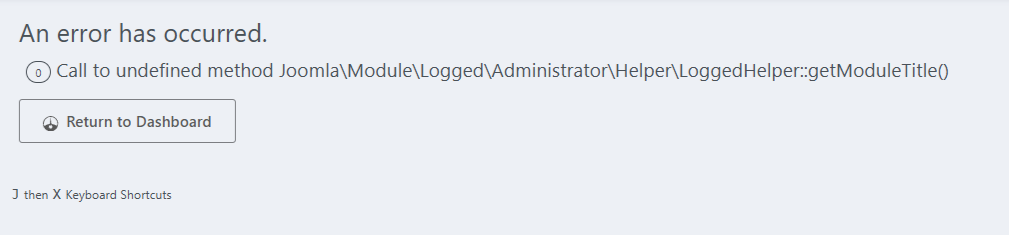
Went straight back to standard... plus one other moan, do an upload image on here instead of the shortcode to an uploaded image elsewhere, so messy. :)
SP
Saman Par
Accepted AnswerI still have the following issue when click on dashboard: 0 Call to undefined method Joomla\Module\Logged\Administrator\Helper\LoggedHelper::getModuleTitle()
Does anybody else see this issue?
A
AMurray2017
Accepted AnswerI'm getting layout issues especially with Akeeba Products (Admin Tools, Backup).
Some screens the close or the action/menu drop down doesn't work. eg. from Menu Manager (among others).
I have Joomla's accessiblity plugin active, but clicking the back-end accessibility icon doesn't open the accessibility options.
Quite few niggling issues I haven't listed but overall it's not bad.
P
Preamble
Accepted AnswerWithin our Dev platform..
Testing a project with Travelkit quickstart 5.2
Loaded Power admin 1.0
Within Main Menu.. Sorting Desending ... Trying to Drag order of Menu items, does not work
Had to switch back...
Scott
Accepted AnswerACANNOT UNINSTALL IT! arg frustrating
HB
Hans van Balen
Accepted AnswerCannot add an image to intro text or full article when using Power Admin.
I’m using:
Joomla 6.6.1
JCE 2.9.99.7
SP Page Builder 6.6.2
SP Power Admin 1.0.0
When using the administrator template Power Admin from JoomShaper and JCE editor, I experience the following.
Cannot add an image to intro text or full article.
Menu on the right; Basic, Images, SEO Options, Links and Publish.
The Images menu has two options:
- Image intro text
- Full article image
If I want to link an image to an article I click on '+ Add Media', the Edit Image window opens, I can go to the relevant folder and choose an image (check mark is on). Then I click on Select. The image is not added now.
If I use TinyMCE for the editor, the image will be added. If I use the standard administrator template, everything works fine.
Do you have a solution to this problem?
Sincerely,
Hans van Balen
Holland
Paul Frankowski
Accepted Answer@Hans, Update JCE, it was update that should help. If not, please record video and share link.
"New" issue after last Joomla update: https://www.joomshaper.com/forum/question/45630
HB
Hans van Balen
Accepted Answer@Paul, I use the latest versions of JCE, SP PageBuilder and SP PowerAdmin. It just doesn't work when I use JCE in combination with SP PowerAdmin. With JCE and the standard Admin template, everything works fine.
I don't know how to record and send a video. So if you don't believe me, I’l stop using SP PowerAdmin.
HB
Hans van Balen
Accepted AnswerHi @Paul,
Can you please respond to my ticket #227486, #229689 I made a video of my findings. See the link below. https://youtu.be/TK1ZwZFNelo
Hans
A
Addington
Accepted AnswerTBH with all the recent spate of extension vulnerabilities, I am reluctant to install anything new that I don't need, or doesn't make a significant improvement. The screenshots look better, but speaking as an end user, I am wondering whether there is anything here that is worth the risk of introducing a new extension into my stack?
Paul Frankowski
Accepted AnswerYes, reduce number to extension.
But, Firewall component is MUST HAVE.
Paul Frankowski
Accepted AnswerYou can use your phone to record video, then share link to it.
OR
At least make 1 or 2 screenshots, and share link to them. Common
Paul Frankowski
Accepted AnswerIt depends what budget do you have?
You may have FREE or PRO (commercial) ones.
HB
Hans van Balen
Accepted AnswerHi @Paul, here is a link to the recording.
JM
John Mendivel
Accepted AnswerI haven't used it yet, but I'll wait until next year when it's more mature, and then I'll use it.
A
Allen
Accepted AnswerI said that once (https://www.joomshaper.com/forum/question/44059#qa-answer-220807) and you see where that got me!
TH
Thomas Harsch
Accepted AnswerAfter I upgraded my Joomla from 6.1.2 to 6.1.3 I had to check some override pages. Without the admin template installed i was able to set the checkboxes in front of the files and do a "mass action" to set them to be checked. In the Power Admin Template I missed this possibilty for a mass action (the checkboxes are there, but no "chek all"-button), I had to set them all one by one.