Opt-in Addon Questions
TH
Tilen Harc
Hi guys!
I have a few questions about the Opt-in addon:
- Where (which .ini file) do I change the label for the EMAIL field?
- I have a button to submit the email, that is than added to the mailing list. In the button settings I have this options: https://ibb.co/xKPCSK6K but nothing happens? I would like to have a landing page, that is shown after a user submits to the newslatter... Is this even possible?
- If option 2 is not possible, where and how to I style this "green" text, that says the entry was submitted? https://ibb.co/JWWYktt9
The URL is https://www.lex-pixel.si/mi2new2026
Best regards! Tilen
4 Answers
Order by
Oldest

Paul Frankowski
Accepted AnswerHi Tilen,
each component in Joomla has single language file for front-end, for example,
language\en-GB\en-GB.com_sppagebuilder.ini
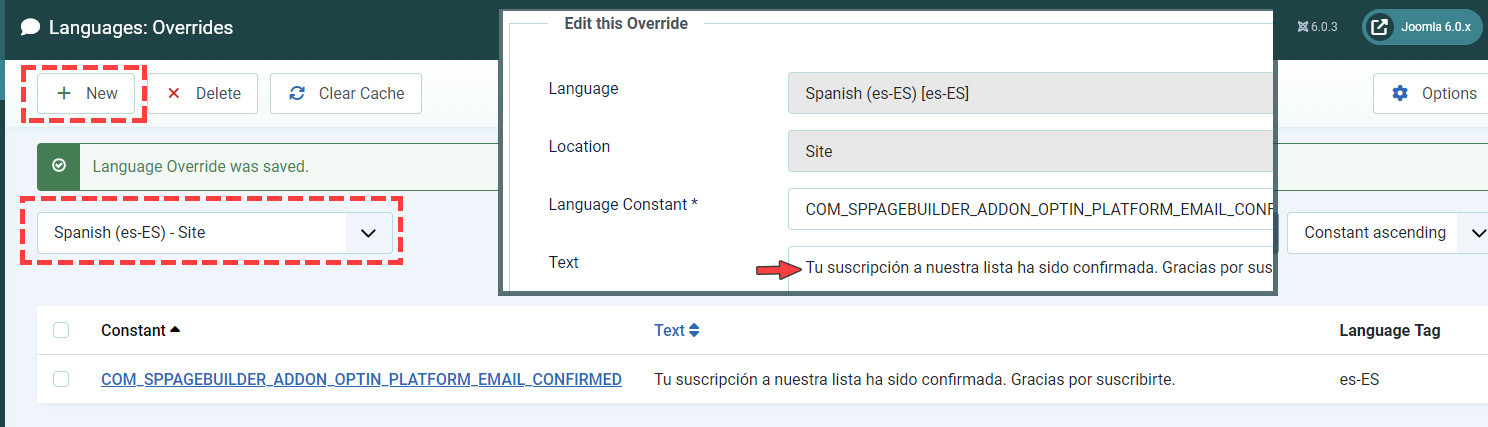
Use Joomla Language Override feature to change language phrase, do not touch .ini file.
;Optin Form;
 COM_SPPAGEBUILDER_ADDON_OPTIN_FORM_EMPTY_API="Please insert your API key for"
COM_SPPAGEBUILDER_ADDON_OPTIN_PLATFORM_EMAIL_PENDING="We need to confirm your email address. To complete the subscription process, please click the link in the email we just sent you."
COM_SPPAGEBUILDER_ADDON_OPTIN_PLATFORM_EMAIL_CONFIRMED="Your subscription to our list has been confirmed. Thank you for subscribing!"
COM_SPPAGEBUILDER_ADDON_OPTIN_PLATFORM_EMAIL_UPDATED="Your email was updated successfully."
COM_SPPAGEBUILDER_ADDON_OPTIN_PLATFORM_EMAIL_EXIST="You are already subscribed."
COM_SPPAGEBUILDER_ADDON_OPTIN_PLATFORM_EMAIL_ERROR="Some problem occurred, please try again."
COM_SPPAGEBUILDER_ADDON_OPTIN_PLATFORM_EMAIL_DUPLICATE_USER="This user is already exist. Please try with new email."
For "email" placeholder phrase use & override that one: COM_SPPAGEBUILDER_ADDON_AJAX_CONTACT_EMAIL
Newsletter addon do not have <label> field only placeholder that is displayed inside <input> field.
Paul Frankowski
Accepted Answer-
OK, we will check that.
-
Look up, at all phrases list, find which one you want to override, and do it. I suggest to translate all.
Example for ES