Issues With Luxyort - Question | JoomShaper

Issues With Luxyort

Charlotte Munch

Charlotte Munch

Template 2 months ago

I am using the Luxyort template for this page -> https://dmifestfyrvaerkeri.dk/ and have some problems with the configuration:

How can I spread my 2 positions in the Footer across the entire width ? How do I set a margin on the pages ? How do I reduce or remove the header on the pages ?

I look forward to hearing from you. Best regards Charlotte Munch

0
17 Answers
Mehtaz Afsana Borsha
Accepted Answer
Support Agent 2 months ago #227175

Hi,

Thanks for contacting us. Is this solved now? It seems ok in my end.

-Regards.

0
Charlotte Munch
Charlotte Munch
Accepted Answer
2 months ago #227176

Hi - Thanks for the answer No, unfortunately all 3 problems are the same. Try clicking on one of the subpages - here you can see the problem -> https://dmifestfyrvaerkeri.dk/index.php/tekst1

Regards

0
Mehtaz Afsana Borsha
Accepted Answer
Support Agent 1 month ago #227187

Hi,

You can use this CSS and reduce the top bottom from here

.view-article #sp-main-body .container .article-details .article-header{
    position: relative;
    padding-top: 120px !important;
    padding-bottom: 130px !important;
}

And by using this CSS you can adjust the padding for the whole body

#sp-main-body {
    padding: 70px 50px !important;
}
0
Charlotte Munch
Charlotte Munch
Accepted Answer
1 month ago #227189

Great - but which stylesheet should I use?

0
Mehtaz Afsana Borsha
Accepted Answer
Support Agent 1 month ago #227190

You can use it in your custom.css file

For more help, you can check it.

https://www.joomshaper.com/documentation/helix-framework/custom-code-css-js-meta

0
Charlotte Munch
Charlotte Munch
Accepted Answer
1 month ago #227191

Thanks - it helped both with the height of the header and the margin of the content!

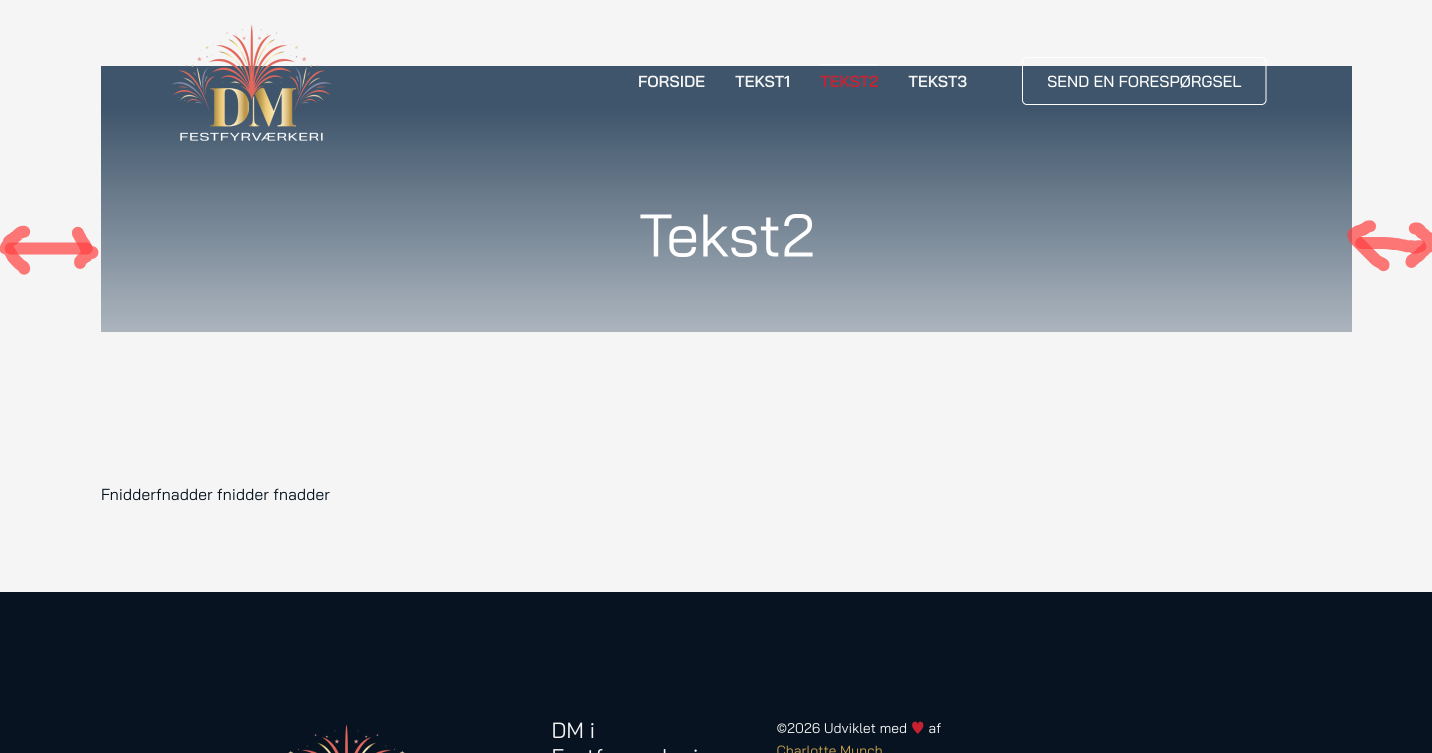
But there are still problems - because the width of the page also affects the width of the header, so it looks strange - see

I really want all my pages to look like this - see

0
Charlotte Munch
Charlotte Munch
Accepted Answer
1 month ago #227193

Whoops - now something has happened to the front page too. That wasn't the intention - see

0
Charlotte Munch
Charlotte Munch
Accepted Answer
1 month ago #227310

Hi I really need help quickly so I can move forward? The template doesn't look like mine website - so why and how ?

0
Mehtaz Afsana Borsha
Accepted Answer
Support Agent 1 month ago #227313

Hi,

Please remove that CSS and give me your super admin access, so that I can check. And please make sure you have a full site backup.

0
Charlotte Munch
Charlotte Munch
Accepted Answer
1 month ago #227316

THANKS

0
Mehtaz Afsana Borsha
Accepted Answer
Support Agent 1 month ago #227317

Hi,

Please remove that CSS from custom.css file

0
Charlotte Munch
Charlotte Munch
Accepted Answer
1 month ago #227318

I have already done that

0
Charlotte Munch
Charlotte Munch
Accepted Answer
1 month ago #227632

Hi ! Unfortunately I didn't hear from you before the weekend - but I would really appreciate hearing from you on Monday, so I can start putting some content on the site. I have an impatient customer waiting!

I have solved some problems myself, but there are still some serious issues:

  • How can I spread my 3 positions in the Footer across the entire width of the site?
  • How do I set a margin on the subpages?
  • The mobile version works very slowly on the front page and not at all on any of the subpages ?

Regards Charlotte

0
Mehtaz Afsana Borsha
Accepted Answer
Support Agent 1 month ago #227768

Hi,

Sorry for the inconvenience. To spread your 3 footer positions across the entire width of the site, you need to turn the footer row into a Fluid Width container in Helix and adjust the column grid.Here is how to do it in 5 quick steps:

Set the Row to Full Width Go to System > Site Template Styles and open your Helix template. Click the Template Options button to open the customizer. Go to the Layout tab on the left sidebar. Find your Footer row. Click the Gear icon (Section Settings) for that row. Turn the Fluid Width (or Full Width) toggle to ON.

https://prnt.sc/0orX7npteMQp

You can also adjust the grid system from here

https://prnt.sc/6a8Y4GN-nqAB

For your other questions, please create a new forum post, so that our team will help you.

0
Charlotte Munch
Charlotte Munch
Accepted Answer
1 month ago #227774

Thanks - I'll try that.

Should I also create a new question regarding How do I set a margin on the subpages?

0
Charlotte Munch
Charlotte Munch
Accepted Answer
1 month ago #227775

Now I have done as you asked - and there are no changes on the website?

0
Mehtaz Afsana Borsha
Accepted Answer
Support Agent 1 month ago #227922

Hi,

Please check now.

0