

Problems With Pagination
TH
Thomas Harsch
Hello,
I want to use the function "Pagination" für my Dynamic Collections' index pages.
The problem: When I use it, the sorting of the collection is corrupted. I want the items listed in alphabetical order depending on one of the collection items' field. This just applies to the first page when activating "Pagination". From the second page the items are sorted in the order of entry (or "creation date").
This applies to all three option of the Pagination function.
Actually I have deactivated the function, but I am able to reproduce it every time I switch it on again.
Website
https://picsnmore.de
12 Answers
Order by
Oldest

Ziaul Kabir
Accepted AnswerHello Thomas,
Thank you for reporting the issue.
Could you please share a short screen recording demonstrating the problem? Specifically, it would be helpful to see the collection settings, the sorting configuration, and how the item order changes between the first and subsequent pages when pagination is enabled.
This will help us reproduce the issue on our end and investigate it further.
Thank you!
TH
Thomas Harsch
Accepted AnswerThe Screencast is available at:
At first the actual setting without pagination, the items are sorted by their Name ("Modell" in the collection).
The second ist when I set pagination to "numbered". I want 3 columns in 4 rows, so I set the limit to 12 items. The first page ist display correct, the second page shows the order of creation date/order in the collection. When I jump to the first page it gets even weirder.
The third is set pagination to "Load More". It also shows the first page correct, then "switches" to creation date/order in the collection.
The fourth is the "endless scrolling" option, also, it starts out correct and from the second bunch it is sorting by date/collection.
Ziaul Kabir
Accepted AnswerHello,
I see the issues and forwarded this to our development team for further review.
Thanks for your patience and understanding.
Thanks
TH
Thomas Harsch
Accepted AnswerHello,
the issue unfortunatly is not solved completely. While Pagination now works for my index pages, the old problem appears on my detail page, i.e. at https://picsnmore.de/sammlung/vintage-computersysteme/mps801
This is a details page for the collection "drucker". I placed a collection addon at the page for collection "computers" and filtered on a multiref, sorted by "Computer Type". But the articles are sorted by creation date.
Ziaul Kabir
Accepted AnswerHello,
I apologize for the confusion.
I see that your sorting is set to Content Type, which sorts the items by title. Therefore, the data will be displayed in ascending or descending order based on the title, which is now correctky showing.
Thank you for your understanding.
TH
Thomas Harsch
Accepted AnswerThe picture you sent shows the collection and the order as I added the items to my collection (i.e. "Creation Date"). Exactly this order is used to display the items on the page.
My expactation was that the items are displayed in alphabetical order on the page, and not the order I added the items.
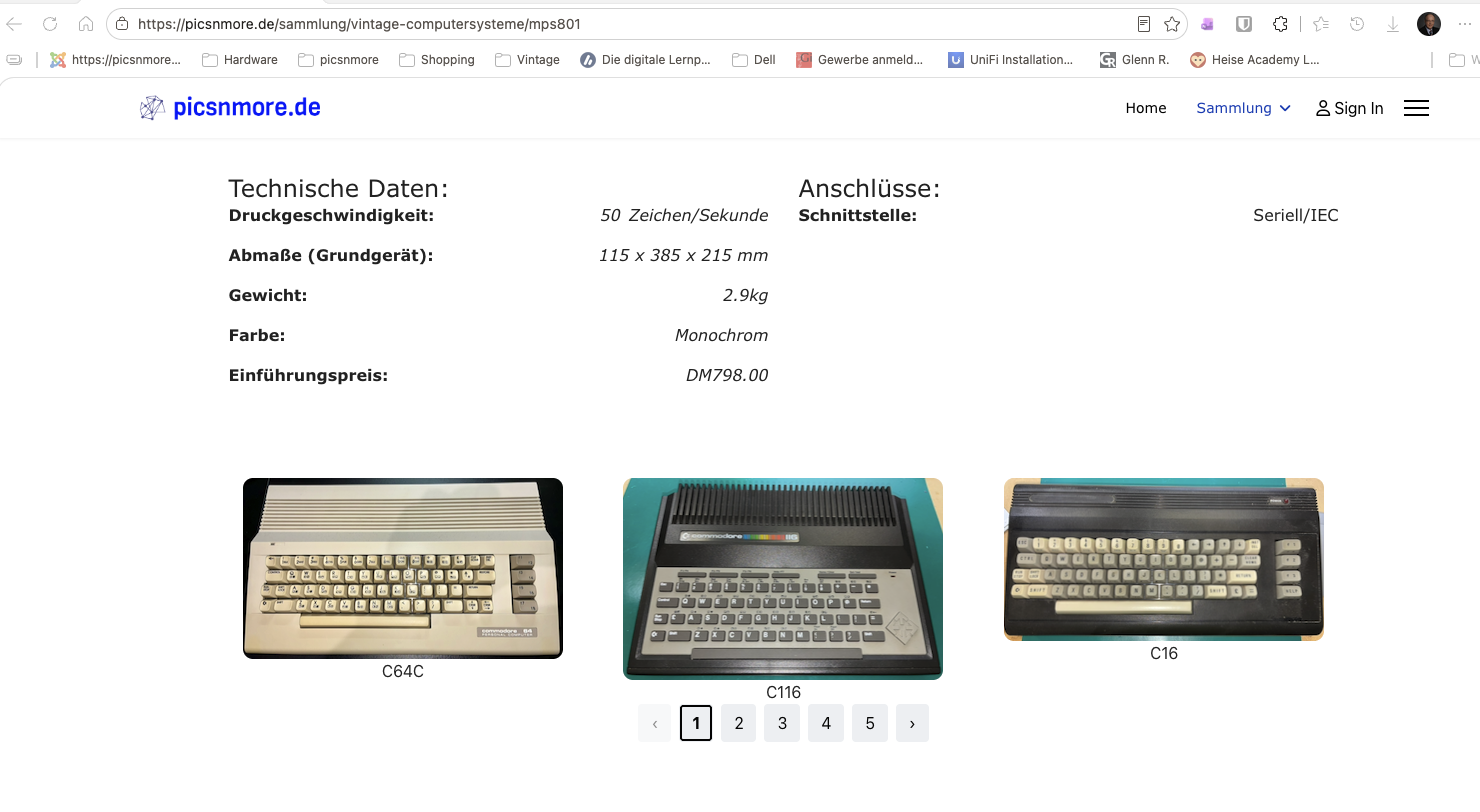
I use the same settings as on my index pages, where pagination works fine and displays the items in alphabetical order.
BTW: You misread the sorting type, it is Computer Type, not Content Type.
Ziaul Kabir
Accepted AnswerYes, I see the issue. Since your Computer Types dynamic content items are treated as text, they are displayed in character/alphabetical order, such as a, b, c, … 1, 2, 3.
However, if you prefer, you can drag and drop the items in the Dynamic Content section to arrange them in your desired order. This allows you to decide which item should appear before or after another.
Also, if a specific Sorting option is selected by default in the Collection Addon, the items will be displayed according to that sorting order.
Could you please check on your end and let me know whether the items are also displaying in this order? I have already checked from my side, and I can confirm that they are displaying correctly according to the selected sorting/order.
However, there is an issue with routing after pagination on some pages. Our team is already aware of this issue and is currently working on a fix. We hope to resolve it in an upcoming update.
Thank you for your patience and understanding!
TH
Thomas Harsch
Accepted AnswerThey are NOT sorted alphabetically to the "Computer Type" field, they are sorted by "Creation Date".
Otherwise they should be in the same order as on the index page https://picsnmore.de/?option=com_sppagebuilder&view=page&id=4 which is sorted correctly by "Computer Type".
If this would be the case, the following computers should be visible on the example screenshot above:
C116, C128, C128
PS: When I switch off "Pagination" the sorting is correct. - It is nearly the same failure as it was on the index pages before the last update of SPPB.
Ziaul Kabir
Accepted AnswerHello,
I apologize for the delayed response.
I have checked your site on my local PC and identified the issue. I have forwarded it to our development team for further review.
Actually, the issue appears to be related to the filtering you are using here: https://prnt.sc/EkrgmCfAskvt
Thank you for your patience.
Best regards,