Icon Addon
Geert Colpaert
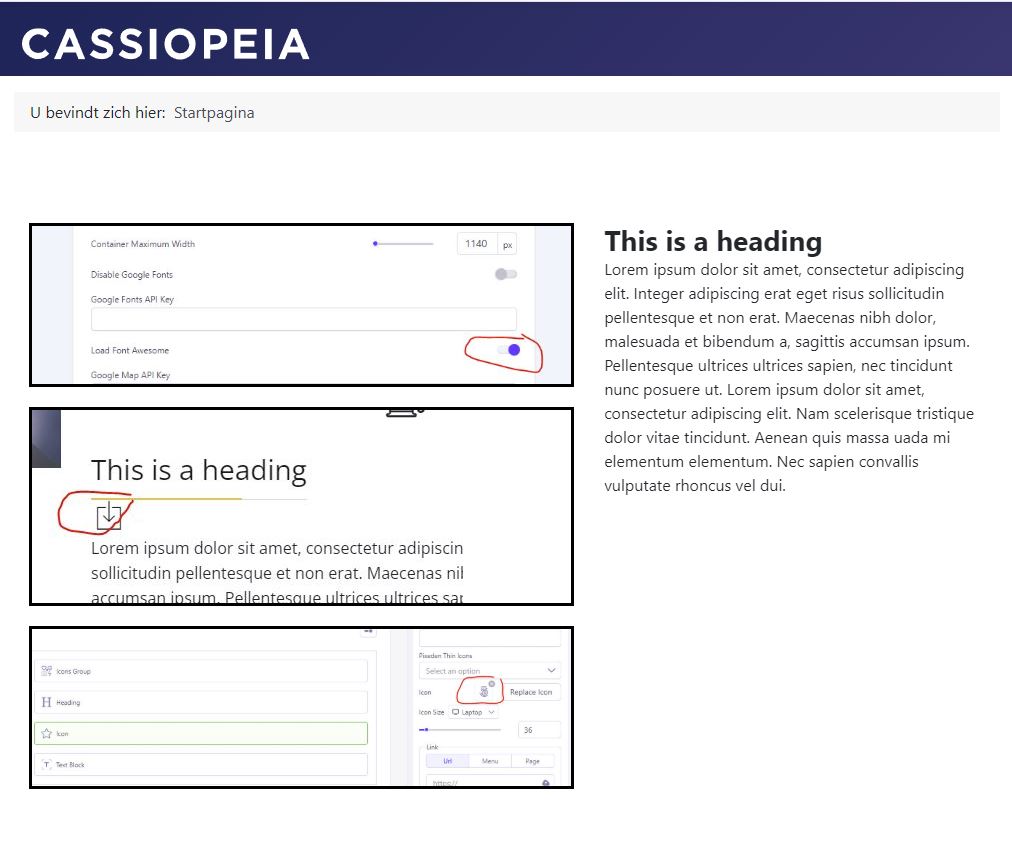
When I use the icon addon and try to use an icon it shows up as just a square with an arrow instead of the right icon. When I use Pixeden Thin Icons it works fine. Also no problem when I use the addon Icon group. Please advise...

Paul Frankowski
Accepted AnswerHi Geert,
make sure that you have Font Awesome active, not disabled.
Go to SPPB Settings > Options > Load Font Awesome: On (blue dot)
it means that it's enabled

Geert Colpaert
Accepted AnswerIt's activated. https://demosite.dubbel.be/index.php/component/sppagebuilder/page/27 Problem persists. I added some screenshots on the link.
Paul Frankowski
Accepted AnswerCan you switch template to Casiopea and test again. Or just assign Casiopea template only that page for testing.
Many users have weird problems with Flex template.
Geert Colpaert
Accepted AnswerAs you can see on the link there is no icon on that page with Casipea template.[https://demosite.dubbel.be/images/2026/10/07/knipsel4.jpg So problem persists. I never had any problems with flex template, nor with SP Page Builder. Until now. It's not such a big deal...