

Helix 2 Ultimate Error

Daniel Jubelt
Site down. Installed Helix 2 Ultimate and site becomes disfunctional. I receive the following errer: Call to undefined method ScssPhp\ScssPhp\Compiler::setOutputStyle() I have tried every procedure recommended in the forum and some on google about this problem and nothing works. I need to fix this quickly?
9 Answers
Order by
Oldest

Paul Frankowski
Accepted AnswerHi,
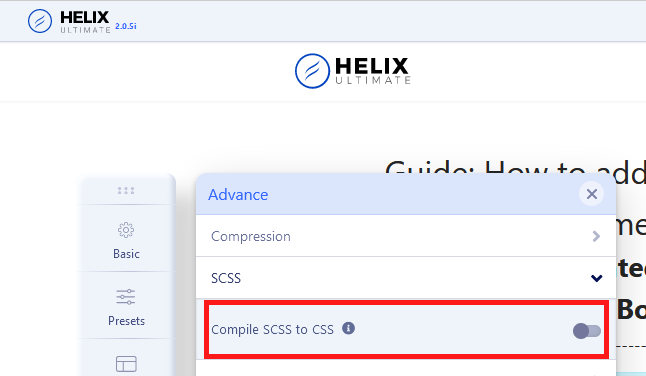
Have you tried my tip which I gave you last time?
Here is screenshot. Turn it off.
BTW
Above Login data doesn't work.
Daniel Jubelt
Accepted AnswerThis time it worked! Thank goodness. That should be off as a default. BTW: I just tested the logon I gave you and it worked. Password has first letter uppercase. Now I only need the button. Also, my Joomla version is 3.10.2 but your templates with a button are for version 4.
Paul Frankowski
Accepted AnswerI sent you video link already in different topic.
But I will add here again : https://www.youtube.com/watch?v=wpWuF52dR7g
This method works even if you don't extra module position next to menu.
Daniel Jubelt
Accepted AnswerGot the video. I understand it. I'm over 80 so I don't do video's well. I need to try and fix 3 major things wrong with Helix Ultimate first. It's quite slow also. Thank you for your help.
Daniel Jubelt
Accepted AnswerI thank you and appreciate it as I am so far behind. I still have to fix 4 things in Helix Ultimate:
- Layout Builder not even close to actual Helix Ultimate layout
- Helix Ultimate layout (top part) doesn't make sense. I click on preview to see the layout
- Changing background color of top1, top2, footer1 and footer2 does nothing.
- Social icons will not turn off and are floating around center right of the content aarea (could be in botton 3 or bottom 4.
I apologize - I'm a desktop programmer. I do, however, find your tech support the BEST on the market. Nobody else comes colse.
Paul Frankowski
Accepted AnswerDo you use Helix Ultimate 1.1.4 or Helix Ultimate 2.0 (the last version) ?
== UPDATE== I checked and you have 2.0.5 - it's OK.
Paul Frankowski
Accepted Answeryour tech support the BEST on the market.
Thanks a lot. Let me check your points (questions).
Paul Frankowski
Accepted Answerad 1) You can add your own rows and columns etc. About Header - you can change style from Template Options - Basic - Header - Predefined Header.
ad 2) ??? I don't know what you expected, but look at my above tip.
ad 3) Hmm, on all my demo sites it works. I can change colors from Preset - Custom Style. It must be related which the error that you had "Call to undefined method ScssPhp\ScssPhp\Compiler::setOutputStyle(..."
Can you give me Super User account / permissions .
ad 4) Those are social share icons for article view only. It cannot be moved so easy.

But classic social icons from template you can set at the bottom / footer. I set you already
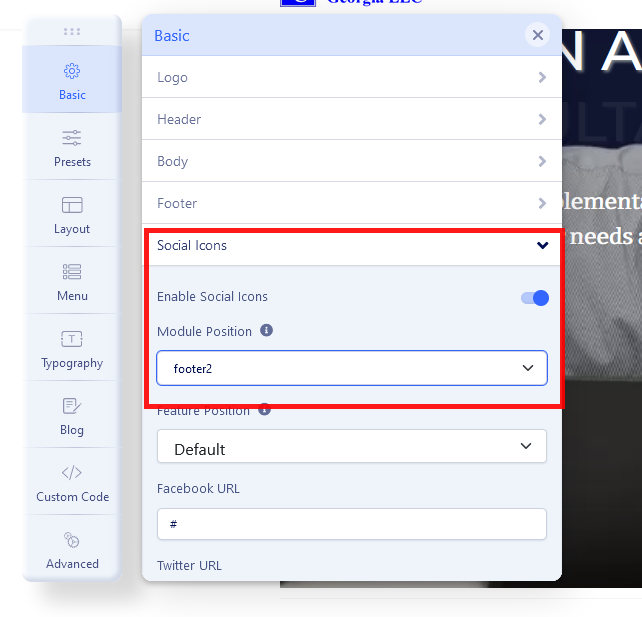
Social icons in Footer2 (yes, you can move into bottom3 or 2)
