

Home Page Travelia
M
marzolla
Good morning I bought the travelia template and I did the installation with quickstar. The problem is that the home is not the same as the one you present. See image. Can you help me, thanks ![https://www.vadoinpuglia.it/images/help-template.jpg]

9 Answers
Order by
Oldest

Ofi Khan
Accepted AnswerHello marzolla
I think you are talking about the demo images on our site preview. The images are not given with the template due to copyright. We encourage you to use your own images. However, you can find free images for commercial use here
Best regards
M
marzolla
Accepted AnswerCiao, Hello I am not talking about the images, but about the template which is not the same. ![https://www.vadoinpuglia.it/images/2-help-template.jpg]

Ofi Khan
Accepted Answerokay, I will check the issue. But I can't access your administrator. You might be using any firewall. Please whitelist my Public IP (in the hidden content box) so that I can check.
Ofi Khan
Accepted AnswerI have found the issue. You have Category Blog menu item assigned to Italian homepage.
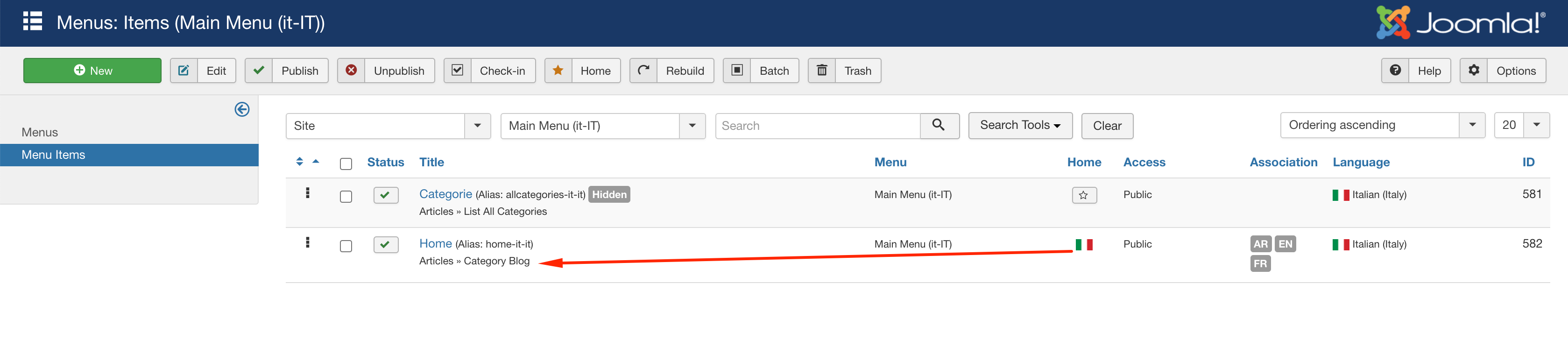
Please follow this blog to make your site multilingual properly.