SPPB Module Edit From The Front End
LW
LAC Webadmin
Hello!
Is there a way to edit the SPPB Module from the frontend without going from the backend? Would be nice if that link "Edit with SP Page Builder" appears in the front end just like when in an Article.
Thanks,
Jackson
3 Answers
Order by
Oldest

Rashida Rahman
Accepted AnswerHi there!
Thanks for your query.
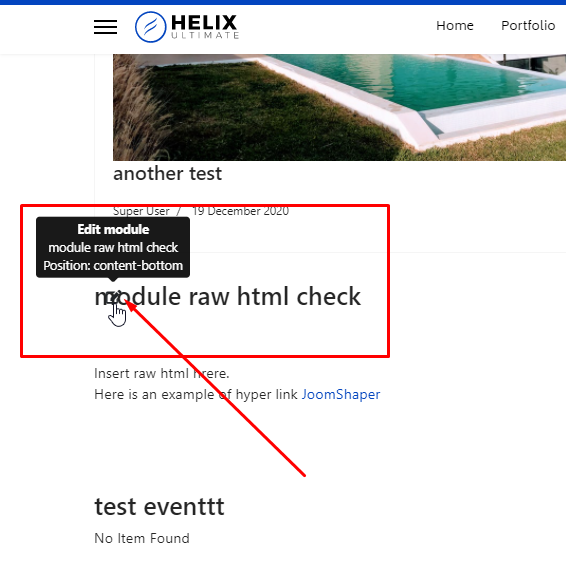
If you have published the module through the module position but not within the Joomla module addon then you should have some basic editing panel visible on the front end. Please hover over at the top left corner of the module, you will notice an edit icon there as the following screenshot spotted: https://prnt.sc/1y71w4q
Hope this helps!
Best Regards
LW
LAC Webadmin
Accepted AnswerHi Rashida,
I cannot see another edit icon except for the default Joomla edit icon which is useless for SPPB. By the way, the prnt.sc takes me to the site with a lot of JS error so the images and layout are not loaded:
https://monosnap.com/file/z1z8fRbEwigExxv5qnhw7Zb2hSSoCM
I am using HelixUltimate template which I am customizing so most of the settings are default including the stylesheet.
Yes, I am using module position to publish SPPB module. Is there a way for you to show me that icon in one of your template demo? If your saying is right, maybe the CSS for that icon in HelixUltimate template was not set properly.
Thanks,
Jackson