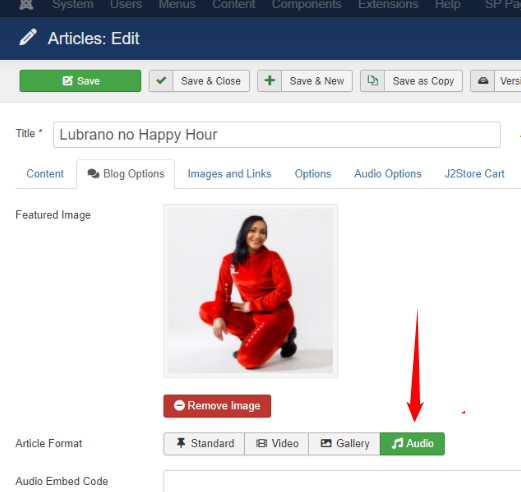
Podcasta Article Soundcloud Audio Link (Soundcluoud Only)
P
Pedro Lírio
Please i need your kindly help to solve this insue, Audio Link (Soundcluoud only) in audio options is bloked and i cant play and listen any podcast using this article field to link to a podcast in my soundcloud account, i need go forward with this put this site online.
Please what i need to do to put all palying again? this happen this happened all suddenly and whithout no clue off error.
25 Answers
Order by
Oldest

Paul Frankowski
Accepted AnswerBut you can use this method to get sounds from soundcloud >> https://www.youtube.com/watch?v=ZUz1tGP47r0
check how I did inside "Motivar com Vitória Silva, O IRT"
Paul Frankowski
Accepted AnswerHi Pedro,
indeed, Soundcluoud is not supported anymore, they changed regulations/code serveral weeks ago.
That's why we had to change our template too. As 1st step please update template to last version, then please read guide : https://www.joomshaper.com/documentation/joomla-templates/podcasta/audio-options-in-articles
Then you have to update all articles with audio links and upload files to your server OR add URL to sound/music file.
P
Pedro Lírio
Accepted AnswerI update template and now i cant see the website i get an error: Call to a member function addStyledeclaration on Null, ho w to fix this please?
I have to update something else?
Call to a member function addStyledeclaration() on null
Paul Frankowski
Accepted AnswerShare access to admin area
I hope you have website backup in case of...
by now you can install older template version if your website has traffic now Or it's night in your country?
P
Pedro Lírio
Accepted Answeryes i have backups but not so recent, this website dont have trafic yet, is in staging mode
Paul Frankowski
Accepted AnswerFixed. Sie is working, yes I made Joomla update as well.
What I did to fix it: I moved your CSS from CSS field into custom.css file, no error "Call to a member function addStyledeclaration() on null" anymore. By now please add all custom CSS changes inside custom.css file, we have to fix helix plugin in the upcoming updates.
P
Pedro Lírio
Accepted AnswerThank you for your help, now can i do fields configuration in articles and put all links right?
P
Pedro Lírio
Accepted AnswerI have checking all settings in website and i note that i lost simbol play in all podcast articles how to fix that?
Paul Frankowski
Accepted Answeryes, you have to follow guide.
About ">" icon I have to ask developer .. can you remind me on Friday.
P
Pedro Lírio
Accepted Answerhi can you fix this: About ">" icon I have to ask developer .. can you remind me on Friday.
Thanks in advance
Paul Frankowski
Accepted AnswerPedro,
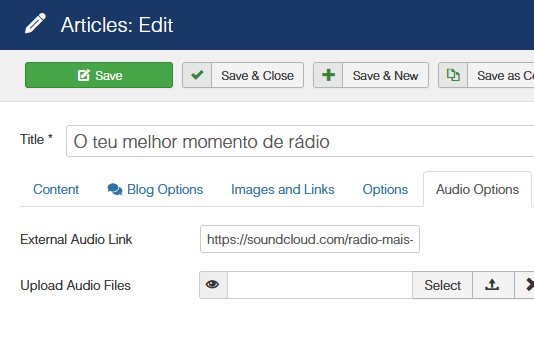
But two weeks ago I told you that soundcloud.com that is not supported anymore.
So you have to add links to mp3 (music) files OR upload music on your server.
So this will not work (!)
P
Pedro Lírio
Accepted AnswerHi there,
I have another insue i need you help, i cant load any podcast by categories in audio layouts, i get "no item found" error but all is published can you help?
P
Pedro Lírio
Accepted Answerplease you can see this error in homepage, section Podcasts Recentes cant load any category podcast in audio layouts
P
Pedro Lírio
Accepted Answerhi this insue you can get in homepage, row Podcasts Recentes addon Audio Layouts in this addon i cant load any category podcast and i cant figure whats wrong, i need your help with this to move on and launch website.
Thanks in advance.
P
Pedro Lírio
Accepted Answerme to but i see in setup panel in this addon is missing 2 layouts it could be a kind of error with this addon, someting is missing no? I need this solved because i need to launch this site. please i apreciate your developer answer.
P
Pedro Lírio
Accepted AnswerHi any news about this insue?
I note that audio layout addon only load from one category "Happy Hour", and only 1 article, saving settings in this addon dont reflect options you save in frontend, layout templates are strange lost part off css format something is wrong with this addon, definetly a need your help to fix this insue please.
Thanks in advance.