

Luxyort Home Page Background Image
M
Mike
I can't change the Luxyort home page background image.
Can you tell me how please?
M
13 Answers
Order by
Oldest

Paul Frankowski
Accepted AnswerMike, I checked my demo, and Home page and the main background image is - should set as Background for 1st row.
Just make sure that you clicked: Row Options > Style > Enable Background Options > click on the "Image" tab
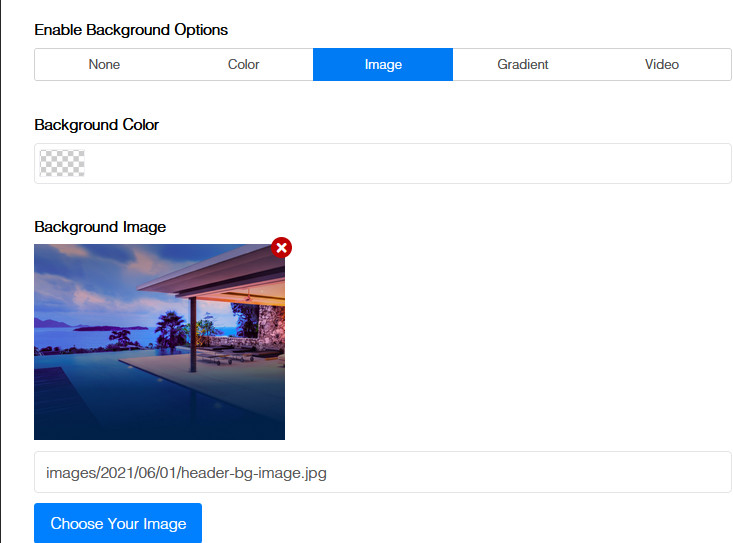
double check please. This image is not hard-coded.

Mehtaz Afsana Borsha
Accepted Answer Mehtaz Afsana Borsha
Accepted AnswerHi
follow this screenshot below:
-Regards
M
Mike
Accepted AnswerOK, did that, clicked save. Still no background image visible in the front end.
Am using Joomla 4. Not sure if there is a cache or something like that, that could be blocking the update.
Can you please confirm that adding an image here works properly.
M
Mehtaz Afsana Borsha
Accepted AnswerDid you try its section background image? Go to that specicif page on pagebuilder and go to that section settings and follow this screenshot below:
M
Mike
Accepted AnswerYour latest comment is changing the image in a slideshow. I need to know how to change the home page background image in Luxyort.
I'll need you to show me step by step (in Joomla 4) how to change the Luxyort home page/full background image. I think you have a bug. Otherwise will need a refund.
I also have this problem here: https://www.joomshaper.com/forum/question/4702 When I mouse up the tool box dissapears. When I mouse up to click on it it dissapears - Same thing as discribed by this person.
Paul Frankowski
Accepted AnswerHi Mike,
edit that page using Admin (back-end) editor - it will be easier to edit first Row.
M
Mike
Accepted AnswerStill not working for me. Will need clear instructions.
Luxyort Home Page Background Image - Someone please???
Paul Frankowski
Accepted AnswerI very glad that you found it after all. I guess that screenshot helped.
Have a wonderful day.