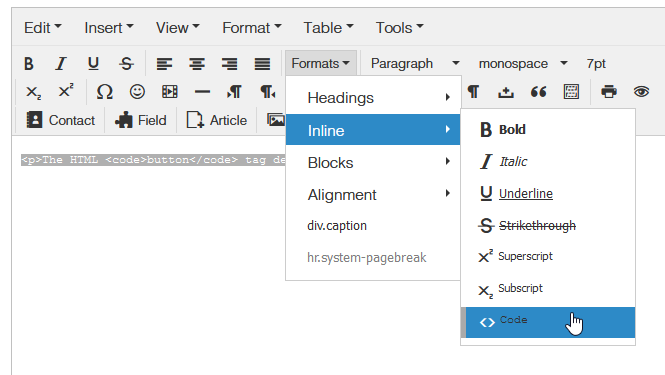
Insert Code

Logica_srl
Good evening, I would like to insert, within my articles, examples of code that you can copy to the clipboard, such as the example that I am attaching to you. Thanks for your help.
https://drive.google.com/file/d/1zPj3rLHSlXu-oZDjJCM2WbeZS-MyHir4/view?usp=sharing
Website
https://www.agrariopellegrini.it
4 Answers
Order by
Oldest

Paul Frankowski
Accepted AnswerCiao,
If you use Helix Ultimate in Template Options - Custom Code - < Header > - you can add there.
OR
You can use HDAnyCode module that allows you to use any custom Code and then publish in template module position.
Logica_srl
Accepted AnswerThanks for the answer, but maybe I didn't make myself clear. I would like to insert, in the code page (html, css, javascript) that the user can only view and / or copy. If it can help to understand the problem, I am sending you the link of one of my page in wordpress. Thanks
https://www.itcrumbs.it/il-metodo-reduce-in-javascript-spiegato-per-esempi/
Paul Frankowski
Accepted AnswerIn that case you have to put that code inside Article or Text addon with < code > marks
More: https://www.w3schools.com/tags/tag_code.asp
It's not related with our software. It's simple HTML syntax, TinyMCE and JCE editor has this inside its toolbar.