
Quote block has no function. Actual version Page Builder.
Staff replied
SP Page Builder
Quote block
Asked by Andreas
4 years ago
Last activity 2 years ago
7 replies

Paul Frankowski Senior Staff
4 years ago
· edited
Hi Andreas,
sorry but I don't understand. Can you share a link to screenshot and give me more details.
Maybe its old addon?

Ugur Uygur
Sorry
Andreas Asked this
It is not possible to put text in the block quote.

Paul Frankowski Senior Staff
4 years ago
· edited
I see german name, it doesn't tell my anything ... switch to enablish.
I can only guess that it should be very old addon,
we don't have it inside SPPB pro 3.8.
Maybe you had it from old template or SPPB installation. Just don't use it anymore and delete its folder.
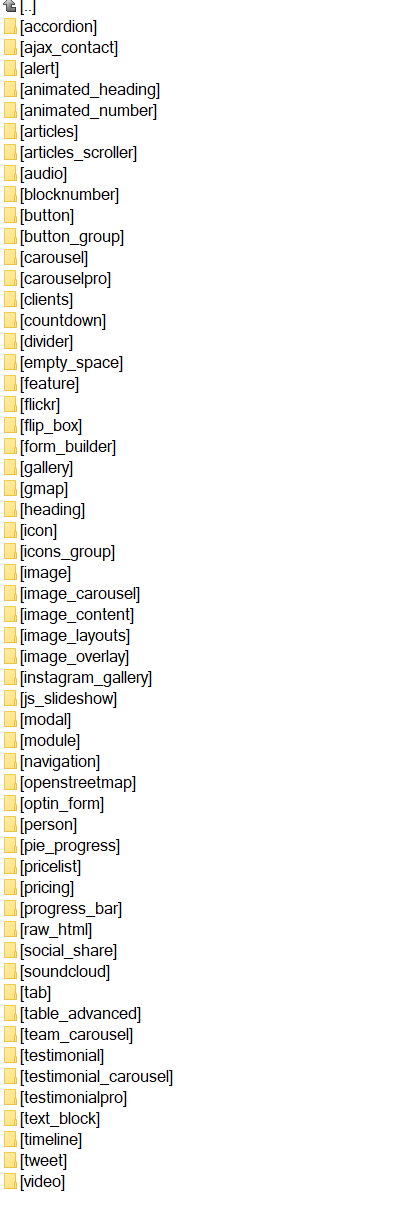
Here is current list of supported addons (components\com_sppagebuilder\addons)
Andreas Asked this
4 years ago
· edited
It looks like this:

It is named "Blockquote".
Result:
Paul Frankowski Senior Staff
Thx.
I checked, it's addon from SPPB 2.5. Not supported anymore. Use Text addon instead.
APD
Hello, i just saw this post, i tried using the add on blocke quote on my installation, and it also does not work anymore. I am using joomla 4.3.3 and sp page builder 3.8.10 on the lastest Finance template.
Could you tell me if this is an error, or the add on must be deleted? what you will use instead?
please advise, thank you.
Paul Frankowski Senior Staff
Text addon and its settings.
The best method to remove old addons will be:
- Delete all subdomains from: components\com_sppagebuilder\addons
- Install / Reinstall SP Page Builder Pro 3.8.10 again. Or, copy them from: com_sppagebuilder_pro_v3.8.10.zip > site\addons
Log in to reply.