

Unable To Change Button Color In Wimble Template - On Hover
DA
Dina Abramson
Hi,
I have tried to locate the place to change the linear gradient colour of the buttons in the Wimble template. I made some css changes, but i can't locate where to change the css on the hover. nothing I have tried makes the change.
picture of button on hover: https://www.awdtest3.com/images/button_colorgradient.png

Also, in the template settings under logo - there is a selection for a dark logo. I am not using that, but I see the alt text in the header. How do I remove that?

1 Answers
Order by
Oldest

Ariba
Accepted AnswerHello
Thank you for your query.
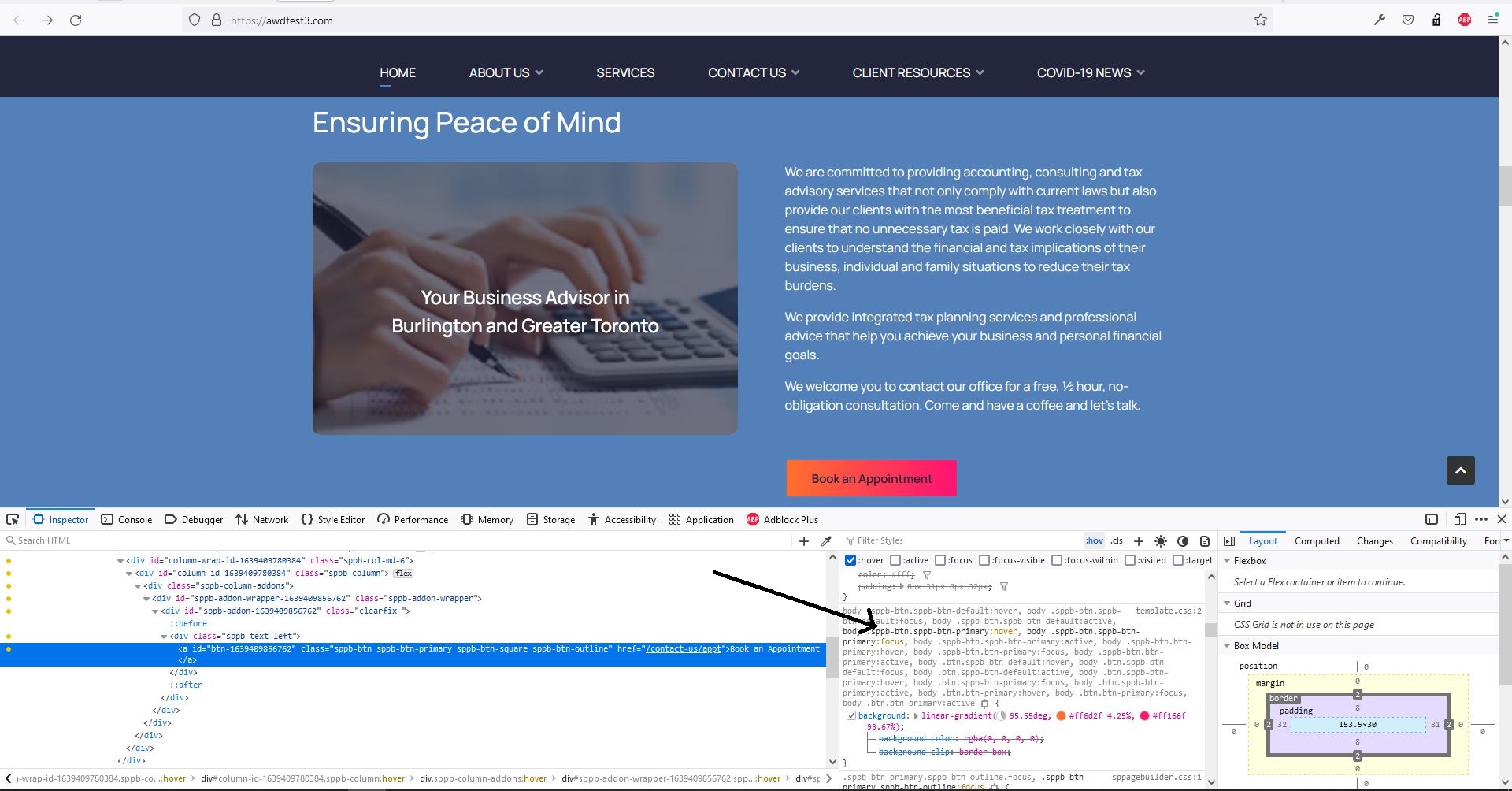
Please check the following screenshot to see from where the hover color is being applied. The following is the current css rule. You can change the colors and insert this in custom css section.
.sppb-btn.sppb-btn-primary:hover {
    background: linear-gradient(95.55deg, #ff6d2f 4.25%, #ff166f 93.67%);
}
For dark logo: I have applied following rule to hide it
.dark-logo {
    display: none !important;
}