

Active Link For Megamenu
LA
Latypov Albert
I used the Luxyort template. Created and configured megamenu for links. Added custom CSS so that links are underlined when hovering just like in the template. This works fine, but I can't configure the link of the active page to be also underlined. If you do not use megamenu, then in your template the style is applied to the active link as to the hovered link
.sp-megamenu-parent .sp-mega-group>li>a {
display: block;
font-size: 18px;
font-weight: 600;
margin-bottom: 10px;
color: white;
text-transform: none;
}
.sp-megamenu-parent .sp-mega-group>li>a:hover {
color: #adb5bd;
}
.sp-megamenu-parent .sp-mega-group>li>a:before {
    content: "";
    background: #fff;
    height: 1px;
    display: block;
    position: absolute;
    top: 28px;
    visibility: hidden;
    opacity: 0;
    transition: all 0.3s ease;
    width: calc(20%)
}
.sp-megamenu-parent .sp-mega-group>li>a:hover:before {
    visibility: visible;
    opacity: 1
}25 Answers
Order by
Oldest

Ofi Khan
Accepted AnswerHello latypov2
Please use only this CSS to Template Options -> Custom Code -> Custom CSS
#sp-menu .sp-menu-item.sp-has-child.current-item a:before{
    visibility: visible !important;
    opacity: 1 !important;
}
Best regards
LA
Latypov Albert
Accepted AnswerIf I use my custom CSS, the links change on hover. Look at the page http://42.webkontorka.ru - Room.
If you use your custom CSS, then nothing changes. Look at the page http://42.webkontorka.ru/about - Room
Ofi Khan
Accepted AnswerSorry, I did not get your issue. Please just point out the change you want to do on Luxyort template. I will provide you the correct CSS.
LA
Latypov Albert
Accepted AnswerI want that if I use megamenu, the submenu will also be displayed as a submenu without using megamenu. When I open the PAGES/Registration page, the Registration link becomes underlined. If megamenu is activated for the PAGES link, the template style will not be applied
Ofi Khan
Accepted AnswerYou can still use the same CSS. There is no noticable changed on the HTML structure if you turn on mega menu. However, if you can give me the page link and share what you want, then I can assist you with proper CSS.
LA
Latypov Albert
Accepted AnswerThis situation applies to all megamenu templates. For the Room link, I used megamenu. Added two links Room List and Room Details. (http://42.webkontorka.ru/Screenshot-2.jpg) Added Custom CSS for the template (http://42.webkontorka.ru/Screenshot-3.jpg)


.sp-megamenu-parent .sp-mega-group > li > a {
    color: #FFFFFF;
}
.sp-megamenu-parent .sp-mega-group > li > a:hover {
    color: #973f3f;
}
.sp-megamenu-parent .sp-mega-group > li > a:active {
    color: #973f3f;
}
When hovering, the color of the link changes (http://42.webkontorka.ru/Screenshot-4.jpg), but for the active link, the color does not change (http://42.webkontorka.ru/Screenshot-5.jpg)


Maybe add a Custom Class in the megamenu settings (http://42.webkontorka.ru/Screenshot-2.jpg)
It is important to me that when users go to a page from megamenu, they understand what page they are on
Ofi Khan
Accepted AnswerPlease use this CSS to Template Options -> Custom Code -> Custom CSS Hopefully, it will fix your issue.
.sp-megamenu-parent .sp-mega-group > li > a:hover::before {
    content: "";
    background: #fff;
    height: 1px;
    display: block;
    position: absolute;
    top: 30px;
    transition: all 0.3s ease;
    width: calc(100% - 30px);
    visibility: visible;
    opacity: 1;
}
LA
Latypov Albert
Accepted AnswerFor the hovered links, this works, but for the active ones it does not work
Ofi Khan
Accepted AnswerSorry, I am out of idea. Please find a developer to do the trick. Without submenu, active menu item CSS works.
LA
Latypov Albert
Accepted AnswerExcuse me, I'm probably not expressing my thoughts well. On your site (http://42.webkontorka.ru/Screenshot-6.jpg), the active link is highlighted in a different color and users understand which page they are on. And in the templates, if you use megamenu, the active link does not change. Maybe it is necessary to register for .sp-mega menu-parent .sp-megagroup so that the style is not (li) but the style from the template is used

LA
Latypov Albert
Accepted AnswerI've been trying to solve this problem for a long time, because users open a page, and then they don't know which page they opened https://novorosmk.ru
Ofi Khan
Accepted AnswerSorry, I had a mistake. This active link CSS is available on the template.css. Please remove all the CSS modifications related to it. It should work normally. You can check our template preview for confirmation. https://prnt.sc/240bnyn
LA
Latypov Albert
Accepted AnswerI didn't understand. Which styles to delete in the file template.css
Ofi Khan
Accepted AnswerDo not edit template.css. Just remove the style that we were trying on custom.css or Template Options -> Custom Code -> Custom CSS
LA
Latypov Albert
Accepted AnswerMade the user a super administrator. Your quickstart Luxyort template is installed on the site. I didn't make any additional settings. This problem occurs on all templates. It is probably connected with the mega menu. Maybe you can set a separate style for links in the mega menu

Pavel
Accepted AnswerHi. If you want something like this
 Here is code (In addition to that you already have)
.sp-mega-group a[aria-current="page"]::before {
    visibility: visible !important;
    opacity: 1 !important;
    top: auto;
    bottom: 0;
}
If you need it for the parent item too, here's another part of the code
.sp-menu-item.active a::before {
    visibility: visible !important;
    opacity: 1 !important;
}Ofi Khan
Accepted AnswerThank you Pavel for looking into this matter.
latypov2
Hopefully, your issue is solved.
LA
Latypov Albert
Accepted AnswerThank you very much! It worked with this template. To configure other templates in a similar way?
LA
Latypov Albert
Accepted AnswerI want to add a color for the active link.
For example
color: red !important;
But the color doesn't change
Pavel
Accepted AnswerTo do it use this parts of selectors
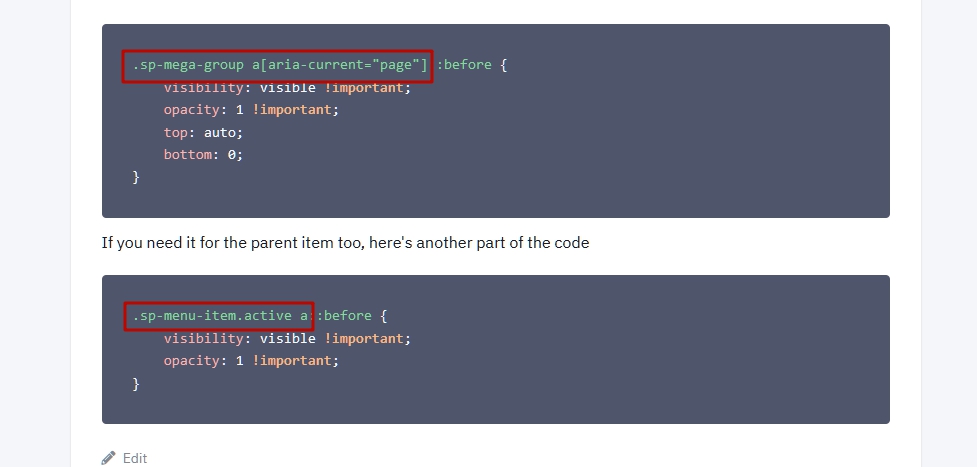
And use browser code inspector. It will show you all that you need
LA
Latypov Albert
Accepted AnswerI realized that I need to add code
.sp-megamenu-parent .sp-mega-group > li > a[aria-current="page"] {
color: red !important;
}