Hi everyone, I'm using the easy image extension and I really like it.
I use it to view various albums but once opened there is no button to go back to the gallery view, and you have to do it manually from the browser and it's not very nice.
I'd like to have a button to go back.
I would also like to have the button as discussed in this post.
https://www.joomshaper.com/forum/question/3918
Thanks
Solved
Extensions
easy image back button
Accepted answer
Marked as the solution
Paul Frankowski Senior Staff
4 years ago
· edited
I added extra JavaScript history.back method button inside Custom module - using CodeMirror editor mode.
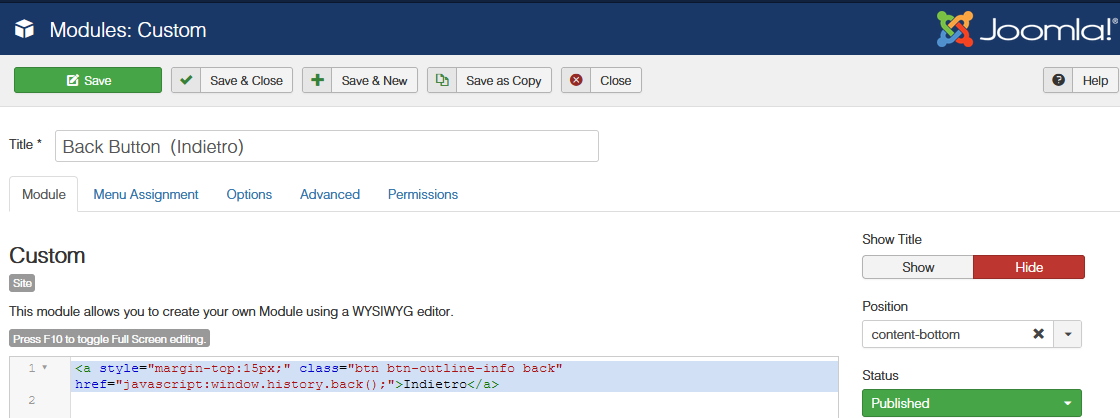
small custom CSS
.view-albums .back {display: none;}
.view-album .back {display: inline-block;}
and now you have it at the bottom inside single gallery view.

9 more replies
Paul Frankowski Senior Staff
Hi,
I will check if there is a easy way to add it or you have to wait for update.
Paul Frankowski Senior Staff
4 years ago
· edited
In case of you need recover my code:
<a style="margin-top:15px;" class="btn btn-outline-info back" href="javascript:window.history.back();">Indietro</a>
Anthony m Asked this
great! that's just what I wanted and now it's a wonder, thank you very much it's a very useful feature.i think it is a feature to consider to be added in an upcoming update. Greetings
Paul Frankowski Senior Staff
I fully agree with you. I will ask
You're welcome.
Paul Frankowski Senior Staff
BTW
You can also publish breadcrumbs, that have path.
Anthony m Asked this
You can also publish breadcrumbs, that have path.
Interesting, I tried but without success, could you give me a short example giving me some start? it can always be useful
thank you
Paul Frankowski Senior Staff
I forgot that in gallery component it doesn't wok so well like in articles. I don't know why.
Anthony m Asked this
That's right, that's why I was asking you, why I tried but couldn't get it to work.
But anyway for the gallery, the back button is already a great function
Paul Frankowski Senior Staff
easy but usefull :)
Log in to reply.