Template Edulif - Forum | JoomShaper
Solved Templates

Template Edulif

Asked by De Wachter 5 years ago Last activity 5 years ago

Hi,
I am a newbie to Joomla and I installed the Quickstart packet of the Wimble Template. How can I replace the slideshow fron the Wimble Template by the slideshow from the Edulif Template.
(In the download there is a option "Download Template settings - How to install them)
Is the CSS class imported with those setting?

Thx,
Jan De Wachter
Belgium

Accepted answer

Marked as the solution
Rashida Rahman Staff

Hi,

Thanks for contacting us.
Basic settings don't have any demo content, only some very basic styles.
However, I can suggest you install on TEST sub-domain quickstart to see how all was made or you can install on your localhost.
So on your working domain, you can install :

  1. Template package
  2. SP Page Builder Pro
    and recover only those areas from the demo which you really need.
    Here is how to reuse:

https://www.joomshaper.com/blog/how-to-reuse-custom-designs-in-sp-page-builder
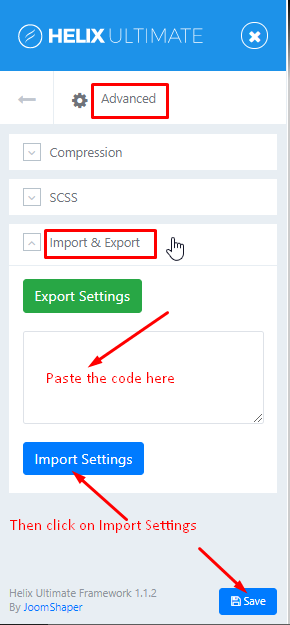
If you want you can download the template's basic settings and open it. Copy the code and put it in the template Import box then click on Import.
Note: Path towards Import Settings:
Extensions>Templates>Styles>
Click on your current default template name then choose Template Options.
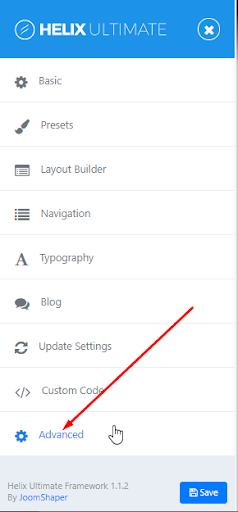
Then find Import settings within the Advanced tab.
advanced tab.png

import-export.png

Hope this helps!

Best Regards

2 more replies

De Wachter Asked this

Works fine.
Thx

Rashida Rahman Staff

You are always welcome:)

Log in to reply.