SP Property Icons - Forum | JoomShaper
Staff replied Extensions

SP Property Icons

Asked by Terry Carter 5 years ago Last activity 2 years ago

Where can I find the icons for SP Property for custom realestate based fields?

For instance when I create a custom field for a property it gives me the option to use the SP Property icons, but it doesn't show me a list of icons I can choose from.

Any ideas?

11 replies

Ofi Khan Staff

Hello Terry Carter

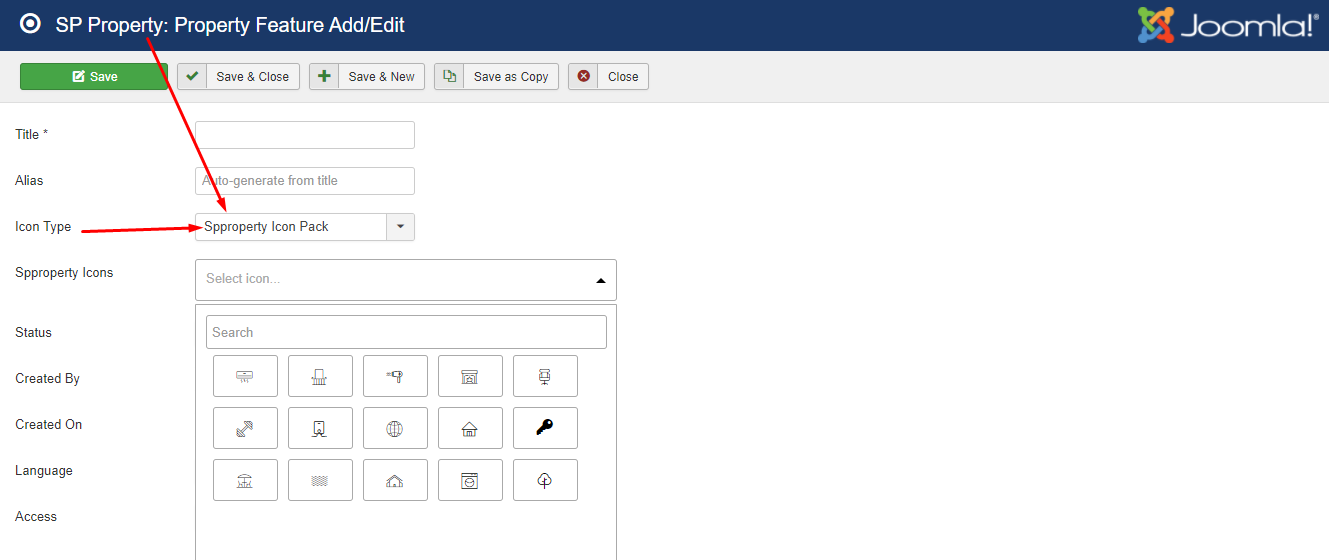
Please try to add a Property Feature. There you can see all the spproperty icons.
Screenshot_566.png

Best regards

Terry Carter Asked this

The problem then appears to be the extension. When I choose the SPProperty Icon Pack the second dropdown does not appear on screen. Apparently there are some missing json files causing the issue and preventing the rest of the script from running.

Uncaught ReferenceError: fontawesome is not defined
    at HTMLDocument.<anonymous> (index.php?option=com_spproperty&view=propertyfeature&layout=edit:113)
    at u (jquery.min.js?637e4895bd09eb195f6df85f9c13c445:2)
    at Object.fireWith [as resolveWith] (jquery.min.js?637e4895bd09eb195f6df85f9c13c445:2)
    at Function.ready (jquery.min.js?637e4895bd09eb195f6df85f9c13c445:2)
    at HTMLDocument._ (jquery.min.js?637e4895bd09eb195f6df85f9c13c445:2)
Refused to execute script from 'https://www.domain.com/administrator/components/com_spproperty/assets/js/icomoon.json' because its MIME type ('application/json') is not executable, and strict MIME type checking is enabled.

Refused to execute script from 'https://www.domain.com/administrator/components/com_spproperty/assets/js/fontawesome.json' because its MIME type ('application/json') is not executable, and strict MIME type checking is enabled.
Ofi Khan Staff

Install SP Property again and then check this issue.

Terry Carter Asked this

Same issue even after uninstalling and reinstalling.

Terry Carter Asked this

The problem is the icomoon and fontawesome json files are being included in a script tag. That is bad form and breaks servers with strict mime types enabled. How do I removed those 2 declarations?

Terry Carter Asked this

Any ideas on this?

canalmedia

Hmm, the problem is in htaccess and these lines:

## Suppress mime type detection in browsers for unknown types
<IfModule mod_headers.c>
Header always set X-Content-Type-Options "nosniff"
</IfModule>
Ofi Khan Staff

Please post a new question.

canalmedia

Why new question? Is this a forum or support tickets?

I have the same problem. And I found out where the problem is (instead of you). So could you please solve it?
Thank You!

Log in to reply.