Hi all
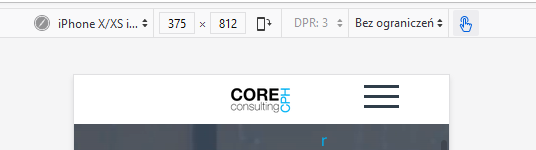
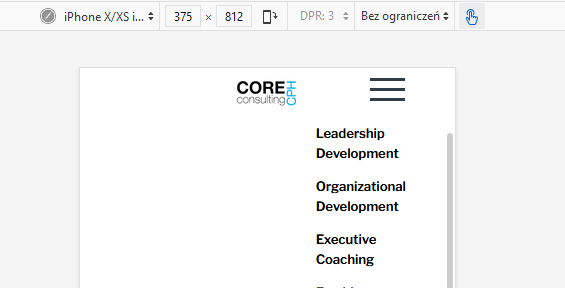
I have a problem with the offcanvas menu. whenever I open the offcanvas menu, then the logo is dragged with it down when it unfolds.

The logo is in a SP-Pagebuilder section with more columns. the center column has an class (.logo-column)
the logo is generated in the column via a css class for the column.

CSS:

I dont know how the offcanvas dropdown is interfering in the column in question.
I hope you can assist me
Thanks
Jesper
Solved
Helix Framework
Offcanvas is dragging logo with down
Accepted answer
Marked as the solution
Paul Frankowski Senior Staff
5 years ago
· edited
2nd idea - is to use:
- Logo image that have 10px of top space included
- and use below custom CSS instead of my above current:
@media (max-width: 580px) {
.sticky.stickyscroll .logo-column
  {background-position: top;}
}
but in general my solution 1 and 2 - should work quite OK. Solution#1 below, so you can keep it as it's now.
15 more replies

Mehtaz Afsana Borsha Staff
Hi
Give me your site URL please
Jesper Asked this
thanks for your fast reply. url and access is in the hidden.
Mehtaz Afsana Borsha Staff
It seems ok on my end
https://prnt.sc/y4g1pf
Jesper Asked this
But have you tried open the menu. then the logo is brought down. Just as I am showing on the first picture
Mehtaz Afsana Borsha Staff
Yes it seems ok.
Please clear your Joomla and Browser cache
Jesper Asked this
I am using Chrome as browser, all cache is cleared, history deleted. and I have now tried on other computers that have never visited the site.
The "burger" menu IS dragging the logo down.
Can you please inform whether you use another browser?
thanks, Jesper
Mehtaz Afsana Borsha Staff
Its better you can give me a screencast of your issue
Jesper Asked this
Hi Mehtaz
Actually I find it very alarming that we dont see the same think.
This video show what I mean by the logo is dropping down with the burgermenu.
https://core-cph.dk/logo-down.mp4
Hope you can see and can assist
/Jesper
Jesper Asked this
Hi Mehtaz
did you manage to see the video? and are you able to help?
/Jesper
Mehtaz Afsana Borsha Staff
I am, unable to access your site
https://prnt.sc/zd80q4
Jesper Asked this
Access to the site is written in the hidden content. I have just tested hte access and it works fine
Jesper Asked this
Any findings that can help?
Paul Frankowski Senior Staff
I decided to help Mehtaz.
I am checking now...
Paul Frankowski Senior Staff
5 years ago
· edited
Found.
The issue was caused by your custom CSS code
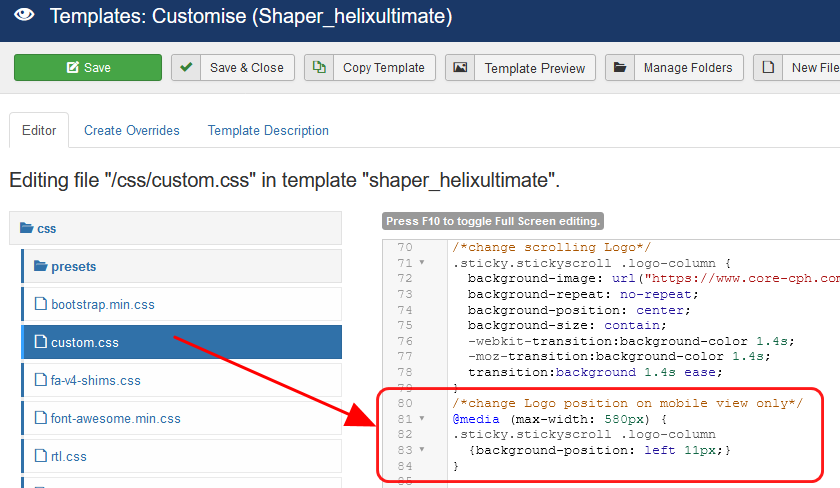
In line ~72 of custom.css you set background-position: center, and you should use "top" OR left 10px; for mobile view.
.sticky.stickyscroll .logo-column {background-position: left 11px;}
Why and how: https://www.w3schools.com/CSSref/pr_background-position.asp
Yes. I corrected it already. Clean browser cache to see changes. But please remember that our support is not for fixing custom code issues. Thanks for understanding.
Jesper Asked this
I Paul. I very much appreciate your trouble finding my mistake. I do understand that support is not for fixing codes. You are just the best.
Many many thanks.
Log in to reply.