Hi, I woud like to know how I can use "read more" when using the Text Block in the Pagebuilder? Can I add code or is there any other way? I do not want to use a button and be re-directed, I want it to open and close in the text block like the accordion does.
Solved
SP Page Builder
read more
Accepted answer
Marked as the solution
Paul Frankowski Senior Staff
5 years ago
· edited
Hi,
Text addons don't support "Read More" nor any other addon.
If you want to have Intro text. Please put 2-3 sentences in "Joomla Editor" tab, and whole rest in "SP Page Builder" tab in addons fields. Then Intro text would be displayed in blog view. Sorry, it's how it works.
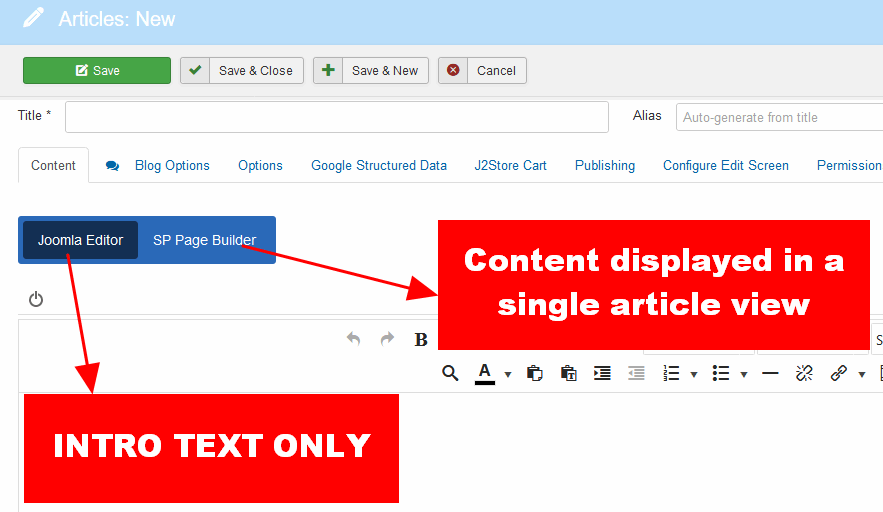
Remember to save article in SPPB mode.
5 more replies

Mehtaz Afsana Borsha Staff
Hi,
If possible give me a demo so that I can check is it possible or not
JoomSon Asked this
On my website, I have a text block:"We specialise in Small Business Consulting & E-Commerce Webdesign.", I would like to add text underneath that text but with a read more link. I want the text to open and close directly underneath the text already posted there.
Mehtaz Afsana Borsha Staff
You have to customize it. We do not provide customization support
Don
Same issue here. Is this still the way to do it in 2023?
Paul Frankowski Senior Staff
@Don.
In Nov 2023, and SPPB 5.1.6 - you have to add intro text manually, and on single article view you see SPPB content. If somehow you don't like how it works, you have two options:
- Stop using SPPB Article integration, and keep only classic articles
- Start using SPPB pages for all content, and keep articles for Blog/News only
Log in to reply.