How to change the page title (template FORTUNE) - Forum | JoomShaper
Solved Templates

How to change the page title (template FORTUNE)

Asked by Denis Mone 5 years ago Last activity 5 years ago

Hi
i don't understand how to change the title of the page (Upcoming Events)

  1. the menu specifies the menu type - category blog
  2. I changed the category name and the name of the menu item. It didn’t work.

This page on your site https://demo2.joomshaper.com/2020/fortune/index.php/upcoming-event
i need to change title "Upcoming Events"

please help

Accepted answer

Marked as the solution
Ofi Khan Staff

Please go to this file: language\overrides(if no overrides folder found, then create one) and create a file en-GB.override.ini(change en-GB according to your site language prefix) under overrides folder. Then add your translation in that file like COM_CONTENT_UPCOMING_STORIES = "whatever you want";

4 more replies

Ofi Khan Staff

Hello Denis Mone

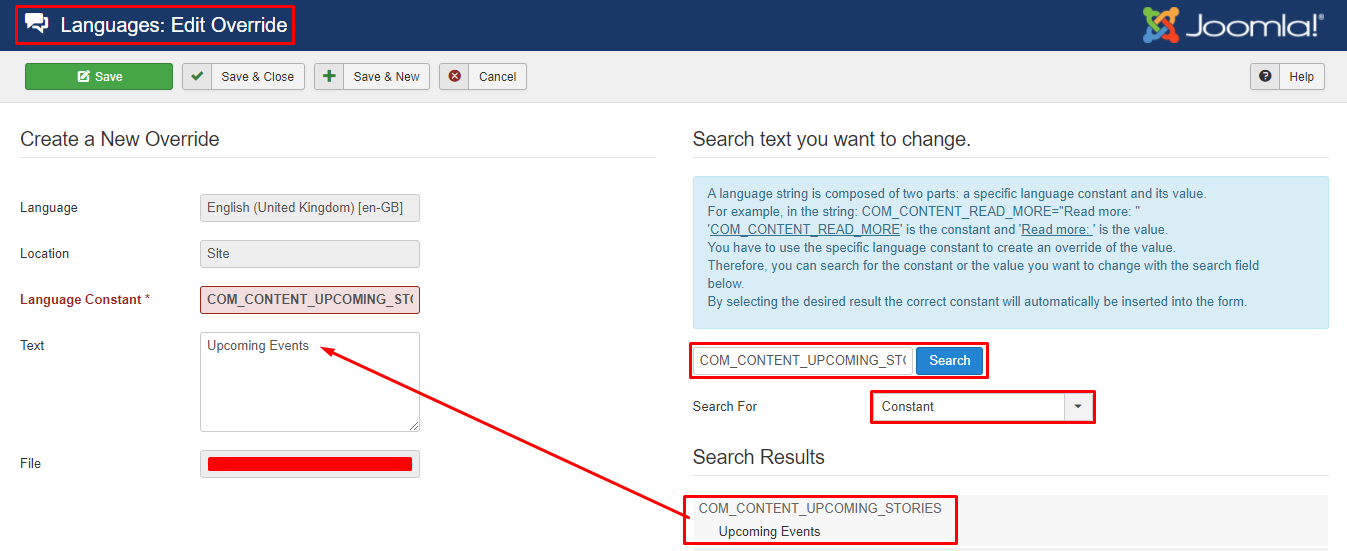
Please go to Languages -> Overrides and create a new override for your site language. Then change the value of this string: COM_CONTENT_UPCOMING_STORIES
Screenshot_581.png

Best regards

Denis Mone Asked this

site in another language. And when I do override for English, nothing happens. What other options are there?

Denis Mone Asked this

yes it works. Why such an unobvious decision? (in the case of another language, 100% need to change titles)

Thank you

Ofi Khan Staff

You are welcome

you need to take the trouble for multilingual sites. Currently, no alternative to this.

Log in to reply.