After updating Helix Ultimate, the drop down arrow is changing to a sqaure after navigation to child menus.
https://ellisellis.com/images/menu-error.jpg
I had this issue before, please help
After updating Helix Ultimate, the drop down arrow is changing to a sqaure after navigation to child menus.
https://ellisellis.com/images/menu-error.jpg
I had this issue before, please help
Look below, extra tip
Hi,
<link href="https://maxcdn.bootstrapcdn.com/font-awesome/4.7.0/css/font-awesome.min.css" rel="stylesheet" />SPPB and Helix template uses Font Awesome 5.x, not old 4.7 anymore.
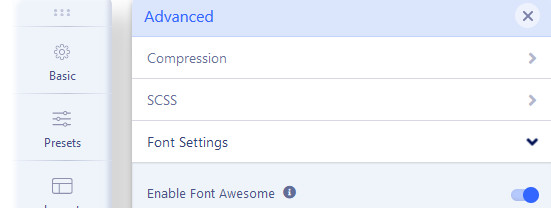
Thanks Paul
Working after enable it, did not see it was disabled.
where do i find that
<link href="/maxcdn.bootstrapcdn.com/font-awesome/4.7.0/css/font-awesome.min.css" rel="stylesheet" />I cannot find it ? hmm
probably is loaded from extra component or plugin
It's not from us.
Hello.
I have the same problem, but no selection Enable Font Awsome?
ADVANCED only shows:
Compression
SCSS
Import & Expor
No Font Awsome?
It´s the HELIX based Template Luxyort i´m using.
Thank you
BR
Klus
Please follow all steps that you can from: https://www.joomshaper.com/documentation/helix-framework/troubleshooting-faq#megamenu-without-arrow-icons-for-submenu-items
Dear Paul.
Thank you very much for your fast response.
But as already mentioned, i don´t have the point to select " Font Awsome" as described here:
Go to Template Options > Advanced (tab)> Font Settings > check if you have enabled Font Awesome (must be On).

    THis option is not available in my Advanced menu.

    Thank you
BR
So use CSS method also from guide.

