Open Graph Helix - Forum | JoomShaper
Solved Helix Framework

Open Graph Helix

Asked by Alex 5 years ago Last activity 4 years ago

Hello,

I enabled the Open Graph function in Helix, but it is missing a lot of properties. I am not sure which properties Helix adds, but for some reason I am missing the image property using the gazette quick start package and I have a feeling that it might have to do with the fact that I am using the Joomla core image function and not the Helix blog images. Can you please get back to me with a solution.

Thank you

Alex

Accepted answer

Marked as the solution
Paul Frankowski Senior Staff
5 years ago · edited

I will inform our developer to implement code that would take image from one of those fields.
But it can be implemented in Helix Ultimate 2.0,
not "older" version of Helix right now.

6 more replies

Rashida Rahman Staff

Hi there!

Sorry for the inconvenience...
Your site URL would be better.

There are two OG options!
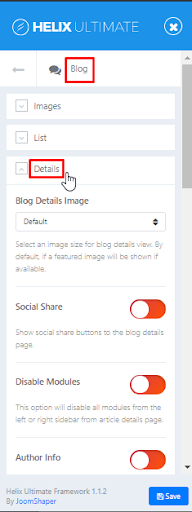
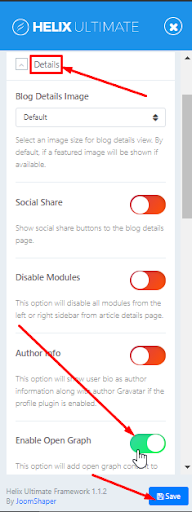
One for Template:
Blog details.png
og in blog details.png
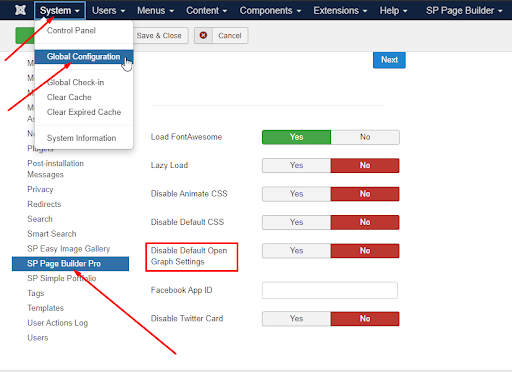
Another for the SP Page Builder:
Global og settings.png
I would like to request you to check by toggling the options several times! I mean please on one with off another and then back it off with on the other and clear your Joomla and browser cache then check each time.
Sometimes it's only the issue that it is getting the default one somehow.

The Open Graph can be set only for Pages from SPPB, check options in each page.
From frontend:
https://prnt.sc/w11vx0

From backend:
https://prnt.sc/1072prm

For other components, you have to install an extra plugin for this purpose.
You can find them on JED (Joomla Extension Directory)

Hope this helps!

Best Regards

Alex Asked this

Rashida,

I know how to activate them, that was not the question. The issue is that it doesn't work with Joomla images. Look at this screenshot: https://zwdrive.com/4Pu91X this shows an article that uses the Joomla Image function. Now look at this screenshot: https://zwdrive.com/uB52JB this one use the Helix blog image function.

Rashida Rahman Staff

Hi there!

Yes, you are right!
If you are talking about the blog, then you need to put the image within the Helix blog options to get that property!

And the reason behind providing all the options about Open Graph setting was to ensure, if you want you can use SP Page Builder OG settings too for your SPPB pages.

Best Regards

Alex Asked this

This is just ridiculous. I am totally waisting my time and money with your products. You are selling products for the Joomla platform and then they do not work with the most basic functionalities of Joomla.

Your statement makes no sense whatsoever:

And the reason behind providing all the options about Open Graph setting was to ensure, if you want you can use SP Page Builder OG settings too for your SPPB pages.

There is no reason that you could have not integrated the basic image function of Joomla. You should clearly mention this on the Helix and PageBuilder pages. Anything else is clearly misleading.

Alex Asked this

Sounds good, looking forward to 2.0 it looks very promissing.

Alex Asked this

Has this been fixed in 2.0?

Log in to reply.