
We are using template oneclip and after updating to Joomla 4 Font Awsome in the main menu doesn't work anymore.
Solved
General
Font awsome not working after update
Asked by Bogo Nicole
3 years ago
Last activity 2 years ago
Accepted answer
Marked as the solution
Paul Frankowski Senior Staff
3 years ago
· edited
Custom CSS fix for arrow icon in main menu:
.sp-megamenu-parent > li.sp-has-child > a::after {
  font-family: "Font Awesome 5 Free";
  content: "\f107"; font-weight: 600; }

@media screen and (max-width: 860px) {
.hidden-sm.hidden-xs { display: none; visibility: hidden;}
}
2nd rule is to fix Mobile view problem.
15 more replies
Paul Frankowski Senior Staff
3 years ago
· edited
Hi Nicole,
Sorry, I know what happended, It's becuase new version of template uses new Font Awesome v5, not 4.7 as it was. And FA developer made a huge changes (and bigger mess).
Give me 3min to prepare Custom CSS fix for you.
Bogo Nicole Asked this
Thanks!!! Now it works fine.
- Nicole
Paul Frankowski Senior Staff
Nicole, please add also 2nd part of CSS code!
Thanks.
Bogo Nicole Asked this
Thanks very much.
Now I have a problem with the off canvas menu function in the mobile view.
Can you have a look?
- Nicole
Paul Frankowski Senior Staff
Have you used all CSS code that I gave you?
No, that's why! Please copy-paste all lines.
Bogo Nicole Asked this
Yes, I have.
Bogo Nicole Asked this
The off canvas menu doesn't work on mobile view.
Paul Frankowski Senior Staff
Opss, ... extra two lines are needed. To reduce confusion please copy & paste the whole over the old one:
.sp-megamenu-parent > li.sp-has-child > a::after {
  font-family: "Font Awesome 5 Free";
  content: "\f107"; font-weight: 600; }

@media screen and (max-width: 940px) {
.hidden-sm.hidden-xs { display: none; visibility: hidden;}
.offcanvas { visibility: visible;}
.offcanvas-menu .offcanvas-inner .sp-module .sp-module-content > ul {display: block; }
}
Thanks
Bogo Nicole Asked this
yeah! thanks!!
Now it works fine.
I still have trouble with another template. After the update, the off-canvas menu has completely disappeared in the mobile view. I checked the template settings. They are correct.
- Nicole
Paul Frankowski Senior Staff
.burger-icon { width: 25px;cursor: pointer; }

#offcanvas-toggler {
  display: flex !important;
  width: 25px;
  align-items: center;
  position: initial !important;
}

.burger-icon > span {
  height: 2px;
  background: whitesmoke;
  display: block !important;
  margin: 5px 0;
  width: 25px;
}
After
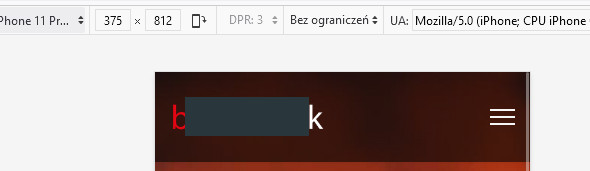
Bogo Nicole Asked this
Thank you very much.
Now you can see the off-canvas menu in the desktop view.
- Nicole
Paul Frankowski Senior Staff
In that case small correction is needed (NEW code):
.burger-icon { width: 25px;cursor: pointer; }
.burger-icon > span { height: 2px;  background: whitesmoke;
display: block !important; margin: 5px 0; width: 25px;}

@media screen and (max-width: 990px) {
#offcanvas-toggler {
  display: flex !important;
  width: 25px;
  align-items: center;
  position: initial !important;}
    }
it should help, if not ... all .burger-icon classes must be inside { } of @media.
Bogo Nicole Asked this
Now, it is perfect!
Thanks for your support!
- Nicole
Paul Frankowski Senior Staff
Have a wonderful weekend.
You're welcome.
Bogo Nicole Asked this
Hello Paul
I have a question regarding template (oneclip).
I would be very grateful for your help.
- Nicole
Paul Frankowski Senior Staff
It's quite easy ....
from current template (file template.css) copy from line 1666 to 1741,
and then use it inside new template (custom.css). It should be all you need to get those shapes..
remember that class name "variation-applanding" must be in body class - but it should be even in new theme.
Bogo Nicole Asked this
Hey Paul
Thanks for your quick reply. Unfortunately I need a little more help. I copied it and pasted it into the template under custom css.
Where exactly do I have to insert the class name "variation-applanding"?
- Nicole
Log in to reply.