[Locked] SP Page Builder 5 RC2 is Released - Forum | JoomShaper
Staff replied SP Page Builder Locked

SP Page Builder 5 RC2 is Released

Asked by Kawshar Ahmed 3 years ago Last activity 3 years ago

Hello Everyone,

We're happy to introduce SP Page Builder 5 Beta RC2, the latest installment of our page builder software, designed based on your valuable feedback and lessons from our past.

Download

We have added support to rollback to the version to series 3.x if anything is unexpected and unsolvable easily. Just uninstall the SP Page Builder 5 and then install the 3.x series.

What's new in RC 2

  • New: Introduced rollback support for the SP Page Builder 3.x series to enhance backward compatibility and facilitate migration from previous versions.
  • New: Detected outdated addon structures and implemented warning notifications to prompt users to upgrade to the most recent addon structure.
  • Fix: Rectified the issue with the invalid Google Font API key.
  • Fix: Solved the item selection problem in the Media Manager folder.
  • Fix: Fixed the issue that led to the clearing of link field values.
  • Fix: Made various bug fixes and enhancements to address and resolve known issues.

In this new version, you'll find:

  • Streamlined backend and frontend editors
  • Enhanced sidebar for easy access to Addons, Sections, and Page Settings
  • A new Color Library for expanded design options
  • Improved Color, Typography, and Box Shadow functionalities
  • Efficient backend and frontend editing switcher
  • Optimized codebase with a more linear structure
  • Redesigned user experience for all addons
  • Quick-access copy & paste feature for sections and addons
  • New sorting feature in layout bundles
  • Enhanced navigation and findability
  • New: Introduced Font Book, a feature that allows both Custom and Google font installation.
  • New: Implemented a Media Manager in the backend.
  • New: Added functionality for sorting saved addons & sections.
  • New: A feature that allows group-based repeatable setting fields rendering in the frontend editor.
  • New: Introduced Colors Library to the frontend editor's color picker.

However, we kindly ask that you adhere to the following feedback rules:

  1. Please refrain from using hate speech. Respectful communication is key.
  2. Only constructive feedback is encouraged. Let's work together to build a better product.
  3. Test on all possible cases, including old templates, 3rd party addons, and even when upgrading from version 2.0.
  4. If you encounter any bugs, please provide detailed information, including how to reproduce the issue and the circumstances that led to it.

We're committed to continuously enhancing our offerings, and we can't wait for you to experience this new version.

Roadmap for the Final Release:

  1. RC 3: June 15
  2. Stable: June 26

Thank you for your ongoing support. We look forward to your feedback on SP Page Builder 5 RC 2!

Please note, this is a beta version of the software and it's not recommended for use on live production sites. We cannot assume responsibility for any disruptions or issues that may occur on your website as a result of using this beta version.

Best Regards

34 replies

Jürgen W.
3 years ago · edited

Hi,

after Updating from RC1 to RC2 getting this error:
With RC1 these worked fine.

https://prnt.sc/8a4Y3wVIqufT

Using Nuron Template with Example data, so there should be a lot of pages.

Toufiq Senior Staff
  • Let me know the current PHP version
  • Enable Debug mode and Error Reporting
  • Check the console
Kawshar Ahmed Senior Staff
3 years ago · edited

In that case try on a new Joomla installation. Looks like joomla had difficulties updating database structure.

thanks

Jürgen W.
3 years ago · edited

But I real life you cannot do easily a new installation. That should work as a charme updating.
If I reinstall RC1 pages are shown!
Imaging you have a running site and the solution should be to install a new instance of Joomla, that is no good idea.
And you are on RC2 and not an alpha!

Kawshar Ahmed Senior Staff

We know. PLease check if the Page Builder works or not. We will figure out the other issues.

Thanks

‏‏‎ ‎J‏‏‎‎e‏‎‏‏‎‎n‏‏‎‎s W.‏‏‎
3 years ago · edited

No improvement, even with RC2 the problems remain :(
Nothing has changed, when upgrading from SPPB 3 to SPPB 5 the previously defined configurations are imported incorrectly.
font-size, font-weight, line-height, text-transform and text-alignment...

before upgrade:
As you can see, the button is all uppercase, font-size 22px, font-weight 700.

after upgrade:
font-size, font-weight and text-transform is gone
the same goes for the titles within the boxes
the other thing is the distance between the text
"73€ pro Jahr Kosten der Versicherung"
and
"3000€ Kosten für Reperatur und/oder Diebstahl"

left is the current live version and right is the staging page

Text-Alignment is also changed after upgrade.

RC2 is also forgetting the text-transform, but remembers the font-size and line-height.

Mind you, this is even just a simple page, I haven't tried the big pages yet.

‏‏‎ ‎J‏‏‎‎e‏‎‏‏‎‎n‏‏‎‎s W.‏‏‎

height of the box has changed, spacing between the elements in the box has changed
The title has lost font-size, line-height and text-align.

before the upgrade:

after the upgrade:

spacing between the outer border and the column spacing has changed too

before the upgrade:

after the upgrade:

If I find the time, I will test the upgrade on one of the larger pages.

Toufiq Senior Staff

I will check your issue and get back to you soon. Thanks

Sajeeb Ahamed Staff

Hello Jens,
We are working on missing typography issue. For the overriden addons you have to update your addon site.php file as there are some breaking changes. We will share a documentation how to update your addons soon.

  • Thanks.
‏‏‎ ‎J‏‏‎‎e‏‎‏‏‎‎n‏‏‎‎s W.‏‏‎

Thank you @Ahamed, I have already fixed/updated the addon to the newst one from the sppb5 rc2 zip-file.
It would be great if we could change the column configuration for the person addon, this would prevent the copying of the hole site.php only to change the columns from col-sm-5 to col-sm-3.

Have a nice day.

‏‏‎ ‎J‏‏‎‎e‏‎‏‏‎‎n‏‏‎‎s W.‏‏‎
3 years ago · edited

Tested the Upgrade on an other page.
Frontpage was ok, only minor position changes because of different spacings "SPPB 3 -> SPPB 5".
But some subpages are broken.
This is because of the way addons have to be overridden for small changes.
The original person-addon sets a sppb-col-sm-5 for layout4, which was too wide.
To change this, I have copied the hole site.php to the template folder and changed the col to sppb-col-sm-3.
Please provide a better way to do this kind of changes, to prevent breaking pages.

trim(): Argument #1 ($string) must be of type string, stdClass given

230: $designation_style .= (isset($settings->designation_margin) && trim($settings->designation_margin)) ? 'margin:' . $settings->designation_margin. ';' : '';

Call stack
#   Function    Location
1   ()  JROOT/templates/shaper_helixultimate/sppagebuilder/addons/person/site.php:230
2   trim()  JROOT/templates/shaper_helixultimate/sppagebuilder/addons/person/site.php:230
3   SppagebuilderAddonPerson->css() JROOT/components/com_sppagebuilder/parser/addon-parser.php:811
4   AddonParser::getAddonHtmlView() JROOT/components/com_sppagebuilder/parser/addon-parser.php:429
5   AddonParser::viewAddons()   JROOT/components/com_sppagebuilder/views/page/tmpl/default.php:98
6   include()   JROOT/libraries/src/MVC/View/HtmlView.php:410
7   Joomla\CMS\MVC\View\HtmlView->loadTemplate()    JROOT/libraries/src/MVC/View/HtmlView.php:203
8   Joomla\CMS\MVC\View\HtmlView->display() JROOT/components/com_sppagebuilder/views/page/view.html.php:60

After fixing the addon-issue, I could lokate the same issue with font-weight, spacing and alignment, which I have already reported.

before upgrade:

after upgrade:

Urls can be found in the hidden content.

All in all, however, things are currently looking very good.

I have tested the following configuration.
Joomla 4.3.2
Helix Ultimate as template in the newest version
SPPB 3.8.10 -> SPPB 5 RC2
PHP 8.0 and 8.1

Pascal Wickert
3 years ago · edited

Hello Ahmed,

It seems that I have issue with page that contain section with overlay Image Overlay ddon. I have hidden section that have such addon on my English home page: https://saea-tlss.uottawa.ca/devsite/fr/ and no error, you can see the error on the French home page with the same section active: https://saea-tlss.uottawa.ca/devsite/fr/.

I have put the credentials of my devsite in the hidden content if you want to check.

Thanks

Update:

I just saw the warning message inside image overlay editor: "Our system has detected outdated addon structure. To ensure compatibility and take advantage of the latest features, we highly recommend converting your addons to the modern structure. For reference follow our modern addon's admin.php file."

I am assuming that I have to reconstruct those elements with the new version and it should work? There is no a magic button to click to convert them?

Thanks

Update 2:

Thanks to Jens, I have fixed the problem (see Jens comment below). I had an override for this specific Addon that I forgot about. In my case, deleting this override (since we weren't sure why we had this in the first pace) fixed the issue. The Image Overlay is working as design and as excpected, nothing to override here ;).

Sajeeb Ahamed Staff

Hello Pascal,
As a major version page builder has some breaking changes. You have to make some changes on your overriden addons. We will share a documentation soon for updating the addons.
Thanks.

Pascal Wickert

Thank you Ahmed!

‏‏‎ ‎J‏‏‎‎e‏‎‏‏‎‎n‏‏‎‎s W.‏‏‎

@Pascal
It looks like the same issue I had.
Have you created an override for an sppb-addon?
You can check your template folder and the stacktrace in debug-mode.

If you can see something like this, then you have an old override, which is not compatible.

JROOT/templates/template-name/sppagebuilder/addons/addon-name/site.php

If yes, then you need to get the new site.php from the sppb5 Zip, make the changes there and replace the old file.
This was in my case the root cause of this issue.
have a look

Pascal Wickert

Hi Jens,

Thank you for pointing out the possible problem. I'll check and I will post result here for other that may have the same issue. We are using SPPage builder for quite a while now and we may have created an override that we forgot about.

Cheers

Pascal Wickert

Wow! You were right Jens. We had an override. I got rid of it and everything is working well now (I am not sure yet why we created it to begin with).

Thank you so much for you help.

Pascal Wickert

Hello,

Two new things to report on my side:

  1. I have an issue with the Media Manager. I am not able to scroll down after a few mouse scrolls. It stays blocked and I don't have access to other images.

  2. I also think that it would be nice to be able to change the list limit of the list of the pages. It is, for example, very difficult to change the order of the page when you can only see 10 pages at a time. We should have a setting available on the page to change it or it should follow the Joomla Default List Limit.

Thank you,

Sajeeb Ahamed Staff

Hi Pascal,
I've checked your site. The media manager can load all the images. We've added a lazy loading for the images, instead of loading all the images at a time we load a chunk of images and load more images on scrolling.

Please try to scroll where the images are displaying.
Thanks.

Hindrek

Hi, I have made update:
Joomla! 4.3.2
Helix Ultimate as template
SPPB 3.8.10 -> SPPB 5 RC2
PHP 8.0
SPPB is working but I get error message if I try to open the page.
The same error also, if i open HU template in admin area.

Sajeeb Ahamed Staff

Hello Hindrek,
Please activate your debug mode from the Joomla Global Configuration. And then post the detailed error message.
Thanks.

Hindrek

Here you are, see also hidden content.

Sajeeb Ahamed Staff

Hello Hindrek,

I don't know why, but you've overriden the com_sppagebuilder/page/default.php file. I believe you have to update this.

Thanks.

Hindrek

Hi,
I have not deliberately overridden anything. I took a backup of the main page and installed it on the test page. After the installation, I updated the SPPB, which resulted in a total of 7 overrides.
Why, thats the question.
You can relook the overrides again. I made new try and the result is the same.

Hindrek

Hi, I have disabled the overrides. As I see the is no override for com_sppagebuilder/page/default.php .
But the eroor is still the same. Please relook it again.

Sajeeb Ahamed Staff

Hello Hindrek,

I've renamed your templates/your_template/com_sppagebuilder/page/default.php to templates/your_template/com_sppagebuilder/page/_default.php. Now your site is working.

Thanks.

Hindrek

Thank you.
But if you compare the test site with the original site, you will see the differences. SPPB 5 does not update the site 1:1.
The tabs behave differently:
See https://tst.rakett69.ee/osalejad vs https://rakett69.ee/osalejad
and https://tst.rakett69.ee/kohtunikud vs https://rakett69.ee/kohtunikud

This page is completely messed up https://tst.rakett69.ee/saated vs https://rakett69.ee/saated
You don't need to fix it, it's just for information on how it behaves differently.

Sajeeb Ahamed Staff

Thanks for mentioning. We could investigate your site. It will be helpful if you share your test subdomain's admin access with us.

Hindrek

Admin acces is still the same. See hidden area.

Jürgen W.
3 years ago · edited

Hi,

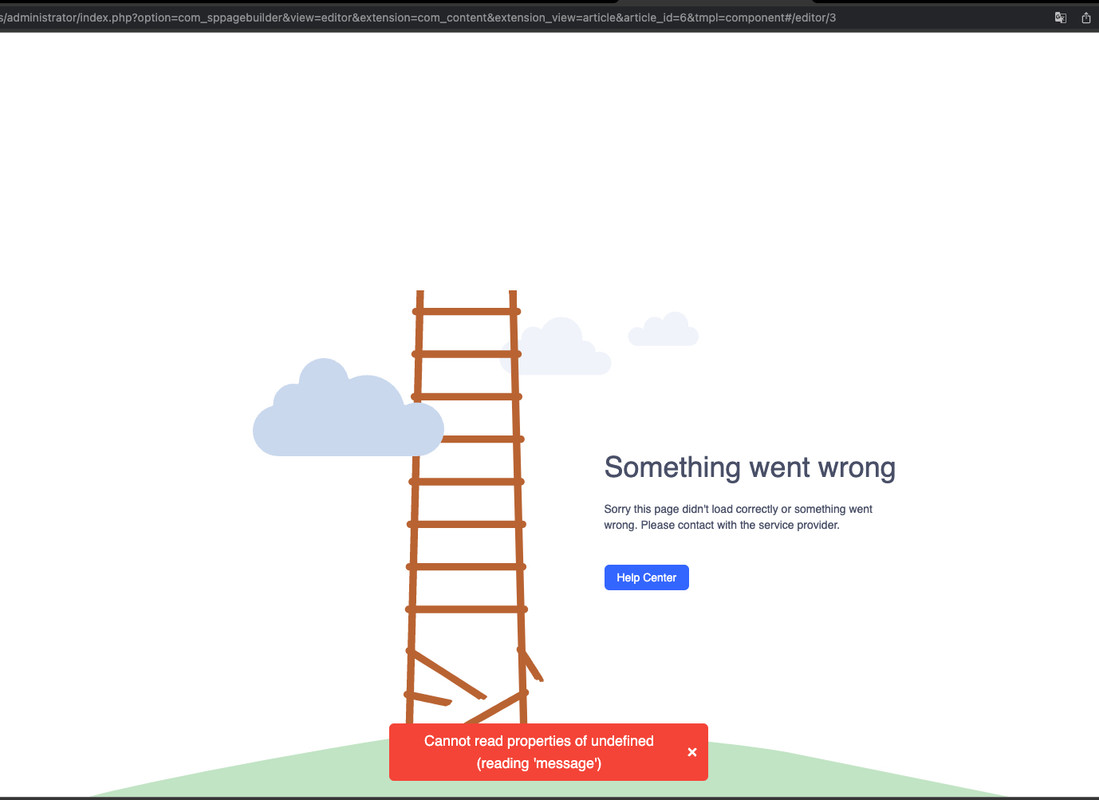
Frontend is shown OK. Only in Backend there is the problem as shown in the screenshot:

I am using an XAMPP for test purposes.

Database Type   mysql
Database Version    10.4.28-MariaDB
Database Collation  utf8mb4_unicode_ci
Database Connection Collation   utf8mb4_general_ci
Database Connection Encryption  None
Database Server Supports Connection Encryption  No
PHP Version 8.1.17
Web Server  Apache/2.4.56 (Win64) OpenSSL/1.1.1t PHP/8.1.17
WebServer to PHP Interface  apache2handler
Joomla! Version Joomla! 4.3.2 Stable [ Bora ] 30-May-2023 16:00 GMT

Logs see Hidden Field

This question is locked, so it takes no new replies. Have a similar problem? Ask a new question.