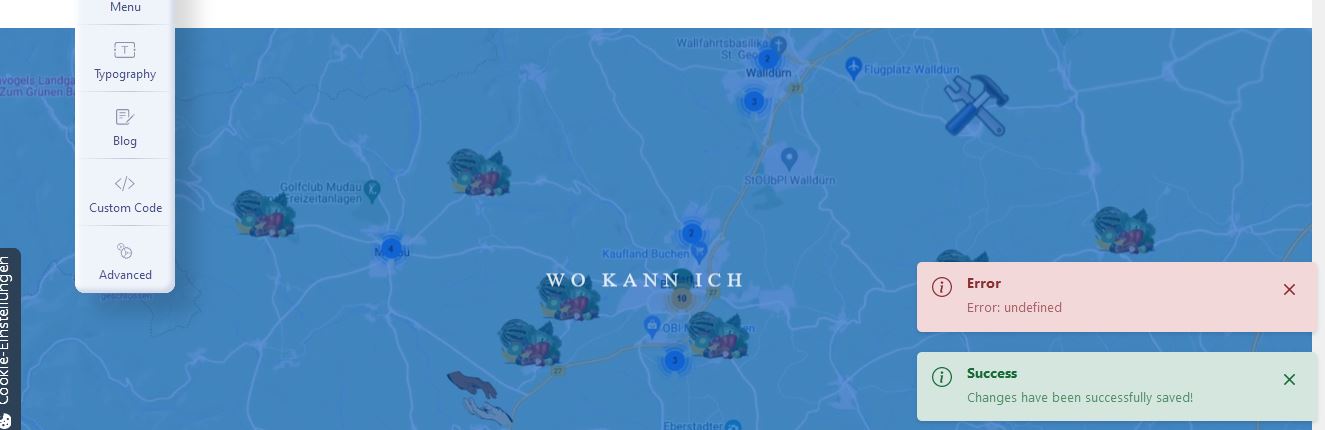
Can not save changes - Error: undefined - Forum | JoomShaper
Solved Helix Framework

Can not save changes - Error: undefined

Asked by deevau 3 years ago Last activity 3 years ago

Accepted answer

Marked as the solution
Ofi Khan Staff

When working with the template options, keep the firewall off. Then you can turn it on after editing the template options.

7 more replies

deevau Asked this

If i switch waf from "on" to "only recognise" i can save the changes but is it a good idea to switch waf?

Here is something from the error log:
[Tue Jul 25 07:32:26.958489 2023] [:error] [pidxxx] [client xxx] [client xxx] ModSecurity: Rule 55778387fce8 [id "331702"][file "/etc/httpd/conf/modsecurity.d/rules/tortix/modsec/99_asl_jitp.conf"][line "53"] - Execution error - PCRE limits exceeded (-8): (null). [hostname "www.treffpunkt-nachhaltigkeit.de"] [uri "/administrator/index.php"] [unique_id "xxx"], referer: https://www.treffpunkt-nachhaltigkeit.de/administrator/index.php?option=com_ajax&helix=ultimate&id=12
[Tue Jul 25 07:32:27.019197 2023] [:error] [pid 2995635:tid 139940470437632] [client xxx] [client xxx] ModSecurity: [file "/etc/httpd/conf/modsecurity.d/rules/tortix/modsec/10_asl_rules.conf"] [line "2924"] [id "310717"] [rev "215"] [msg "Atomicorp.com WAF Rules: Cross Site Scripting Attack"] [data "application/x-www-form-urlencoded; charset=utf-8"] [severity "CRITICAL"] Access denied with code 403 (phase 2). Pattern match "(?:< ?script|(?:<|< ?/)(?:(?:java|vb)script|about|applet|activex|chrome)|\\%env|< ?i?frame ?src ?= ?(?:ogg|tls|ssl|gopher|file|data|php|zlib|zip|glob|s3|phar|rar|s(?:sh2?|cp)|dict|expect|(?:ht|f)tps?):/|(?:\\.add|\\@)import |asfunction\\:|background-im ..." at ARGS:before_head. [hostname "www.treffpunkt-nachhaltigkeit.de"] [uri "/administrator/index.php"] [unique_id "xxx"], referer: https://www.treffpunkt-nachhaltigkeit.de/administrator/index.php?option=com_ajax&helix=ultimate&id=12

Ofi Khan Staff

Hello Dieter

Apology for the inconvenience. Please share your administrator access here to check the issue. Use the Hidden Content box to share the credentials. Make sure that you have a full site backup with you before sharing.

Best regards

deevau Asked this
3 years ago · edited

you have admin access now and the error log from today

greetings

Ofi Khan Staff

Sorry, your given credentials for Joomla admin login do not match. Please check and share again. Also, what changes you cannot save in Helix?

deevau Asked this

No changes could be saved in helix, see errorlog or try to make changes by yourself.
Login works, i've tried now, see hidden content...

Ofi Khan Staff

Please take a full site backup with Akeeba Backup in ZIP format and share here. Follow this tutorial

deevau Asked this

The problem is the web application firewall (waf) in CloudPit. If i switch to "only recognize" i can save changes in template but i think it is better if the waf is acitve...
Backup see hidden content

Log in to reply.