Cannot read properties of undefined (reading 'data') after upgrading tot Joomla 4 - Forum | JoomShaper
Staff replied SP Page Builder

Cannot read properties of undefined (reading 'data') after upgrading tot Joomla 4

Asked by Judith Schoorlemmer 2 years ago Last activity 1 year ago

Hi,

I just upgraded my website to Joomla 4. It took me some time, but it worked. But when I try to open pages in SP Page Builder, I get an error with the text: Cannot read properties of undefined (reading 'data')

I have uninstalled SP Page Builder and re-installed it. But no change. I have PHP 8.0.

What can I do?

Best regards, Judith Schoorlemmer

17 replies

Toufiq Senior Staff

Hi there,

I appreciate you reaching out. I sincerely apologize for this oversight. Trying to find out the solution. But, No solution found. Can you give me time to check your site on my localhost?

-Thanks

Judith Schoorlemmer Asked this

Hi Toufiq,

Thank you for your reply, of course I'll give you time to check it. Glad that someone is helping out, because I've tried for many, many hours now.

Best regards, Judith

pgypps

ive had this on 3 different sites over the last 2 months ...all have had the last 3 updates and it hasnt helped..the issue comes and goes. Judith, who do you host with ? im on siteground.

Judith Schoorlemmer Asked this

I have a small, personal host, which I have good contact with. But I don't think this is the problem. page Builder worked just fine with Joomla 3, on the same server.

Paul

I have the eactly the same issue as described above.
Jooma 4.4.1
Page Builder 5.2.2

Please update me with any progress made.

Toufiq Senior Staff

Hi there,

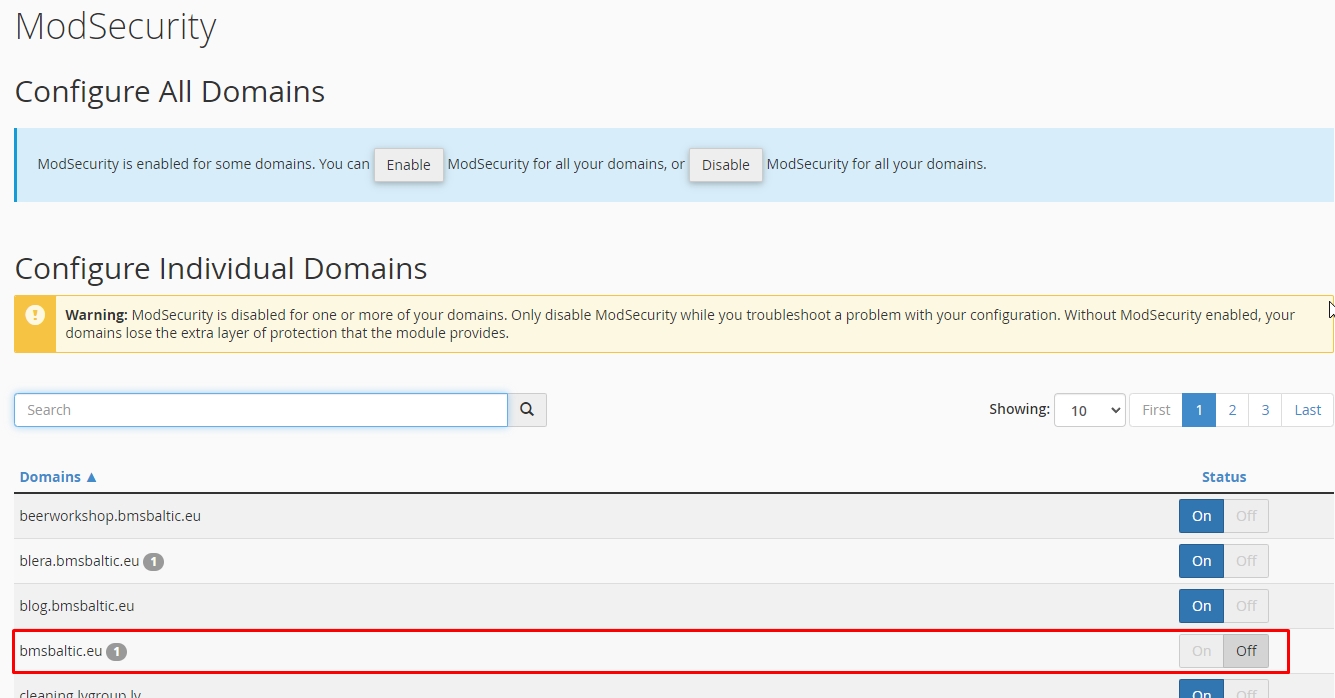
I've successfully downloaded your site backup using the Akeeba Backup extension and installed it on my local server. Everything appears to be functioning correctly. However, your console displayed an error indicating difficulty loading resources. If you're using CloudFlare, consider disabling the rocket_loader. Additionally, you may want to attempt the process again after disabling mod_security on your hosting server. This should help resolve the resource loading issue. If you encounter any further challenges or need additional assistance, please feel free to reach out.

-Thanks

Paul

Hi Toufiq,

I assume your reply with directed to Judith and her system.

I found some additional information which may help.

I have one particular user who is accessing the page builder through the administrator backend. When he logs in the Notification checks all show as errors. EG 'Error on checking overides.' Unknow Joomla', 'Unknow Extentions', Unknow request' .

When accessing the page builder he gets the 'Cannot read properties of undefined (reading 'data') message. If he clicks the 'Back to admin' button, this loggs him out, when he re-logs in the notifications all show green and the page builder works fine.

Sometimes the user would click on the back button of the browser, in this case the issue continues until the 'Back to admin' button is clicked on the error message.

This happens every day for this one user, any thoughts on what may be the cause?

Thanks

Paul

Toufiq Senior Staff

Can i get the site login credential?

Judith Schoorlemmer Asked this

I can't seem to find my answer to you. Maybe others should better start a new topic? As lots of people sharing this topic for maybe different problems?

My host is not switching the mod_security off and I don't use cloudflare. But I have an errorlog of the server, which may explain more? I'll put it in the hudden section.

Toufiq Senior Staff

Did you change the administrator login URL?

Judith Schoorlemmer Asked this

No I didn't?

0815joomlauser

Hi Toufiq,
I have the same problems as Pauls friend have on my system in a different way.
I made a backup with akeeba an moved to another server. Set it up with kickstart and mysql 8.
Then using component sppagebuilder entering settings, etc. always "Cannot read properties of undefined (reading 'data')"
What can I do?
Thanks
Udo

Toufiq Senior Staff

Will you please provide me the Joomla administrator access to check the issue?

Judith Schoorlemmer Asked this

So... anything new yet? I'm still struggling with the error and can't reach my pages.

Toufiq Senior Staff

Please provide me with the correct login URL for administrator access of administrator. Cause the administrator login URL redirects me to the home page. Thanks

Judith Schoorlemmer Asked this

Hi Toufiq,

This is strange, as I didn't change anything at the site. But I edited your logon info and sent it to the hidden section.

Hope this will work out.

Judith

Toufiq Senior Staff

Administrator url redirect me on home page instead of login page. Thanks

frigi

Hi, I have the same situation like you. The only way to edit pages is to click on the back button. It bings me back to a login page, after redo the login it works as normal.

But it is very annoing.

Toufiq Senior Staff

Maybe you have added any code or used any third party extensions on your site. That's why occurred this problem. Thanks

frigi

No, the same site (backup) work on another hosting.

Toufiq Senior Staff

Will you please provide me the Joomla administrator access to check the issue? Besides, Please share a screencast of the full scenario. Thanks

Toufiq Senior Staff

Where exactly did you click? I can't see your mouse pointer. Thanks

frigi

Here you can find a new video with the mouse: https://files.fm/f/vsvuwp3yvn

This are the steps:

  1. login
  2. checks errors
  3. no media is visible
  4. log out
  5. login (no change)
  6. open pages list in page builder
  7. error
  8. click on back to admin button
  9. login
  10. everithings it's ok
frigi

I did not provide login credentials.

With my hosting provider I have changed the version of MariaDb (now with one supported by Joomla 5). With some browser works better, but not with Chrome.

Toufiq Senior Staff

Please check the screenshot.

Genadijs
2 years ago · edited

Hello, I also had a problem with invisible pages!

The list of all pages created in SP Page Builder has disappeared in the admin panel.
When I try to somehow access the list of my pages, sometimes the error message Cannot read properties of undefined (reading 'data') pops up.

Previously, all my pages were divided into categories, after updating the SP Page Builder component, I noticed that all the created categories disappeared, but the site worked and did not require updating, so it’s difficult for me to say at what point the problem with invisible pages in the admin appeared SPPB panel.

I came to the conclusion that the problem was in the categories created by earlier versions of SPPB, so I decided to try to do this...

  1. in the admin panel SPPB created the SERVICES category.
    since I can't access the page through the SPPB admin I go to the site
    I go to the page I need and click the EDIT PAGE (Fronted editor) button
  2. In the page settings, I select the created SERVICES category and select the language I need. I save the page.

Now in the SPPB admin panel I select to show only what is in the SERVICES category and select the language I need. This is the only way I can get each of my pages back.

There is another way, export each page through (Fronted editor) and then import it again through the SPPB admin, but here’s how to delete the old page...???


Toufiq Senior Staff

Will you please provide me the Joomla administrator access to check the issue?

Genadijs

Hello! I sent you your login information. I have created a backup copy of the site but please be careful! This is a big website project. Thank you!

Toufiq Senior Staff

Super administrator access, please. Thanks

Genadijs

Sorry, you are now a super user!

Toufiq Senior Staff

I've successfully downloaded your site backup using Akeeba Backup, and it's running smoothly on my localhost. It appears that your server might be blocking the loading of resources for the Page Builder, which is likely the cause of the issue. Thank you.

Genadijs

but before the SPB update everything worked as it should, we did not change the server. how do we fix this?

Toufiq Senior Staff

I have checked older version of Page Builder. But, the result is same. Will you please disable the mod_security and check again. Thanks

Log in to reply.