Where can I add customer note option to my checkout? I cannot find it but it was released in 1.0.9 (I updated 1.0.10 from 1.0.7)
Staff replied
EasyStore
Easystore customer note checkout
13 replies

Rashida Rahman Staff
Hi there!
Thanks for reaching out.
Will you please put the email and licence key first here: https://share.cleanshot.com/w85T1SFY
However, you should find it below the shipping address option. Please check the tutorial:
https://www.youtube.com/watch?v=hQQcd8brChs
Best Regards
Daniel Horvath Asked this
Did put the licence key, also watched the video but it doesn't show that part. I still don't have it.
Daniel Horvath Asked this
Greetings! Any news?
Daniel Horvath Asked this
Did put the licence key, also watched the video but it doesn't show that part. I still don't have it.
Daniel Horvath Asked this
Greetings!
I am still looking for support here, it's a littlebit urgent
Rashida Rahman Staff
2 years ago
· edited
Hi there!
I am really sorry for the delayed response. There was Eid vacation running here. However, I have just tried to check, but the administrative URL is not the correct one, I guess.
Would you please give me the correct URL again here?
Best Regards
Daniel Horvath Asked this
2 years ago
· edited
Greetings!
Yes sure
Rashida Rahman Staff
Greetings!
I have tried the new URL too... Please check the screenshot in the hidden content box.
Daniel Horvath Asked this
We will solve it in a minute
Daniel Horvath Asked this
I think it should be good
Rashida Rahman Staff
Still the same!
Some websites restrict access based on IP addresses, preventing certain users or locations from accessing specific content. Do you have this types of location restriction?
Well, we are from Bangladesh.
Thanks.
Daniel Horvath Asked this
I informed our webhost about the issue
(unless you can use vpn, I will get back to you when its solved. we are in budapest)
thank you
Daniel Horvath Asked this
Our host asks for the Public IP you were trying to reach the site from.
Rashida Rahman Staff
Hi Daniel Horvath,
Sorry for such delayed response. I have just succeeded to enter to your backend today. It's a bit tough to check due to language barrier though. However, may I know how did you renamed the EasyStore? I mean which process you followed?
Best Regards
Daniel Horvath Asked this
I have modified administrator language files also I used some overrides on admin site
Rashida Rahman Staff
Hi Daniel Horvath,
It seems the updated versions of EasyStore is not implementing correctly in your case.
Did you follow the mentioned process while translating?
https://www.joomshaper.com/documentation/easystore/how-to-translate-phrases-translations
Best Regards

Paul Frankowski Senior Staff
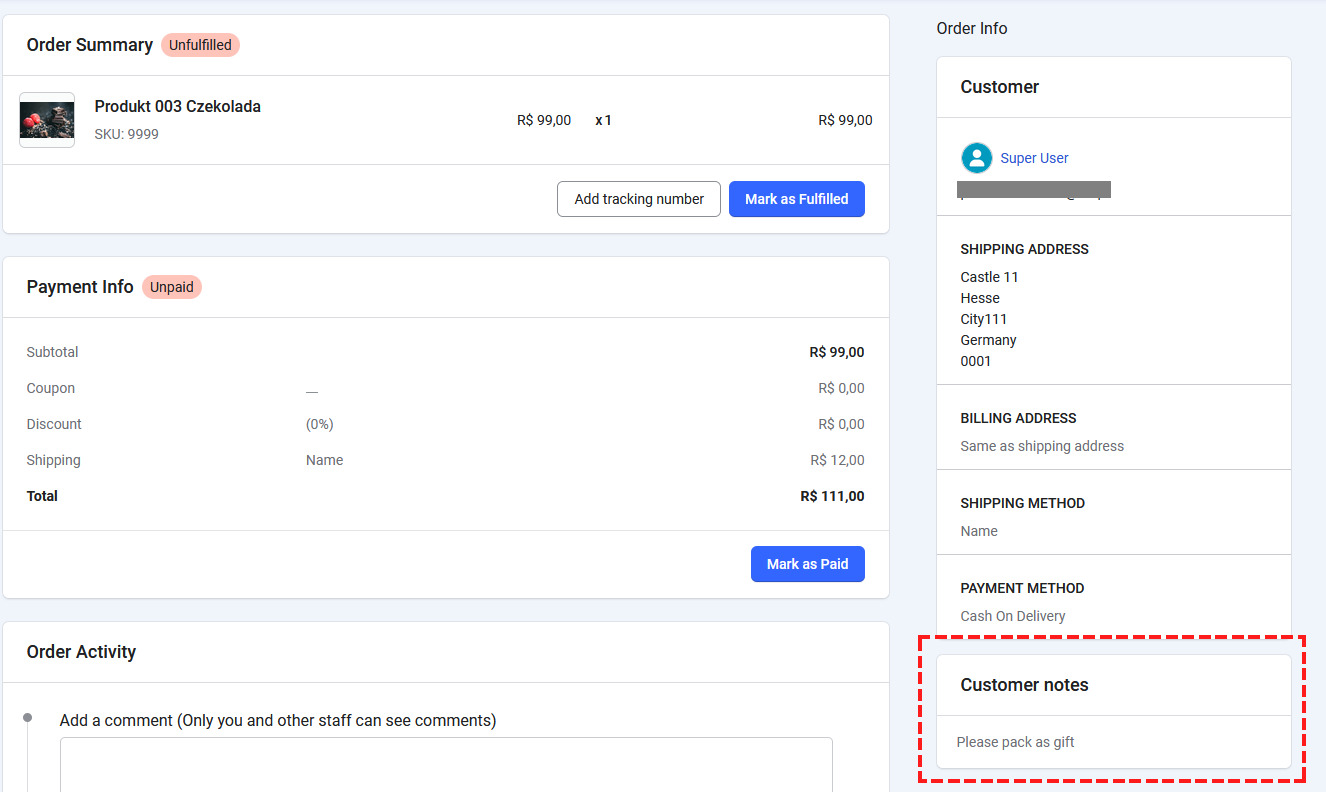
In new EasyStore v1.1+ you can see it in Order details.
You can translate & override that phrase
COM_EASYSTORE_CUSTOMER_NOTE="Customer Note"
Using Joomla Language override for Front & Back-end view
Daniel Horvath Asked this
Daniel Horvath Asked this
2 years ago
· edited
I feel like we are misscommunicating here. I am missing the opportunity to add note as a customer on checkout phase
https://imgur.com/a/qRTL0JF
This is not a translate or a language issue I am totally missing a part
Paul Frankowski Senior Staff
2 years ago
· edited
But there is... at least should be by default
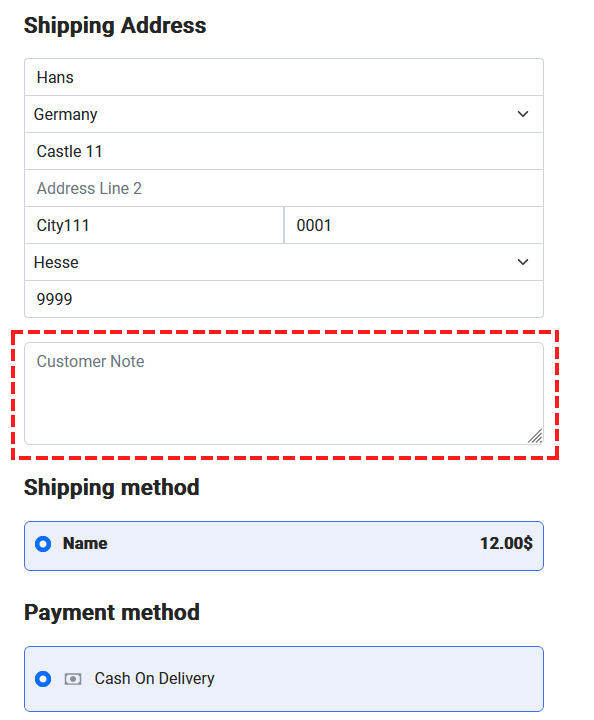
Switch template to Casiopea for 90sec and test "Checkout" page again. It will tell us where to search.
Daniel Horvath Asked this
I see on cassiopeia I have the checkout. So please how do I fix it to have on my shopin template too?
Paul Frankowski Senior Staff
2nd. What version of EasyStore you have installed. If you renamed component folder as well, you have to update files manually.
Paul Frankowski Senior Staff
2 years ago
· edited
Maybe you overriden "checkout" view in template a month ago, hmm?
Have you made any custom changes here:
templates\shaper_shopin\html\com_easystore
By default we don't have that folder in Shopin Template v2.0.1!
Log in to reply.