Formatting the Search Field - Forum | JoomShaper
Solved Helix Framework

Formatting the Search Field

Asked by Francois Barnard 2 years ago Last activity 2 years ago

Hi,

The article at https://www.joomshaper.com/forum/question/27068 helped me activate the search function on two existing websites. However, while the search box looks fine on one of the sites, the text appears far too large on the other.

I'm looking for assistance in formatting the search box, specifically in adjusting the text size. I've searched the forum for relevant CSS code but couldn't find any solutions. If anyone has suggestions or examples of CSS that could help, I would greatly appreciate it.

Additionally, I haven't found a way to activate the search box in the Off-Canvas Menu using the Helix template. Am I missing a function or setting for this?

Thank you,
Francois Barnard

PS Helix Ultimate 2.1.1 & SP Pagebuilder 5.3.4

Accepted answer

Marked as the solution
Paul Frankowski Senior Staff
2 years ago · edited

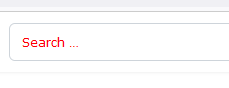
To change font-size & color of default phrase "Search ..." use Custom CSS:

.js-finder-search-query.form-control::placeholder {
  color: red;
  font-size: 12px; }

info_2964_2024.gif

Francois Barnard Asked this

Thank you so much, Paul! Much appreciated.

2 more replies

Paul Frankowski Senior Staff
2 years ago · edited

Hi Francois.

I can help a little bit but URL must be shared. I hope you are using Smart Search (only that we can support).


About search field in Off-Canvas Menu - if you are using raw Helix Ultimate (and not older template based on it) option to display it's inside Template Options > Menu (tab) > Offcanvas (tab) > Enable Search: On

But as always there is alternative way:

  1. Modules (Site) > NEW > Smart Search
  2. Choose module position: offcanvas-modules (recommended) or offcanvas
  3. Menu Assignment (tab) > On all pages
  4. Title : Hide, and Publish.
  5. Click Save
Francois Barnard Asked this

Hi Paul

Thank you for your reply. The URL is https://bowlsgn.co.za/

And thank you, I have now activated the search option on the Off-Canvas menu.

Paul Frankowski Senior Staff

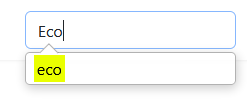
Here is default look, before and during the search

d_look.gif

info_2958_2024.gif

Q: what element do you want to change?

Francois Barnard Asked this

The search box at the right top of the screen

Log in to reply.