[Locked] Attention!! Read before updating the Joomla v5.2.4 - Forum | JoomShaper
Staff replied Helix Framework Locked

Attention!! Read before updating the Joomla v5.2.4

Asked by Toufiq 1 year ago Last activity 1 year ago

Apology for the inconvenience caused. The issue you're experiencing is due to the recent Joomla v5.2.4 update. We are currently waiting for Joomla's response to confirm whether this is a bug or an intentional syntax change.
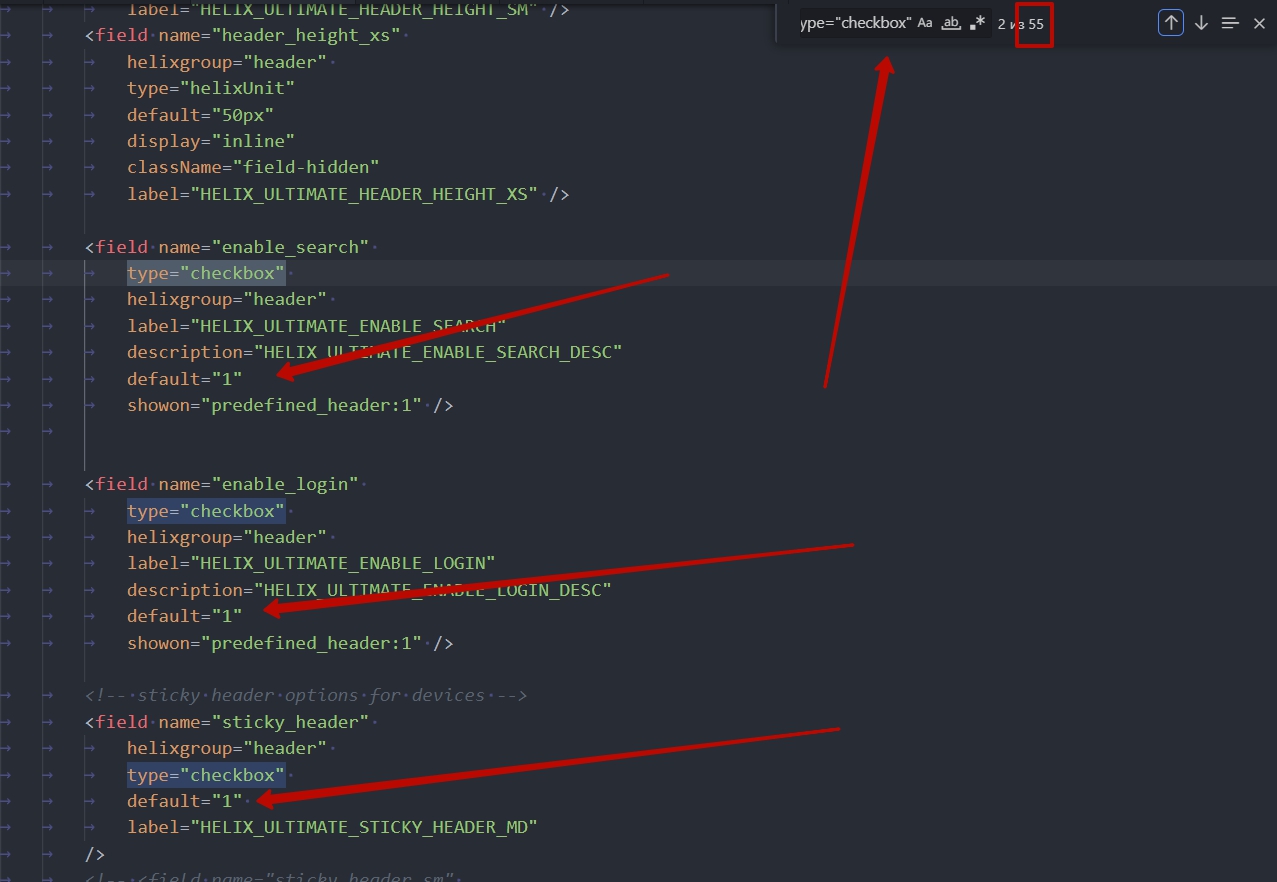
In the meantime, a temporary solution is available. Please modify all instances of type="checkbox" in the template’s options.xml file by updating the default attribute. Specifically, if the value is set to default="0", change it to an empty string default="" .

templates/shaper_helixultimate or your_template/options.xml)

For example, change this:
<field name="predefined_header" 
type="checkbox"  
helixgroup="header"  
label="HELIX_ULTIMATE_PREDEFINED_HEADER"  
description="HELIX_ULTIMATE_PREDEFINED_HEADER_DESC"  
default="0" />  
To this:
<field name="predefined_header" 
type="checkbox"  
helixgroup="header"  
label="HELIX_ULTIMATE_PREDEFINED_HEADER"  
description="HELIX_ULTIMATE_PREDEFINED_HEADER_DESC"  
default="" />  

This adjustment should resolve the issue temporarily. We will keep you updated as soon as we receive further clarification from Joomla.

Note: Make sure that your pre-defined header is enabled.
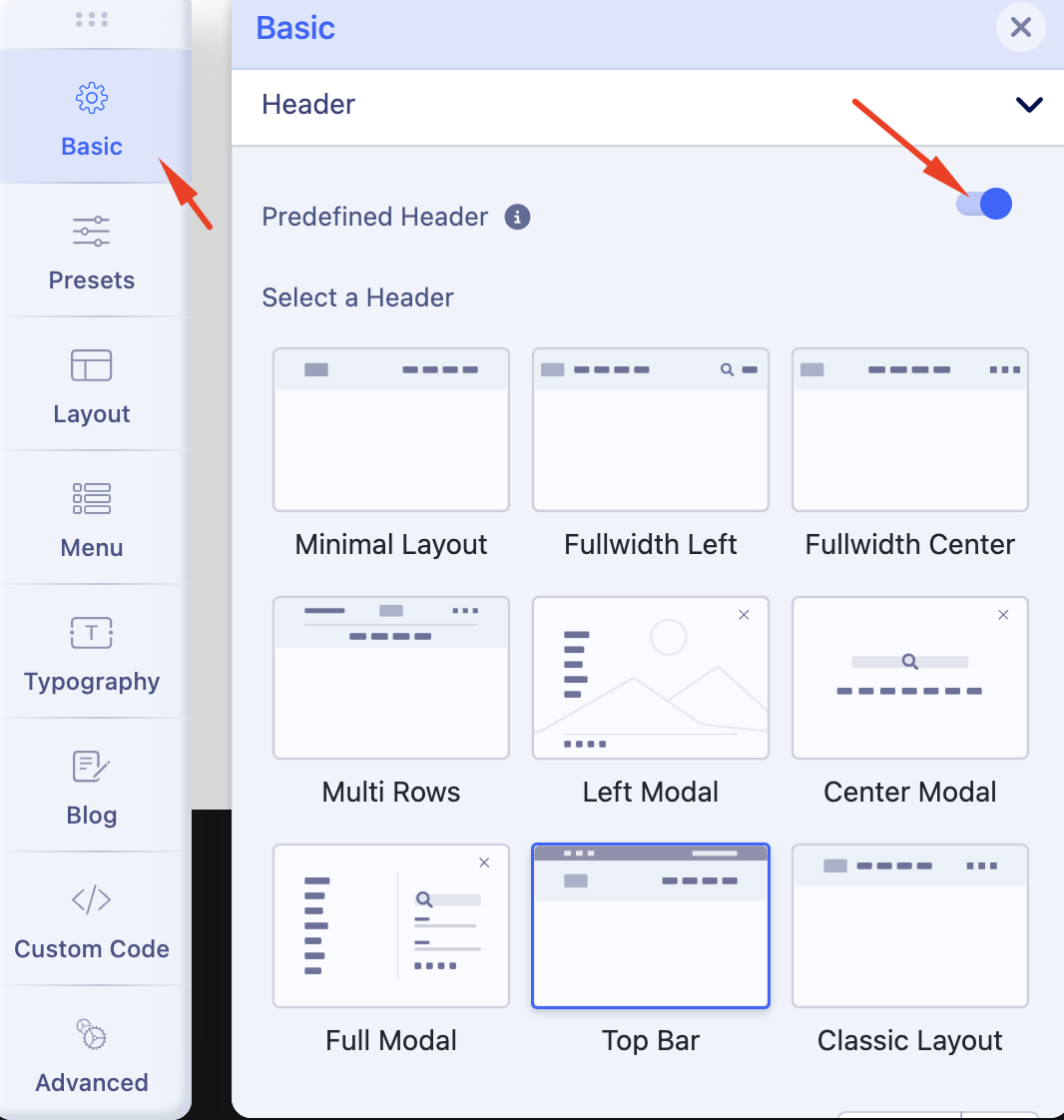
Screenshot at Feb 19 18-17-13.png

Thank you for your understanding and patience.

Best regards

46 replies

Elmir Mustafic

I just noticed that my header disapeared after updating to Joomla 5.2.4.

Toufiq Senior Staff

Kindly follow the instructions provided above & make sure that your pre-defined header is enabled.

Peter Klinke

Hello Toufiq,
the instructions didn't help for my site.
only export/import of template settings brings back my header but with wrong colours, height and font-size. Editing/saving is not possible.

Is it possible to get my layout back or must I do a complete restore?

Sincerely
Peter

Remco

I only saw your message after I had already updated Joomla to the latest version (5.2.4). I immediately rechecked all websites. I use Helix Ultimate on 70 websites and have reviewed them all, but none of them are experiencing this issue.

Toufiq Senior Staff

Glad to hear that you didn’t face this problem! If you ever do, just follow the instructions.

Raffaele Viola

thanks Toufiq, I also don't think I've had any problems with the headers of my sites, but why don't you also warn your subscribers of these problems (not due to you obviously) with an immediate newsletter????

Ofi Khan Staff

Hello Remco,

In general, the problem does not appear as soon as you update the Joomla version. It will appear if you save template settings after Joomla update. Then you have to follow the solution mentioned above to fix this.

Best regards

Peter Klinke

at same time there was an update to joomla 4.4.11.
Does this have the same problmem?

David Collado

you have all our email addresses, send it out in a mass email, its the only responsible thing to do.

Ofi Khan Staff

Hello Peter Klinke,

I have not found the issue on Joomla 4 update. No users have officially complained about it. The issue seems to be appear only on Joomla 5.

Best regards

Ofi Khan Staff

Hello Peter Klinke,

We have solved the issue on our product. Install the latest Helix Ultimate template and the issue will be solved. If you use any other template of Helix Ultimate framework, then install Helix Ultimate plugin on the site. It will fix the issue over the Joomla update.

Best regards

Petra

Hi Toufig,

it works, thanks!

Toufiq Senior Staff

You are most welcome & Thanks

Szymon

Hello! Thank you for the information and solution!
Strangely enough I'm seeing the problem only on the website where I modified Helix Ultimate options and saved it.
What's even more strange after the predefined header option IS SELECTED I'm not seeing any list of them.
Is it just my website or the problems are related?

Toufiq Senior Staff

Did you rename your template?

Szymon

No, I didn't. I have just added a module position!

Toufiq Senior Staff

Can you provide me administrator access via hidden content?

Szymon

Here they are in the hidden content.
In fact I haven't followed yet the temporary procedure with altering the option.xml file.
If you would like me to do it forst, please let me know.
The good thing is that I have a full backup from before the Joomla update. :)
Simon

Toufiq Senior Staff

Please check now.

Szymon

Thank you, Toufiq! Everything is ok!
Many thanks for your assistane!

Toufiq Senior Staff

You are most welcome & Thanks

Eduardo Nader
1 year ago · edited

It works everywhere but in blog.

Yesterday, when I added a section in Layout, (with logo and menu parts), the same happened. Workaround "worked" everywhere but it blog. (Only logo shows up, but no menu nor menu button).

Now it renders a mess in blog. Please check link.

Hope this observation helps

Regards.

https://toposuranus.com/greenteam/index.php/blog

Toufiq Senior Staff

Could you provide access to your Joomla admin area so I can investigate the issue? Please ensure you back up your site first. You can securely share your login credentials in the hidden content area.

Ofi Khan Staff

Hello Eduardo Nader,

Thank you for reaching out to our technical support forum. I’m sorry to hear about the trouble you’re experiencing. Rest assured, I will look into this issue for you and work to resolve it as quickly as possible.

Please share your administrator access here to check the issue. Use the Hidden Content box to share the credentials. Make sure that you have a full site backup before sharing.

Best regards

Alvaro

The problem arises when you edit the template style. If you only updated without editing the template style, everything will work fine because you are getting the data saved from the database. Do not edit until further notice.
Regards

Cuauhtemoc Rojas

got into an issue...
I was able to edit the file on the main site, but on the demo site every time I hit "save and close (or save), once finished with all the edits, I get a Error 403. I assume it's an issue of permissions but I can't find what I should do to get this permission.

Any assist will be appreciated - if login credentials are needed, please let me know...

Toufiq Senior Staff

Please make sure that you are super user of your site.

Ofi Khan Staff

Hello Cuauhtemoc Rojas,

Thank you for reaching out to our technical support forum. I’m sorry to hear about the trouble you’re experiencing. Rest assured, I will look into this issue for you and work to resolve it as quickly as possible.

Please post a new question regarding your issue. We will check and help you.

Best regards

Cuauhtemoc Rojas

I am the superuser... can do anything supposed to be done with that access level, except editing that particular file...
the strange issue is that in the main site, at first I was getting a similar message, but eventually I was able to save the edits... something that it's not happening here...

Alvaro

The only 403 error we know of (4 reports) while editing a template style is because you have selected a background image in one of the layout sections. Although this should not happen, I think it is due to the security rules of the servers because it identifies it as a media from a different source and this is because with AJAX they are loading the image inside an IFRAME which is the preview. It is true that it does not happen when you select logos or background images for 404 pages, Coming Soon, and others, it only happens when you add the background image in the Layout Builder and I think the way Helix processes those background images for the preview should be improved.
PS: I don't know if this is your case.
PS2: I don't know if I have already reported this to the developers, if I haven't, here it is.
Regards

Toufiq Senior Staff

Create a new forum post and share your login credential via hidden content area. Once you have done, please let me know. Thanks

Łukasz

Do we already know which side will release the fix? Are we waiting for updates from joomla or your side?

Toufiq Senior Staff

We also waiting for the next Joomla update. After that, we can confirm.

Łukasz

Do you have any information on how long it will take?

Toufiq Senior Staff

We also investigate this issue. Once we get update from the Joomla, We will update all of you. Thanks

Alexander Brandl
1 year ago · edited

Hello, I followed your instructions... unfortunately it doesn't work.
I updated to 5.2.4 and then renamed my helixultimate template, then the header was gone and now I can't continue working.
Is there still an option?

http://cms.elektro-krapf.de/

When editing the template I cannot select the predefined presets, there is no switch.

Toufiq Senior Staff

Please update the latest version of Helix.

This question is locked, so it takes no new replies. Have a similar problem? Ask a new question.