How do i use custom font in SP Page Builder - Forum | JoomShaper
Solved SP Page Builder

How do i use custom font in SP Page Builder

Asked by Murugappan Ramanathan 5 years ago Last activity 4 years ago

Hi,

I am trying to use one of our own web fonts in SPPB but very confused with all the misleading posts and video in here. Example, there was a post that requested the font for SPPB but the support gave a link to a video for font in a helix ultimate template. That is an example of a mislead.

When i use SPPB addons, i am able to select a whole list of fonts in the font family but could not see the one added in the template. That is the problem. The user who requested the answer must have gone disappointed, especially when there was a sarcastic reply from Joomshaper support (see link https://archive.joomshaper.com/forums/custom-local-font-inside-sp-page-builder )

So i want to know how i can set up my own font and then use it SPPB. Please do direct me to misleading forum posts. I have seen enough misleads.

Accepted answer

Marked as the solution
Toufiq Senior Staff

Hi there,

Thanks for contacting us.Sorry to say that, there is no way to use the custom font into the Page Builder.

-Thanks

25 more replies

Murugappan Ramanathan Asked this

It is really hopeless for us when SPPB is supposed to be the best page builder when it seems to fail in many important areas of flexibility. Even in the custom css area it seem to be inadequate.

Joomdev's JD page builder seems to get better and simpler to use. Anyway thank you.

Paul Frankowski Senior Staff
5 years ago · edited

Hi.
But you can add custom font using template custom.css - it should take you few minutes according to my video guide on youtube: https://www.youtube.com/watch?v=MfAIT8cMuv4

In general custom font you set ones for selected HTML tags or classes, you don't have to select this font everytime in addon settings.

Pavel
5 years ago · edited

when it seems to fail in many important areas of flexibility.

Hi. If I may... You are wrong. This is not an important area, but harmful. Then you will write posts with a question, "How do I speed up my site?".

I would not recommend using in the SP PB not only your fonts, but also those Google fonts that are there.

And yes, good design begins with typography settings. The template is an excellent place to configure this, but not Page Builder.

Page Builder is not Photoshop, where the number of fonts does not matter. Each new font is an increase in the load on the server and slowing down the site.

Murugappan Ramanathan Asked this

Hi Paul,

Thank you for the answer. I will accept your recommendation but the only problem is that the video shows that the change affects the entire template and components, including other parties components too. Imagine a font that should be appearing for kids page in the site appearing all over the rest of pages.

I m sure you would have read one of the archived post where another user gave you the reason why he needs the font in SPPB addon - company standards, branding and design in displaying products only. Would appreciate your advise on this.

Hi Pavel,

I may have misunderstood or been mislead on the purpose of SPPB but definitely not wrong! Most likely you are wrong because you terribly lack experience and exposure in the handling user needs. Your answer should stick to the question at hand and not extrapolate to other areas which you do not have access to or knowledge of.

Please do not talk about good design concepts with your style of thinking. Why do you think other Page Builders provide this facility? Because they have professionalism and experience to think out-of-box to address user needs. Load on the server? How does a font present at the template has lower laod than from addon level ? Let me teach you how to think. Lesson: When a font is loaded at the template level, the load is always there because it will affect site-wide. When it accessible at addon level, it only gets loaded when the addon is loaded otherwise it will not be there. I can show you some better design concepts that will even lower the total size of the website on the disk caused by the extra fat loaded by templates and addons.

Some at a higher level should audit your replies before allowing you to post. We just bought a corporate level license on SPPB. Please do not convince us to dump this and move on to JD Builder.

Paul Frankowski Senior Staff

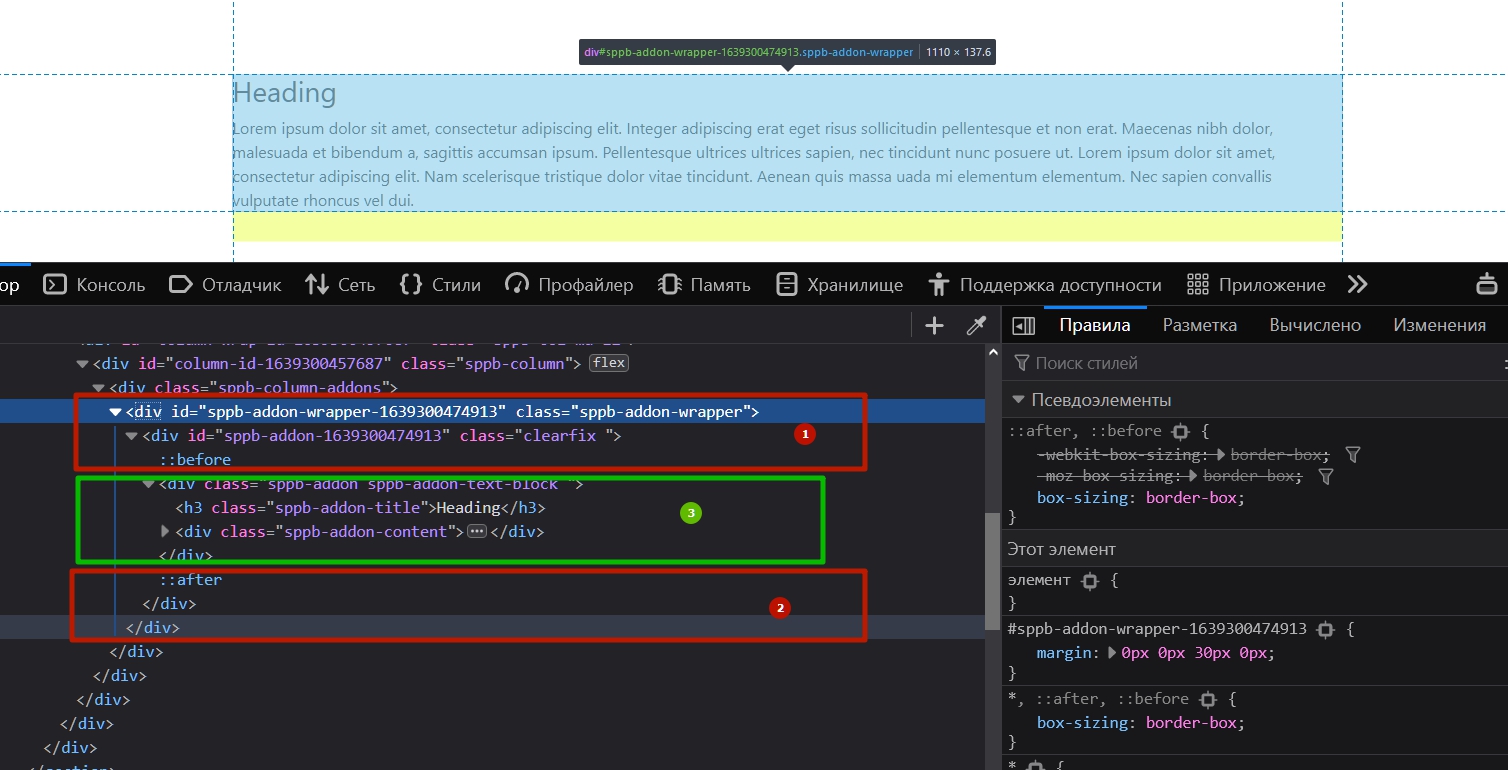
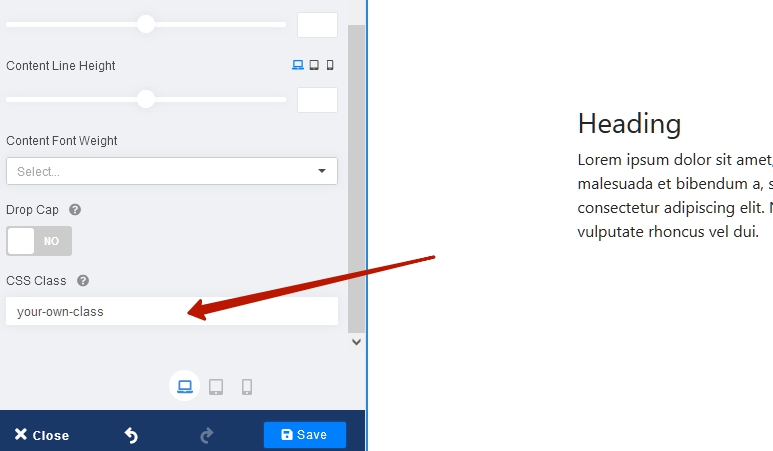
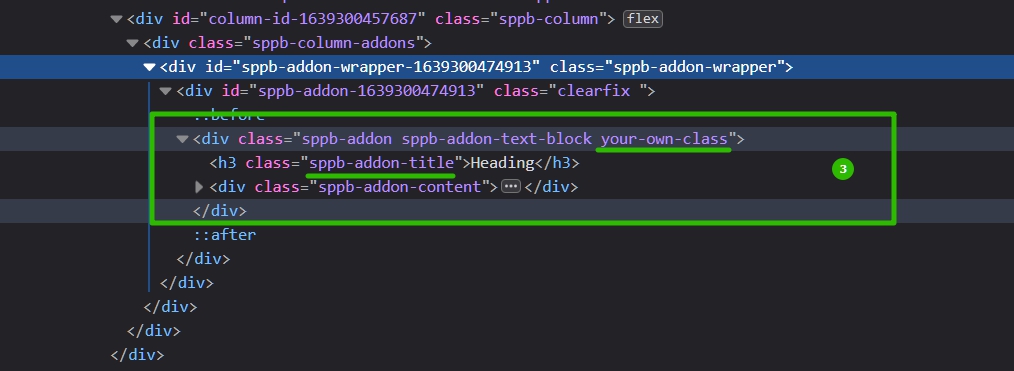
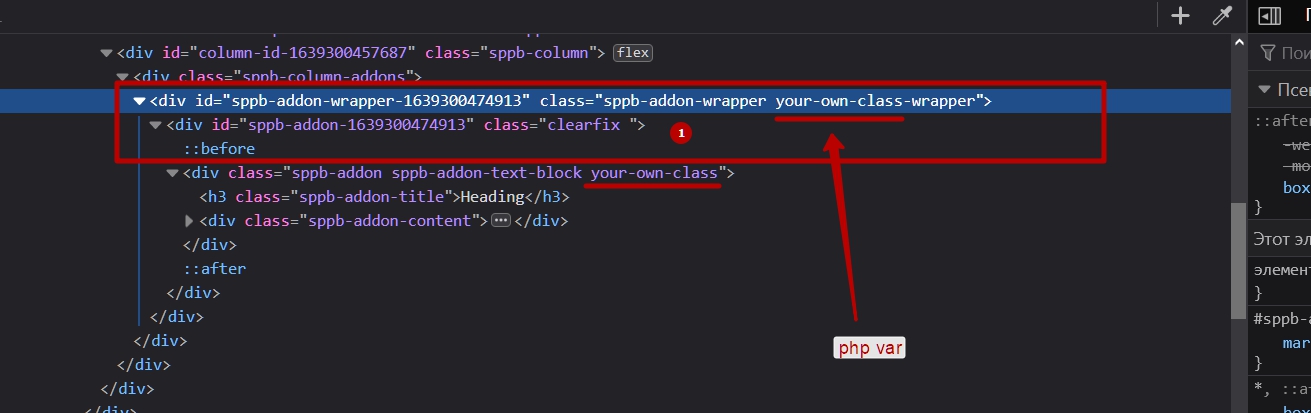
Unique Class Name used for Addon can solve this problem.

Murugappan Ramanathan Asked this

Hi Paul,

I am not sure if i understood your suggestion correctly. This what i understand:

Add the font at the template level and then define a unique class name and use this font as font-family attribute. Then use this class in the addon.

Is my understanding correct? I will try this. Thank you so much.

Paul Frankowski Senior Staff

yes, indeed.

Yofie Setiawan

Hi,

I just want to share my frustation also, relate to this issue. Sometimes, my client insist to use custom font, which SP Page Builder can't. Please consider this feature for future update. Although i have Developer Plan on SP Page Builder, this plan seems useless now. I have to use and learn another Page Builder which provide this basic feature.

The answer such "sorry, there is no way" just sounds so sad...

Murugappan Ramanathan Asked this

Hi Yofi,

I dont want to seem rude to Joomshaper but the truth has to be said. It is pointless to come with so many odd stuff that really does not mean much to developers. They seem to be circling around the old features and improvising them. Although that has to be done, it should not be at the sacrifice of common standard user needs.

The entire framework becomes disfunctional when user/developers cannot add and use their custom css, fonts and icons. The idea of including these under the Joomla template defeats the purpose of Helix Ultimate and SPPB. Especially with css classes. All Joomshaper had to do is to display the "id" of the element in the each of the fields in the addon. Then we could add our own css for these elements in custom css section.

Well, there was so much said about Helix Ultimate 2.x and SPPB but didnt see much other than fancy GUI and rearrangements. Even until now i do not know which CSS are applied in the addons. If you look at the css for Wayne template, for example, you would crazy trying to find what goes where. Their template messes other third-party addons which they lack. In such circumstance, i revert to standard Joomla template.

Good products but poor finishing. And, Yes, Yofi. the common "sorry, there is no way", "we do not provide consultancy" etc seems to be a bit tiring. Same as you, i have installed Quix and JD Builder to solve some of the issues. Try out Kiolezo Joomla Templates Builder. Very interesting component to builder custom template framework and seems to work well with other Page Builders and Extensions. Also please try out Regular Lab Sourcerer which allows you add code into joomla page.

Pavel
4 years ago · edited

All Joomshaper had to do is to display the "id" of the element in the each of the fields in the addon. Then we could add our own css for these elements in custom css section.

Hi. Just for an honest look.

Each addon, section, column has a class field. You can do what you write about. Each addon has its own unique ID. But the ID in this aspect is not competent.

I do not know what complexity you encountered in understanding the Helix and Page Builder code base. In my opinion, everything is simple, clean and understandable compared to other similar products. For me, your statement is strange.

Any font can be tied through CSS. Yes, this is not a visual binding interface, but it is quite easy to do. All products in the world have their strengths and weaknesses.

If you have no understanding, I can give you a consultation for some particular question.

Log in to reply.