[Locked] Class "JText" not found when try upgrade to Joomla 6 - Forum | JoomShaper
Solved Templates Locked

Class "JText" not found when try upgrade to Joomla 6

Asked by Gianluca Pantaleo 11 months ago Last activity 11 months ago

Trying to upgrade from Joomla 5 to Joomla 6, the i before deactivate joomla compatibility plugin, and I got this error for two of my joomla website:

Class "JText" not found

Opus template
JROOT/templates/shaper_opus/sppagebuilder/addons/opus_image/admin.php:15

Helix ultimate
JROOT/components/com_sppagebuilder/addons/blockquote/admin.php:15

Accepted answer

Marked as the solution
Paul Frankowski Senior Staff

About 2nd issuse from file:

components/com_sppagebuilder/addons/blockquote/admin.php

Sorry, but we don't support that addon anymore. It was removed from SPPB 5 and SPPB 6.
Use Text addon instead with custom style. And using FTP delete that folder : components/com_sppagebuilder/addons/blockquote

Gianluca Pantaleo Asked this

Thanks, I also had to disable other addons:

  • blockquote
  • call_to_action
  • dropcap
  • facebook_like
  • facebook_likebox
  • gplus_button
  • twitter_share

I'm an old user, upgrader Sppb from very old version. It could be a great feature the new version of Spbb automatically delete unsopported addons when a user upgrade Sppb

5 more replies

Mehtaz Afsana Borsha Staff

Hi

Thanks for contacting us and sorry for your issue. Could you please give me a screenshot of your issue?

-Regards.

Paul Frankowski Senior Staff
11 months ago · edited

Hi Gianluca,

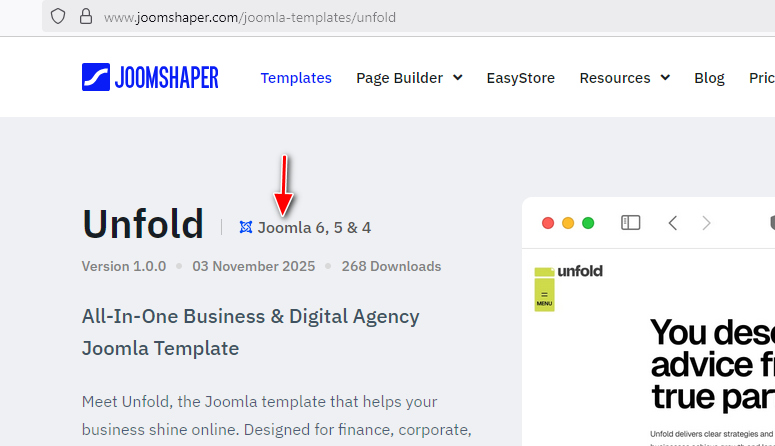
Not all templatea are Joomla 6 ready. Before you will use any check if has "Joomla 6" tag in desciption.
If not, you have to wait for offical update.

info_3463_2025.jpg

Paul Frankowski Senior Staff
11 months ago · edited

I am not sure if Joomla can delete old files thru extension installer.
Indeed, it's problem when somebody used the same site since SPPB 3.x or even 1.x/2.x version.
For example, Akeeba had to make extra plugin to delete files from old versions Akeeba Backup/Tools before you will upgrade from J3 to J4.


Easy solution is:

  1. Using FTP delete all subfolders from : components\com_sppagebuilder\addons
  2. Then Re-install SPPBP Pro - then only new/current addons will stay (will be added).
Paul Frankowski Senior Staff

If we helped and solved your problem already, please mark topic as solved. Thx

This question is locked, so it takes no new replies. Have a similar problem? Ask a new question.