Good afternoon. In the Crunch template, after installing the quick start,
there are no pages in SPPB. I need your help.
Staff replied
Templates
absence of sppb pages on the website
7 replies

Rashida Rahman Staff
Hi there!
Thanks for reaching out.
Did you use the template pack or the quickstart pack, please? We have two types of packages inside the download section. Please check this documentation on the difference between them:
https://www.joomshaper.com/documentation/helix-framework/introduction#template-vs-quickstart
If you used template pack, then it comes with a very basic structure only, no demo data or content inside.
Best regards,

Paul Frankowski Senior Staff
It's normal in Joomla, since begining. If you installed only template, you get only template (!) If you will install QS you get whole demo, with content and components. If you buy a car, you will get only car, not car with driver and drinks & snacks ;p
I know, that in WordPress, there is option to load demo content, but it Joomla it doesn't work like that.
Is now all clear?
Евгений Asked this
Good afternoon. The Quickstart Pack for Joomla 5 has been installed. There are no SPPB-created pages. New pages created by Sppb are not saved.
Paul Frankowski Senior Staff
9 months ago
· edited
Saving problem (tip from documenation):
Disable mod_security in cPanel and check the behavior of SPPB again. And enable SSL (https) for domain.
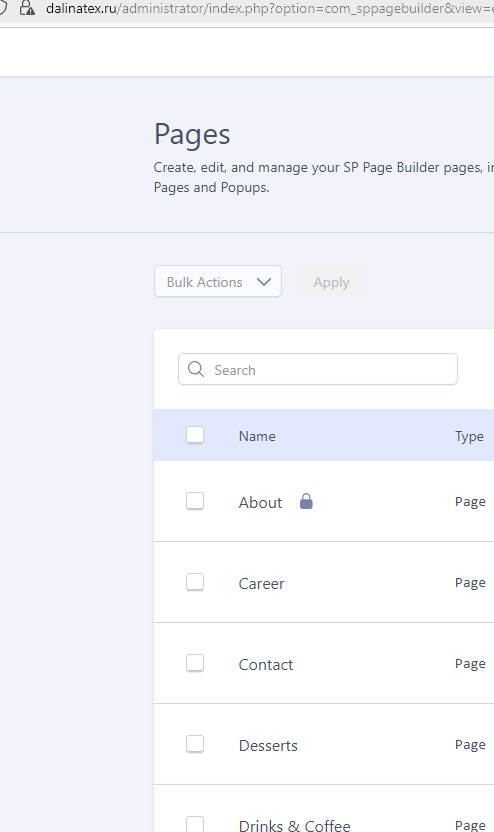
About your 1st sentence "There are no SPPB-created pages": I saw demo pages on your site (evidence below). I assume this is a translation mistake.
Евгений Asked this
I see. I logged into the admin panel, selecting English as the language. SPPB Pro pages appeared, as shown in the screenshot. Then I logged into the Russian admin panel. SPPB was no longer Pro. And the pages disappeared.
Paul Frankowski Senior Staff
9 months ago
· edited
Weird. I have to ask our developer.
Paul Frankowski Senior Staff
9 months ago
· edited
There is problem with RU translation file of SPPB.
Temporrary I forced EN for admin area, and all works. I hope you know some basics ENG words to work in next days, and I will ask our team to check that file deeply.
Please remind me on Tuesday morning.
Log in to reply.